
RGB Case Fan Guide: Avoid These Costly Mistakes
As a Joybuy Product Recommendation Officer, I see people struggle with purchasing PC components every day. An RGB case fan seems like a simple upgrade, but marketing promises can be misleading. Before you invest in better PC cooling and a new look for your system, it's important to know a few common pitfalls that can cost you money and time.
Many PC builders fall into the same traps:
- The "silent" fan that's actually loud: Manufacturers often advertise noise levels (in dB) measured at the lowest, least effective speed. As soon as the fan has to work harder to keep your PC cool, the noise can increase significantly.
- The mess of RGB cables and software: You buy a set of beautiful fans, but during installation, you discover that the RGB connectors don't fit your motherboard or that you need a separate controller for each fan. The result is a chaos of cables and software that don't communicate with each other.
- High airflow, but no power: A fan can move a lot of air (high airflow), but if it doesn't have enough power (static pressure), it's useless against a dust filter or radiator. The airflow gets blocked, and your components overheat anyway.
This guide will help you avoid these problems and make the right choices based on specs that truly matter.
What to Look For: The Most Important Specs
To avoid a bad purchase, it's crucial to look beyond just the lighting. Pay attention to the following technical specifications.
Size: 120mm vs. 140mm
The two most common sizes are 120mm and 140mm. The choice depends on what your PC case supports and what your goal is.
- PC fan 120mm: This is the most universal size. These fans fit in almost any case and are often designed to reach high RPMs. This makes them suitable for water cooler radiators, where a concentrated airflow is needed.
- Case fan 140mm: A larger fan can move the same amount of air as a smaller, faster fan at a lower speed (RPM). This often results in quieter operation. If your case supports 140mm fans and your priority is a silent case fan, this is usually a good choice.
Airflow vs. Static Pressure
This is perhaps the most misunderstood aspect of PC fans.
- Airflow (CFM or m?/h): This number indicates how much air a fan can move in an open space. High airflow is ideal for intake (pulling air into the case) and exhaust (pushing hot air out) in places without obstructions.
- Static Pressure (mmH2O): This measures how powerfully the fan can push air through an obstacle. High static pressure is essential if you're placing the fan on a radiator, a CPU cooler, or behind a dense dust filter.
A fan focused purely on airflow will struggle to push air through a radiator, leading to poor cooling performance.
Control and Lighting: PWM, RGB, and ARGB
The way you control the speed and lighting determines the ease of use.
- PWM fan: PWM stands for Pulse Width Modulation. A fan with a 4-pin PWM connector can automatically adjust its speed based on your component temperatures. This is more efficient and quieter than a DC fan (3-pin) that runs at a constant, fixed speed.
- RGB vs. ARGB fan: Standard RGB (often 4-pin, 12V) can only display one color at a time across all LEDs on the fan. An ARGB fan (Addressable RGB, often 3-pin, 5V) has individually addressable LEDs. This allows you to create complex effects like rainbows and animations. Pay close attention to which standard your motherboard supports. Brands like Corsair also offer proprietary ecosystems like Corsair iCUE, which simplify installation but lock you into their products.
PC Builder Recommendations for Every Need
Below are some popular choices, matched with specific user profiles.
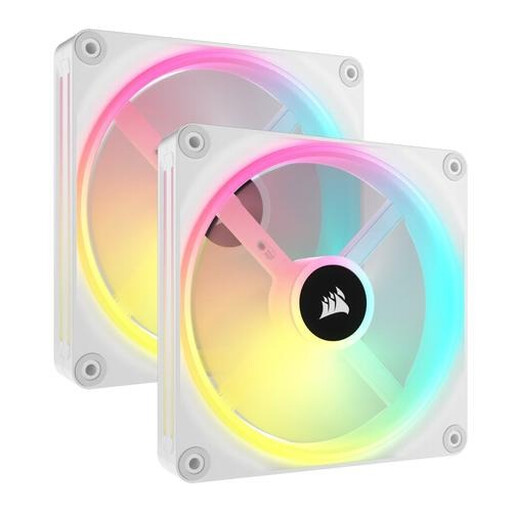
Corsair iCUE LINK QX140 RGB Computer Case Fan 14cm White 2-Pack
Why This Fits Their Persona: Perfect for those who want a clean, modern white PC fan build with minimal cables. The iCUE LINK system simplifies installation, and the 34 addressable LEDs per fan offer extensive customisation options.
This system solves the pitfall of cable clutter and compatibility issues. Fans connect directly to each other with a single cable leading to a central hub, ensuring a clean installation.
Outstanding aesthetics with 34 LEDs per fan and a greatly simplified installation process thanks to the Corsair iCUE LINK ecosystem. Good balance between airflow (82.5 CFM) and static pressure (3.5 mmH2O).
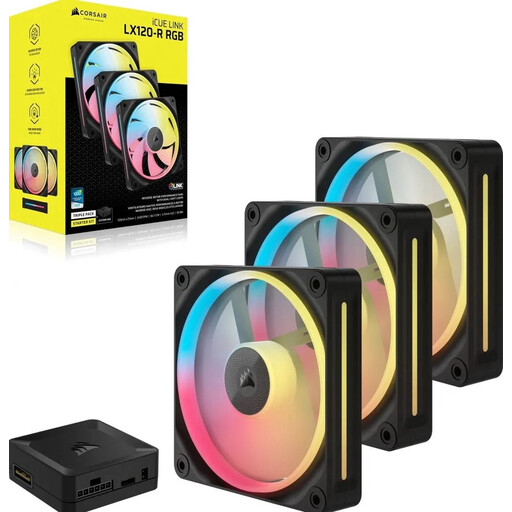
Corsair iCUE LINK LX120-R RGB Computer Case Fan 12cm Black 3 Pack
Why This Fits Their Persona: For gamers who demand maximum cooling performance. This Corsair fan is designed for high RPMs and delivers both strong airflow and high static pressure, ideal for demanding systems.
This fan bypasses the 'high airflow, low pressure' trap. With a static pressure of 3.8 mmH2O, it's powerful enough for radiators and restrictive cases where other fans would fail.
High maximum speed (2400 RPM) and an excellent balance between airflow (up to 70 CFM) and static pressure. The PWM control ensures efficient cooling when needed.
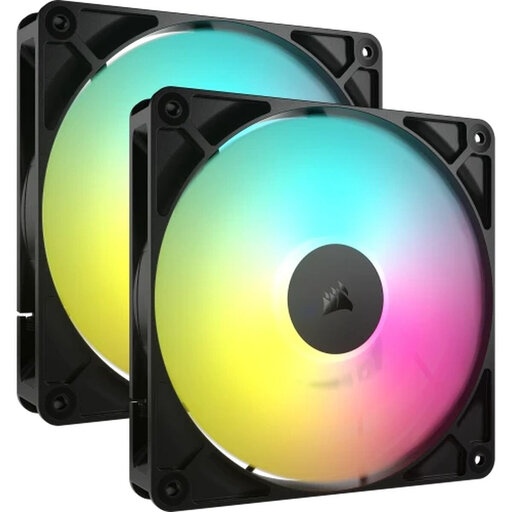
Corsair RS140 ARGB PC Case Fan 14cm Black 2-Pack
Why This Fits Their Persona: An affordable way to equip your PC with ARGB lighting and better cooling. These 140mm fans offer good airflow and are relatively quiet without breaking the bank.
This fan uses standard 4-pin PWM and 3-pin ARGB connectors. This avoids the 'vendor lock-in' of a proprietary ecosystem and ensures it works with most modern motherboards.
Good price-to-performance ratio. The 140mm size provides efficient and quiet airflow. Broad compatibility thanks to the use of industry-standard connectors.
Looking for more options?
We have compiled a complete, up-to-date list of products that fully meet these strict selection criteria and local regulations.
Frequently Asked Questions
How many case fans do I need for good PC cooling?
For a standard gaming PC, a setup with two or three fans is often sufficient: one or two at the front for cool air intake and one at the back for hot air exhaust. For high-end systems with powerful components, additional fans at the top (exhaust) can help lower temperatures further.
Can I mix and match RGB and ARGB fans?
Technically, it's difficult. Standard RGB uses a 12V 4-pin connector, while ARGB uses a 5V 3-pin connector. Plugging them into the wrong header can permanently damage the LEDs. While you can have them in the same PC, you'll need separate controllers or motherboard headers, and you won't be able to synchronise the lighting without advanced software.
What is the difference between a Corsair fan with and without 'LINK'?
'LINK' refers to the Corsair iCUE LINK ecosystem. Traditional fans have two cables each: one for power (PWM) and one for RGB. This quickly leads to a lot of cables. iCUE LINK fans have a special connector that lets you 'daisy-chain' multiple fans together with a single cable that goes to a hub. This significantly simplifies installation and cable management.