
Choosing the Right Wireless Switch: A Practical Buyer’s Guide
By Joybuy Product Recommendation Officer, 28 July 2026
A lamp in an awkward spot, a power outlet hidden behind a heavy cabinet, or the desire to add a light switch without breaking open walls. A wireless switch seems like the perfect, simple solution. However, there are pitfalls that can turn a quick purchase into a disappointment.
Before making a choice, it's wise to consider a few common problems. This will prevent you from wasting money on a product that doesn't work as you'd hoped.
- The unreliable signal: Many packages promise a range of 30 metres but fail to specify that this is in an open field. In a home with concrete walls and ceilings, the actual range can decrease dramatically, rendering your switch useless.
- Hidden complexity and costs: Some "smart" switches require a separate hub or bridge to function. This means extra costs and an installation that's more complicated than necessary, when all you really wanted was a simple
remote control switch. - Insufficient power rating: A budget-friendly switch might have a low maximum power rating (wattage). If you connect an appliance that draws more power, like an electric heater, you risk overheating and a fire hazard.
What to Look For: The Core Specifications
To avoid these pitfalls, it's crucial to check three technical specifications. These determine the reliability, safety, and ease of use of your wireless switch.
1. Signal Technology: RF vs. Wi-Fi/Zigbee
The way the switch communicates determines its installation and reliability.
- RF (Radio Frequency): This is the most direct solution. An RF switch works like a garage door opener: you press the button, and the receiver responds instantly. The signal travels well through walls and furniture. You don't need an internet connection, an app, or a hub. Ideal for anyone looking for a
wire-free switchthat just works. - Wi-Fi/Zigbee/868 MHz: These technologies enable "smart" features, such as control via an app or voice assistant. This offers more possibilities but often requires a stable internet connection and a separate hub (a central device that translates the signals). This is a good choice if you already have or want to build a smart home system.
2. Maximum Switching Capacity (Wattage)
Safety is paramount. Every wireless switch has a maximum power rating, expressed in Watts (W) and Amperes (A). This indicates how much current the device can safely switch.
- 10A / 2300W: Sufficient for most lighting (LED, halogen) and small appliances.
- 16A / 3680W: Recommended for appliances that consume more power, such as electric heaters, kettles, or multiple devices on a power strip. Always check the power rating of the appliance you want to connect and choose a switch with sufficient overhead.
3. Installation Type: Plug-in or In-wall
Wireless switches come in two main forms, each with its own application.
- Remote Control Socket (Plug-in): This is the simplest type. You plug an adapter into the existing wall socket and connect your lamp or appliance to it. The installation takes literally ten seconds.
- Wireless Wall Switch (In-wall Module): This set consists of a small receiver that you install (invisibly) near the lamp or in a junction box, and a separate wall switch that you can stick anywhere on the wall. This allows you to create a new, permanent-looking
wireless light switchwithout any chasing or demolition work.
Our Product Recommendations
Based on these criteria, we have selected a number of products that suit different user profiles.
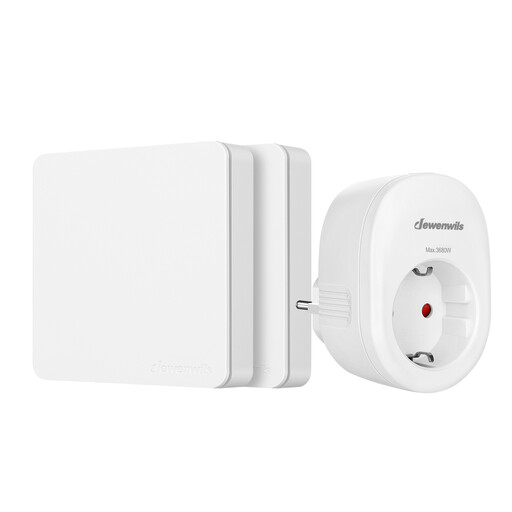
Dewenwils Remote-Controlled Power Sockets, Plug-In On/Off Wireless Wall Switch
Why This Fits Their Persona: This user wants a direct, no-nonsense solution to a problem: turning an appliance on and off remotely. This plug-in set is the definition of 'plug-and-play'. Ideal for controlling ambient lighting, Christmas decorations, or a fan behind the sofa.
Works via a stable RF signal, so no hub or app is needed. The high switching capacity of 16A / 3680W makes it safe for virtually all household appliances, avoiding the risk of overload.
Ready to use straight out of the box, no installation required. The remote can be clicked into the included wall-mounted holder, allowing it to function as a fixed wall switch as well.
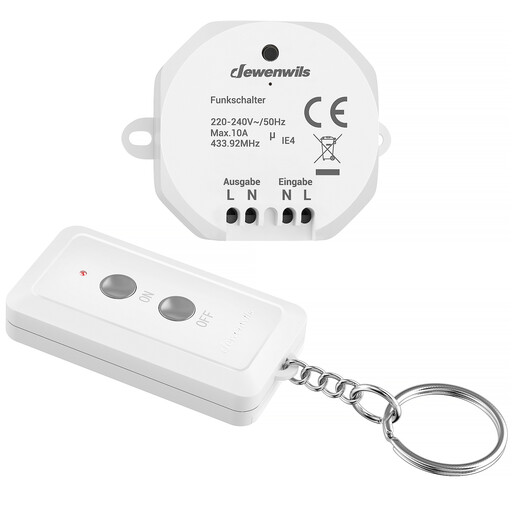
Dewenwils 230V Wireless Switch Set with 1 Receiver and 1 Remote Control
Why This Fits Their Persona: Perfect for renters or homeowners who want to add a light switch where there is no existing wiring. Think of a long hallway, an attic, or next to the bed. This set makes it possible to place a physical switch without having to drill into the wall.
This is a complete, self-contained system. The compact receiver and the wireless transmitter are pre-paired. It avoids the pitfall of an unreliable signal by using a stable RF connection that works through walls.
Creates a permanent-looking switch solution without permanent modifications to the home. The system is expandable with additional `Dewenwils switch` models, offering flexibility for the future.
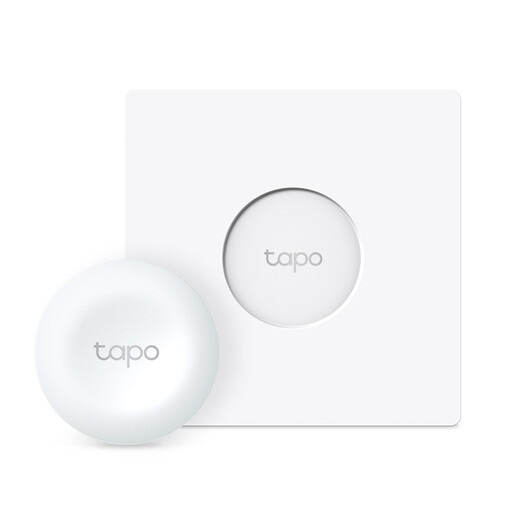
TP-Link Tapo S200D Smart Remote Dimmer Switch
Why This Fits Their Persona: This user wants more than just on/off. Dimming, activating scenes, and integration with an existing smart home ecosystem are important. This switch offers programmable actions (click, double-click, rotate) to control different devices and moods.
This product is transparent about its requirements. It's not a hidden pitfall, but a deliberate choice for an ecosystem. For this user, the required Tapo Hub isn't a drawback, but the gateway to an integrated smart home.
Offers dimming functionality in addition to on/off. The button is programmable for controlling multiple smart devices or activating scenes (e.g., 'movie night'). Runs on a long-lasting battery.
Looking for more options?
We have compiled a complete, up-to-date list of products that fully meet these strict selection criteria and regional safety standards.
How long does the battery in a wireless switch last?
The transmitter (the remote control or wall switch) usually runs on a standard coin cell battery (like a CR2032). With normal use, such a battery typically lasts one to two years. The receiver, which is plugged into a socket or installed in-wall, is powered by the mains and therefore does not require a battery.
Does a wireless switch work through walls and ceilings?
Yes, most wireless switches that use an RF (radio frequency) signal are designed to function through walls, doors, and furniture. The practical range depends on the thickness and material of the obstacles. A wooden door will dampen the signal less than a thick concrete wall. However, for most situations in a standard home, the range is more than sufficient.
Can I control multiple lights with a single wireless switch?
Certainly. Most systems are flexible and expandable. You can typically pair multiple receivers (sockets or in-wall modules) to a single button on the remote control. This allows you to turn on all the lamps in the living room simultaneously with a single click. Conversely, it's also often possible to control one receiver with multiple switches, for example, by placing a switch at each entrance to a room.