
Choosing the Right Wireless Mouse in 2026: A Practical Guide
A standard mouse is fine for basic tasks, but with daily, prolonged use, its drawbacks can add up: a desk cluttered with cables, an awkward wrist posture, or constant clicking that disturbs colleagues or family. A good wireless mouse isn't a luxury; it's an investment in comfort and productivity. The challenge is navigating the vast market to find the model that fits your specific needs, without overpaying for features you won't use.
This guide will help you make an informed choice. We'll cover the most important specifications and highlight several models designed for specific use cases.
What to Look For in a Wireless Mouse?
When comparing mice, several objective parameters determine if a model is right for your work or study environment.
- Ergonomics: An ergonomic mouse is designed to keep the hand, wrist, and arm in a more natural position, which can reduce muscle strain. A vertical mouse is a well-known example of this, as it holds the hand in a handshake position. Pay attention to the shape and whether it's suitable for left- or right-handed use.
- Connectivity: Most wireless mice operate via a 2.4 GHz RF connection with a USB dongle or via Bluetooth. A Bluetooth mouse has the advantage of not occupying a USB port and can often connect to devices like tablets. A multi-device mouse can be paired with multiple devices simultaneously, allowing you to switch between your laptop and tablet, for example, with the press of a button.
- Noise Level: Do you work in an open office, a library, or at home with others? A silent mouse can make a significant difference. These mice feature switches that, according to manufacturers, reduce click noise by up to 90%.
- Power: A rechargeable mouse, often via a USB-C port, eliminates the hassle of replacing batteries. On the other hand, models with disposable batteries often offer an extremely long battery life, sometimes up to two years on a single AA battery.
- Sensor and DPI: DPI (Dots Per Inch) indicates the mouse's sensitivity. A higher DPI means the cursor travels further on the screen with a small movement of the mouse. For a standard office mouse, a DPI between 800 and 1600 is typically sufficient. Adjustable DPI is useful if you switch between tasks that require different levels of precision.
Our Top Picks for 2026
Based on the criteria above, we have selected a range of wireless mice with distinct, functional features for different users.
HP 925 Ergonomic Vertical Mouse: For Long-Term Comfort
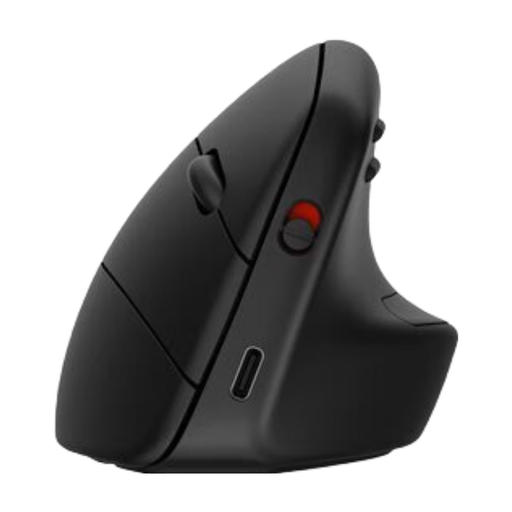
Why This Product The HP 925 is a vertical mouse specifically designed to reduce muscle strain. According to HP, its vertical shape leads to 12% less muscle activity. The mouse can connect to up to three devices via Bluetooth 5.3 or the included dongle. The battery is rechargeable and lasts up to sixteen weeks. Its sensor, with a resolution of up to 4000 DPI, works on virtually any surface.
Pros
- Vertical, ergonomic shape with a detachable wrist rest.
- Multi-device connectivity for up to three devices.
- Long battery life and rechargeable via USB Type-C.
- Made from 65% recycled plastic.
Who is this for? This model is an excellent choice for professionals and students who spend many hours a day at the computer and want to prevent or alleviate emerging wrist or arm discomfort. It's also ideal for users who need to switch seamlessly between their laptop, desktop, and tablet.
Trust Ozaa Mouse Office: The Quiet and Compact Multi-Tasker
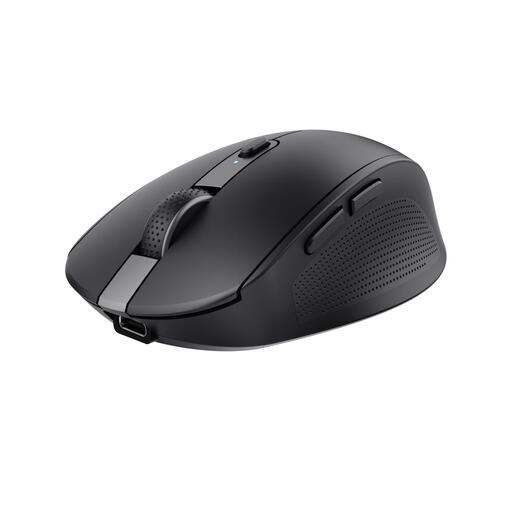
Why This Product The Trust Ozaa combines several sought-after features in a compact design. It's a silent mouse, making it perfect for shared workspaces. Like the HP 925, this is a multi-device mouse that can connect to three devices via Bluetooth or its USB dongle. The built-in battery is rechargeable via USB-C. With an adjustable DPI of up to 3200, this mouse offers flexibility for various tasks.
Pros
- Silent buttons for a quiet work environment.
- Compact size, convenient for travel.
- Rechargeable mouse with a USB-C port.
- Connects with up to three devices.
Who is this for? The Trust Ozaa is well-suited for remote workers, students, and office employees looking for a quiet and versatile mouse. Its compact size and multi-device functionality also make it a practical travel companion for those who work in different locations and with multiple devices.
Logitech M330 SILENT PLUS: Simplicity and Silence
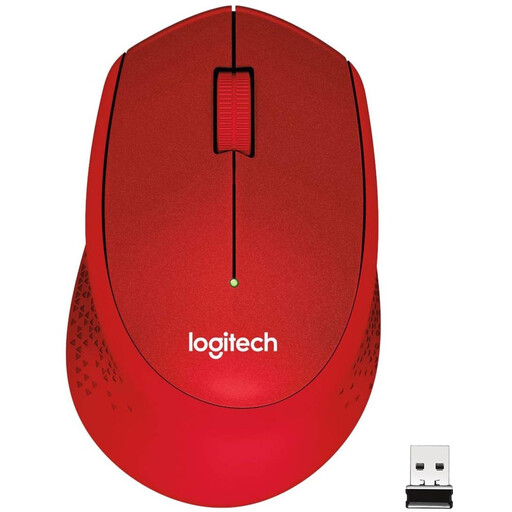
Why This Product The Logitech M330 SILENT PLUS focuses on one thing: the quietest possible operation. According to Logitech, this mouse offers the same click feel with over 90% noise reduction, a claim verified by Quiet Mark. The M330 is not rechargeable, but the included AA battery lasts up to 24 months. Setup is simple: plug the nano-receiver into a USB port, and the mouse works instantly.
Pros
- Extremely quiet click, verified by Quiet Mark.
- Very long battery life of up to 24 months.
- Simple plug-and-play setup via USB receiver.
- Comfortable, ergonomic design for right-handed users.
Who is this for? This is the ideal mouse for users who prioritize absolute silence and want a reliable, no-fuss solution. It's perfect for use in libraries, quiet office spaces, or late at night at home without disturbing others. The long battery life makes it very low-maintenance.
Didn't Find a Match? Explore More Options
The selection above covers several common needs, but the perfect mouse is a personal choice. You might be looking for a specific size, a left-handed model, or a different combination of features. For a broader overview of available models, you can browse our full collection.
Check out our full range of wireless keyboard and mouse for more choices.
Frequently Asked Questions about Wireless Mice
What is the difference between a Bluetooth mouse and an RF (wireless) mouse? An RF (Radio Frequency) mouse connects via a small USB dongle that you plug into your computer. This provides a stable and direct connection. A Bluetooth mouse connects directly to your device's built-in Bluetooth receiver. This saves a USB port and allows it to connect to devices without a USB-A port, such as tablets and some laptops.
How important is DPI for an office mouse? For general office work, web browsing, and email, a high DPI is not crucial. A standard value between 1000 and 1600 DPI is usually comfortable. Adjustable DPI can be useful if you have a very large monitor or if you switch between general tasks and precision work like photo editing. For most users, however, it is not a decisive factor.