
Find Your Ideal Wireless Mouse: Top Picks for Every User
A desk without stray cables promotes a clean and organized workspace. A wireless mouse is a simple step toward an uncluttered setup, whether you work from home, in the office, or on the go. But the market is vast: from a compact Bluetooth mouse for your laptop to an advanced wireless gaming mouse for maximum performance.
This guide is designed to help you make an informed choice. We'll cut through the marketing jargon and focus on the specs that truly matter, so you can find a mouse that fits your needs.
What to Look for When Buying
Before we dive into the products, here are a few key points to simplify your decision.
1. Connectivity: Bluetooth or 2.4GHz USB?
A wireless mouse connects in one of two ways:
- Bluetooth: A
Bluetooth mousepairs directly with your laptop or computer, freeing up a USB port. This is ideal for awireless mouse for laptopor tablet, where ports can be scarce. - 2.4GHz RF (with USB receiver): These mice come with a small USB dongle that you plug into your device. This connection is often very stable and has a fast response time, which is preferred for gaming.
Some models offer both options, allowing you to switch between devices easily.
2. Power and Comfort: Rechargeable, Batteries, and Ergonomics
Consider how you want to power your mouse. A rechargeable mouse charges via a USB cable, which saves money in the long run and reduces waste. In contrast, models with replaceable AA or AAA batteries can last for months or even longer on a single set.
Comfort is subjective. Do you work long hours at the computer? An ergonomic mouse that supports the natural posture of your hand can make a huge difference. For shared workspaces or quiet environments like a library, a silent mouse with muted clicks is a great option.
3. Precision (DPI): How Much Do You Need?
DPI (Dots Per Inch) indicates the sensitivity of the mouse sensor. A higher DPI means the cursor moves faster across the screen with a small movement of the mouse. For general office work and web browsing, a DPI around 1000-1600 is sufficient. Gamers and graphic designers often benefit from a higher, adjustable DPI for quick actions and fine-tuned precision work.
Recommended Products
Based on specifications and use cases, we've rounded up some popular choices for you.
Microsoft Surface Arc Mouse Platinum
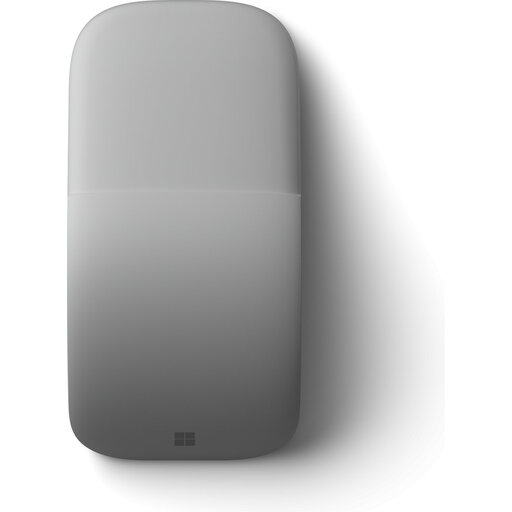
Why It Stands Out: Its unique design. You bend the mouse to turn it on and flatten it to turn it off and store it. This makes it extremely portable.
Pros:
- Ultra-portable: Very thin and light (82.5 grams), it slips easily into any bag.
- Innovative design: The bending mechanism is a clever way to power the mouse on and off.
- Touch scroll: Instead of a traditional scroll wheel, the Arc Mouse has a touch-sensitive surface for vertical and horizontal scrolling.
- Connectivity: Connects via Bluetooth 4.0 or higher.
Who Is It For? This is an excellent wireless mouse for laptop users who are often on the go. Its minimalist design and portability make it a favorite among mobile professionals and students, especially when paired with Microsoft Surface devices.
RAPOO 1680 Silent Wireless Mouse
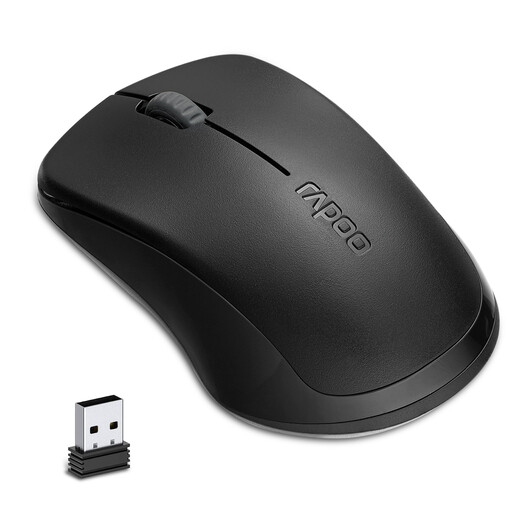
Why It Stands Out: This mouse focuses on one thing: silence. Its muted buttons make it ideal for quiet environments.
Pros:
- Silent mouse: According to Rapoo, the click sound is reduced by 90%, ensuring a quiet work environment.
- Long battery life: Runs on a single AA battery that the manufacturer claims lasts up to 12 months.
- Simple setup: Uses a stable 2.4GHz connection via a USB receiver.
- Ambidextrous design: Suitable for both left- and right-handed users.
Who Is It For? Perfect for use in the office, library, or at home when you don't want to disturb others. A reliable and no-nonsense silent mouse for daily tasks.
ASUS ProArt Mouse MD300
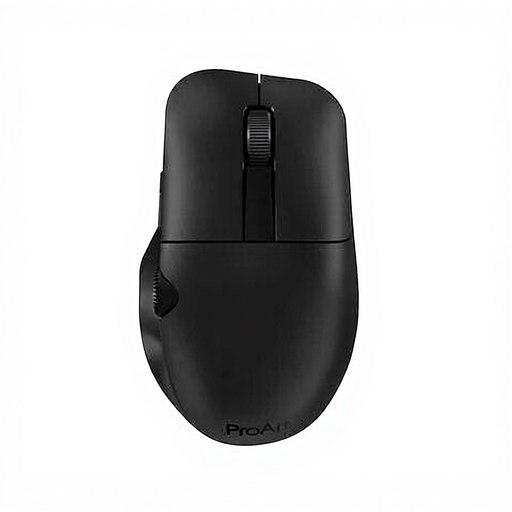
Why It Stands Out: This mouse is designed for precision work. With a high DPI and programmable buttons, it's aimed at creative professionals.
Pros:
- High precision: The optical sensor has a resolution of up to 4200 DPI, ensuring accurate cursor movements.
- Dual connectivity: Connect via RF wireless (2.4GHz) or Bluetooth, allowing you to easily switch between devices.
- Rechargeable mouse: Equipped with a built-in 800 mAh battery.
- Ergonomic design: Shaped for right-handed users for comfort during long work sessions.
Who Is It For? The ASUS ProArt MD300 is a strong contender for graphic designers, video editors, and other creatives who need a precise and customizable ergonomic mouse.
Logitech G PRO X Superlight 2c Wireless Gaming Mouse
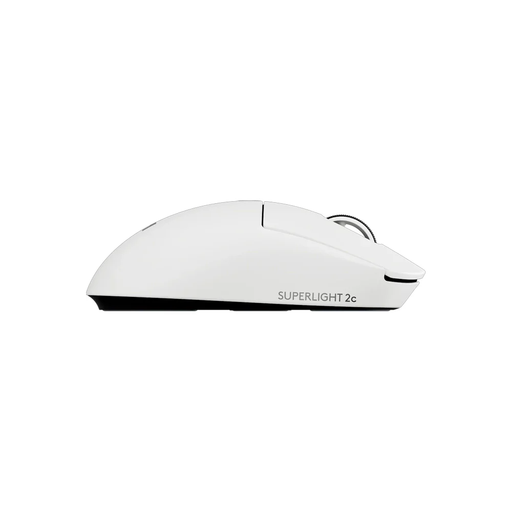
Why It Stands Out: This is a top-tier wireless gaming mouse designed for competitive performance. It's extremely light and features a highly advanced sensor.
Pros:
- Extremely lightweight: Weighs only 53 grams, allowing for fast and effortless movements.
- Professional-grade performance: The HERO 2 sensor offers an adjustable DPI up to 44,000, and the LIGHTSPEED wireless technology ensures a lag-free connection.
- Long battery life: According to Logitech, the rechargeable battery lasts up to 95 hours of continuous use.
- Designed for gamers: Ambidextrous design with programmable buttons, developed in collaboration with esports pros.
Who Is It For? This mouse is aimed at serious gamers who refuse to compromise on speed, weight, and precision. It's also suitable for users who simply want a highly responsive and lightweight mouse for daily use.
Looking for Something Else?
The models above cover common scenarios, but perhaps you're looking for a mouse with more buttons for productivity or specific game genres. A computer mouse with side buttons can significantly speed up your workflow by allowing you to assign macros and shortcuts.
? Check out more computer mice with side buttons here
Frequently Asked Questions
1. What's the difference between a Bluetooth mouse and an RF (2.4GHz) mouse? A Bluetooth mouse connects directly to your device's built-in Bluetooth, which frees up a USB port. An RF mouse uses a separate USB receiver (dongle) for the connection, which often results in a slightly more stable and faster connection—a key factor for gaming.
2. How long does a wireless mouse battery last? This varies greatly by model. Mice with replaceable batteries, like the Rapoo 1680, can last up to a year. A rechargeable mouse for gaming, such as the Logitech G PRO X Superlight 2c, offers dozens of hours of playtime on a full charge. Battery life depends on usage, the sensor, and any backlighting.
3. Can I use a wireless gaming mouse for regular work? Absolutely. A wireless gaming mouse often has a superior sensor, a comfortable shape, and programmable buttons that can also be useful for office tasks. The high precision and fast response can also be pleasant for general use, although it's not strictly necessary for most people.