
Choosing a Wireless Keyboard and Mouse Combo: A Practical Guide
A clean, cable-free desk often starts with purchasing a wireless keyboard and mouse combo. But the search can be surprisingly challenging. The market is flooded with promises of "universal compatibility" and "extremely long battery life." Unfortunately, these marketing terms often lead to buyer's remorse. Before you invest in a new set, it's wise to know what to look for to prevent your purchase from gathering dust in a closet after just a few months.
The 2 Most Common Pitfalls When Buying
Many combos look great at first glance but hide flaws that only become apparent after purchase. Pay close attention to the following two points:
- The "long battery life" myth: Manufacturers often advertise a battery life of months or even years. These figures are typically based on very light usage, such as two hours a day. If you're a heavy user who types and clicks all day, the actual duration can be significantly shorter. A combo with a rechargeable battery via USB-C can be more practical than a model that relies on disposable batteries.
- "Quiet" is a subjective term: A quiet keyboard and mouse combo is ideal for an office environment or a quiet study area. However, what one person perceives as quiet, another may still find distracting. The term "quiet" is not standardised. It's more reliable to look at the key switch type (like membrane or scissor-switch) and for products that specifically mention "silent clicks" for the mouse.
What to Look For: The Core Specifications
To avoid a bad purchase, it's helpful to check three technical aspects. These determine the functionality and ease of use of your keyboard and mouse combo.
1. Connectivity: Bluetooth or 2.4GHz RF Dongle?
A wireless keyboard and mouse combo connects via Bluetooth or a small USB receiver (a 2.4GHz RF dongle).
- Bluetooth keyboard and mouse: Ideal if you frequently switch between devices like a laptop, tablet, and PC. You don't need a USB port for the connection, and many sets can be paired with multiple devices simultaneously. This is a flexible choice for a keyboard for Mac and Windows.
- 2.4GHz RF dongle: Generally offers a more stable and direct connection with lower latency. This is often a better option for a fixed workstation or for a gaming keyboard, where every millisecond counts.
Some combos offer both options, providing maximum flexibility.
2. Key Switch Type: Membrane, Scissor, or Mechanical?
The type of switch under the keys determines the typing experience, sound, and lifespan.
- Membrane: This is the most common type in standard office keyboards. The keystroke is soft and relatively quiet, but can feel a bit "mushy" to some.
- Scissor-switch: Often found in laptops and low-profile keyboards. These offer a stable, short key travel and are typically quieter than mechanical keys.
- Mechanical keyboard: Favoured by gamers and typing enthusiasts for their distinct feedback and durability. They come in various types (e.g., linear, tactile, clicky), each with its own feel and sound level.
3. Size and Ergonomics
A keyboard is not "one-size-fits-all". The right size and shape are crucial for comfort.
- Full-size (100%): Includes a numeric keypad. Useful for those who work extensively with numbers.
- Tenkeyless (TKL): A more compact model without the numeric keypad. This provides more space for the mouse.
- Compact (60%/75%): Even smaller, lacking function keys or a dedicated arrow key cluster. Popular for a minimalist desk or for portability.
An ergonomic combo with a split design or a wrist rest can help reduce strain during prolonged use.
Our Top Product Recommendations
Based on the criteria above, we have selected a few combos that suit different user profiles.
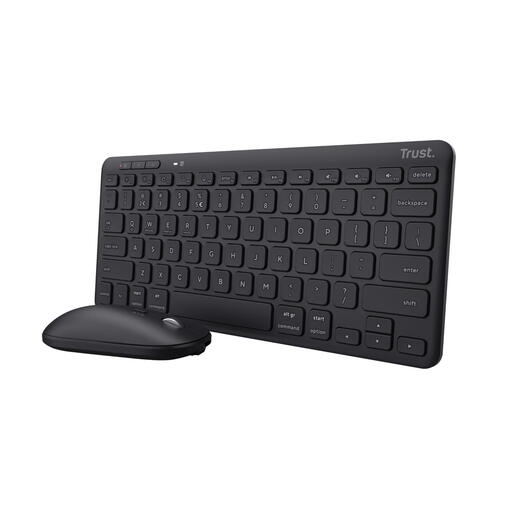
Trust Lyra Keyboard Mouse Included Office RF Wireless + Bluetooth QWERTY English Black
Why This Fits Their Persona: This combo is designed for the modern multitasker. You can easily switch between your laptop, tablet, and phone. Its compact size and rechargeable battery make it a practical choice for those who value a clean and flexible desk.
The built-in rechargeable battery, which Trust claims lasts up to 6 months, prevents the frustration of constantly changing batteries. The scissor-switch keys offer a quieter typing experience than many standard membrane or mechanical keyboards.
Multi-device connectivity: Pair up to 3 devices via Bluetooth and 2.4GHz. Sustainability: Made from 84% recycled plastic.
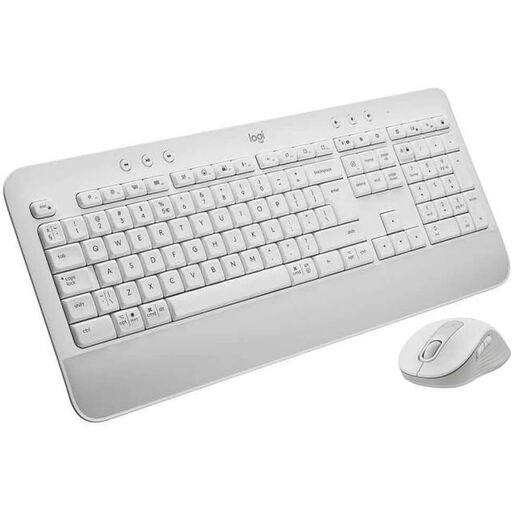
Logitech MK650 Keyboard Mouse Set White
Why This Fits Their Persona: For those who spend long days at the computer, comfort is a necessity, not a luxury. This combo focuses on ergonomics, featuring an integrated palm rest and a comfortably shaped mouse.
This combo tackles the "quiet" claim head-on with a membrane keyboard and a mouse featuring 'SilentTouch' technology, which Logitech states reduces click noise by 90%. The battery life is specified for both the keyboard (up to 36 months) and mouse (up to 24 months), providing more clarity than vague promises.
Ergonomic comfort: Built-in palm rest and a contoured mouse. Quiet operation: Specifically designed for minimal noise disturbance.
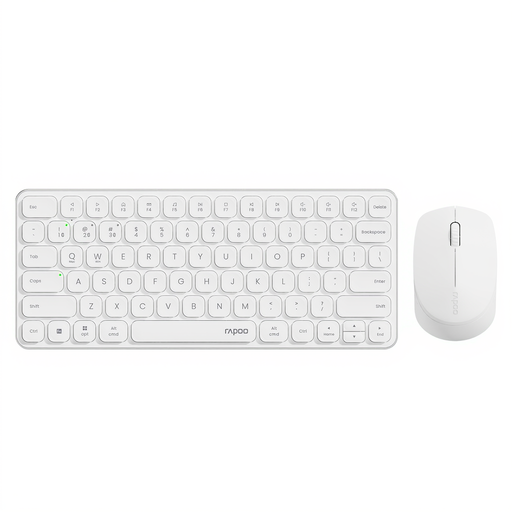
RAPOO 9010M Multi-Device Keyboard and Mouse Combo
Why This Fits Their Persona: This user constantly switches between a work PC, a personal laptop, a tablet, and a smartphone. The RAPOO 9010M is designed to facilitate this seamlessly, allowing you to switch between four paired devices at the touch of a button.
This combo offers concrete solutions to common annoyances. The 'silent click' mouse and low-profile keyboard are genuinely quiet. The addition of indicator lights for the active device and Caps Lock prevents confusion while multitasking.
4-Device Connectivity: Switch between your PC, tablet, and phone. Adjustable DPI: The mouse sensitivity is customisable (800-2400 DPI) for different screens and tasks.
Looking for more options?
We have compiled a complete, up-to-date list of products that fully meet these strict selection criteria.
Frequently Asked Questions
How long does the battery of a wireless combo really last?
The actual battery life depends heavily on your usage. The advertised lifespan is often based on a few hours of use per day. If you type intensively for 8 hours a day, the battery will drain faster. Combos with rechargeable batteries via USB-C are often a practical solution, as you don't need to buy separate batteries and can charge the set while you work.
Is a Bluetooth keyboard and mouse combo suitable for gaming?
For most casual gamers, a modern Bluetooth keyboard and mouse combo is sufficient. The technology has improved significantly in recent years. However, for competitive gamers who need the lowest possible latency, a combo with a 2.4GHz RF dongle or a wired connection is often preferred.
Can I combine a keyboard and mouse from different brands?
Yes, that's not a problem at all. You can use a standalone keyboard from one brand and a standalone mouse from another. The only drawback is that you might need two separate USB dongles if both devices use 2.4GHz RF, which would take up two USB ports. If both devices support Bluetooth, this is not an issue.