
Choosing the Right Wireless Gaming Mouse: Avoid Costly Mistakes
When you're looking for a new wireless gaming mouse, you're quickly overwhelmed by technical specifications and marketing promises. Manufacturers throw around terms like "extremely high DPI," "ultra-lightweight," and "8K polling rate." But which specs actually give you an in-game advantage, and which are mainly designed to empty your wallet?
As a Joybuy Product Recommendation Officer, I'm here to help you separate fact from marketing fiction. Before you invest in a new gaming mouse for PC, it's important to recognize a few common pitfalls.
Pitfall 1: Unrealistic Battery Life
A common claim is a battery life of hundreds of hours. This sounds great, but these figures are often based on use in a power-saving mode, such as a 1000Hz polling rate or even a bluetooth gaming mouse connection. As soon as you crank up the performance to a 4K or 8K polling rate for competitive gaming, that battery life can decrease dramatically.
Pitfall 2: The "High DPI" Marketing Ploy
A high DPI gaming mouse with values of 30,000 or more is often presented as a sign of superiority. In practice, most competitive gamers use settings between 400 and 1600 DPI. An extremely high maximum DPI value says little about the actual precision of the sensor. The quality and consistency of the sensor are far more important than a number you'll likely never use.
Pitfall 3: Ultralight at the Expense of Build Quality
A lightweight gaming mouse is great for fast movements in FPS games. However, some manufacturers go so far in reducing weight that the structural integrity suffers. This can result in a mouse that creaks, flexes, or has buttons that feel less responsive after just a few months.
What Really Matters: The Core Specifications
To avoid a bad purchase, focus on the specifications that truly matter for your gaming experience.
1. Sensor and Polling Rate: The Engine of Your Mouse
The sensor is the heart of your mouse. Brands like Pixart (with its PAW series) and the proprietary sensors from Logitech (HERO) and Razer (Focus) are known for their reliability. They offer accurate tracking without unwanted acceleration or jitter.
The polling rate, measured in Hertz (Hz), indicates how often the mouse reports its position to the computer. The standard is 1000Hz (1000 times per second). A fast wireless mouse with an 8K polling rate mouse (8000Hz) can further reduce input lag, which can make a tangible difference in fast-paced shooters. Keep in mind that a higher polling rate demands more from your CPU and drains the battery faster.
2. Weight and Shape: Comfort for Long Sessions
The ideal weight depends on your preference and the games you play. For fast-paced games like FPS and MOBAs, a lightweight gaming mouse (under 70 grams) is often an advantage, as it makes quick, repetitive movements easier and reduces fatigue.
The shape is at least as important. An ergonomic gaming mouse is shaped for right-handed use and often provides more support for your palm. Symmetrical (ambidextrous) mice are suitable for both left- and right-handed gamers and are often used by players with a 'claw' or 'fingertip' grip.
3. Buttons and Switches: Durability and Feel
Pay attention to the type of switches used. Optical switches, like those in some Razer and Rapoo mice, use a light beam to register a click. This eliminates the risk of unintentional double-clicks and they often have a longer lifespan. Mechanical switches offer a more traditional, tactile click feel. A programmable gaming mouse also gives you the flexibility to assign buttons to specific actions or macros, which can be a major advantage.
Recommended Products to Consider
Based on these objective criteria, we have selected a few models that suit different types of gamers.
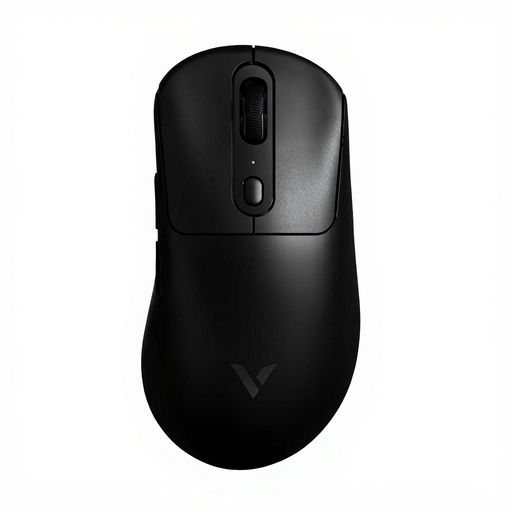
RAPOO VT3PRO MAX Wireless Gaming Mouse
Why This Fits Their Persona: For the eSports player, every millisecond counts. At 59 grams, this model is extremely light and combines this with a native 8KHz polling rate for minimal input lag. The PAW 3950 Ultimate sensor is designed for maximum precision at the highest level.
This mouse focuses on performance that truly matters (sensor, polling rate) instead of a uselessly high DPI number. The battery life is realistically specified for the performance it delivers.
Advantage: Native 8KHz wireless polling rate and a top-tier sensor for a competitive edge. Pro: Ultralight 59-gram design reduces fatigue.
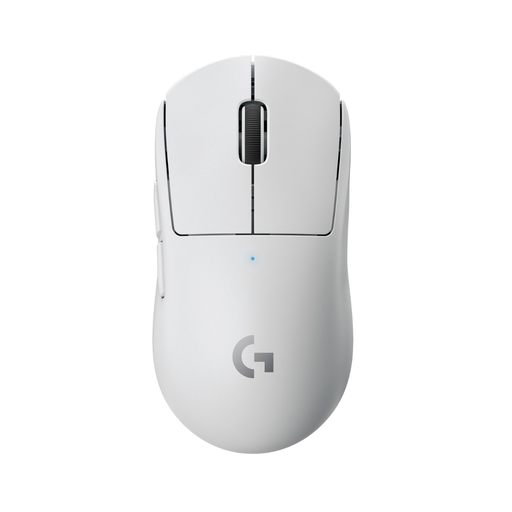
Logitech G Pro X SUPERLIGHT Wireless Gaming Mouse
Why This Fits Their Persona: This gamer is looking for a reliable, high-quality mouse that excels in any situation. The SUPERLIGHT is a popular choice in the eSports world for its perfect balance of weight (63g), comfort, reliable LIGHTSPEED technology, and solid battery life.
This model doesn't chase the highest specs but delivers an extremely consistent and reliable performance. The build quality is solid despite its low weight, thus avoiding the pitfall of a fragile, lightweight mouse.
Advantage: An excellent balance of weight, performance, and reliability. Pro: The HERO 25K sensor and LIGHTSPEED technology provide consistent, lag-free performance.
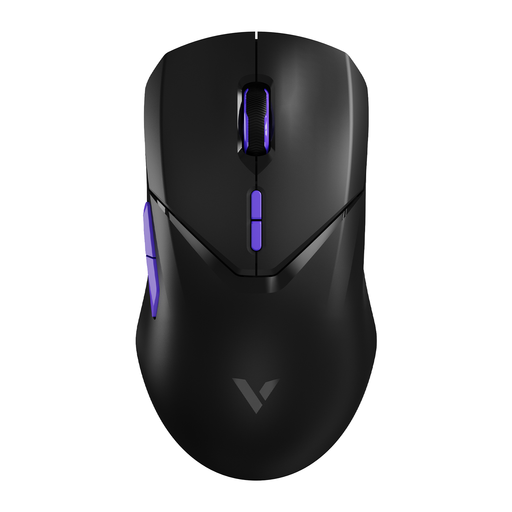
RAPOO VT9Pro 4K Wireless Gaming Mouse
Why This Fits Their Persona: This gamer wants high-end features without paying the premium price. The VT9Pro offers a 4K polling rate, an excellent PAW 3398 sensor, and a lightweight (68g) design. It's an eSports mouse at a more accessible price point.
This model proves you don't have to spend a fortune for a fast, responsive gaming experience. It delivers a 4K polling rate and a top-tier sensor, features often reserved for more expensive models.
Advantage: 4K polling rate for a highly responsive feel at a competitive price. Pro: Ambidextrous design makes it suitable for both left- and right-handed gamers.
Looking for more options?
We have compiled a complete, up-to-date list of products that fully meet these strict selection criteria and safety standards.
Frequently Asked Questions
Is an 8K polling rate mouse worth it?
It depends. For professional FPS players with a high-end PC (to handle the higher CPU load) and a high-refresh-rate monitor, it can provide a smoother, more responsive feel. For most gamers, however, 1000Hz is more than sufficient and offers significant battery savings.
How important is the weight of a gaming mouse?
For fast-paced games like shooters, a lightweight gaming mouse (under 70 grams) can reduce wrist fatigue and enable faster, more precise movements. For other genres, like MMOs or strategy games, a slightly heavier, more ergonomic gaming mouse with extra buttons might be preferable. It's a personal choice that depends on your games and playstyle.
What is the difference between 2.4GHz wireless and Bluetooth?
A 2.4GHz connection via a USB dongle offers much lower latency and a more stable connection, which is essential for competitive gaming. A bluetooth gaming mouse is mainly useful for compatibility with devices like laptops and tablets without sacrificing a USB port, but its higher latency makes it less suitable for serious gaming. Most high-performance wireless mice use a 2.4GHz connection.