
Choosing the Right Wireless Gaming Mouse: Our Recommendations
A stuttering mouse or a cable snagging behind your monitor can be the difference between victory and defeat. For serious PC gamers, a wireless gaming mouse isn't a luxury—it's an essential part of your setup. The freedom of a wireless connection, combined with the precision of modern sensors, can significantly enhance your gameplay.
But the market is flooded with technical specs and marketing jargon. How do you choose the mouse that's truly right for you? In this guide, we'll help you understand the key features and provide concrete recommendations for 2026, based on objective specifications.
What to Look for in a Wireless Gaming Mouse
Before we dive into specific products, it's helpful to know which specifications truly matter. Focus on these three points to make an informed decision.
1. Weight and Ergonomics
A mouse's weight directly impacts how quickly you can react. A lightweight gaming mouse (typically under 70 grams) reduces drag and fatigue during long sessions. This is especially advantageous in fast-paced FPS games where quick, precise movements (flicks) are crucial. Also, pay attention to the shape: is the mouse symmetrical (ambidextrous), making it suitable for both left- and right-handed use, or does it have an ergonomic shape designed specifically for one hand?
2. Sensor Performance: DPI and Polling Rate
The sensor is the heart of your mouse. Two terms are important here:
- DPI (Dots Per Inch): This indicates how sensitive the mouse is. A
high-DPI gaming mousecan register more movement with a smaller physical displacement. While manufacturers advertise extremely high DPI values (over 20,000), most competitive gamers play at a much lower setting (400-1600 DPI) for greater control. However, a high maximum DPI is a sign of a capable, modern sensor. - Polling Rate: Measured in Hertz (Hz), this indicates how often the mouse reports its position to the computer. The standard is 1000Hz (1000 times per second). A high polling rate mouse (e.g., 4000Hz or 8000Hz) provides smoother cursor movement and lower latency, which can make a noticeable difference on high-refresh-rate monitors.
3. Connectivity and Battery Life
Most high-performance wireless gaming mice use a 2.4GHz USB dongle for a stable, low-latency connection. Some models also offer a Bluetooth gaming mouse option, which is convenient for use with laptops or other devices without an extra dongle. A rechargeable gaming mouse is standard, but battery life varies dramatically. Look for models that last for tens, or even hundreds, of hours to avoid running out of power mid-game.
Our Top Product Recommendations
Based on the criteria above, we've selected a few models that stand out for their specifications.
RAPOO VT9Pro 4K Wireless Gaming Mouse
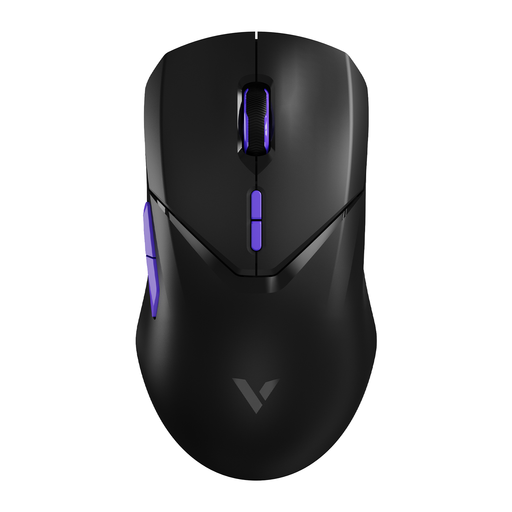
Why It Stands Out The VT9Pro focuses on pure speed and responsiveness. With a wireless 4000Hz polling rate, the manufacturer claims a latency of just 0.25 milliseconds. This, combined with the Pixart PAW 3398 sensor, makes it an instrument for gamers who want to leverage every millisecond. Its 68-gram weight is low enough for swift movements without being extreme.
Key Features
- Polling Rate: 4000Hz wireless for extremely smooth tracking.
- Sensor: Pixart PAW 3398 with up to 26,000 DPI, 650 IPS, and 50G acceleration.
- Weight: 68 grams, a great balance between lightweight design and control.
- Battery: The built-in 800mAh battery offers up to 180 hours of use, according to Rapoo.
- Buttons: 10 programmable buttons for full customisation.
Who Is It For? For the competitive gamer seeking a professional gaming mouse with a focus on minimal latency. Ideal for fast-paced shooters like Valorant or Apex Legends, where reaction speed is everything.
RAPOO VT3 Wireless Gaming Mouse
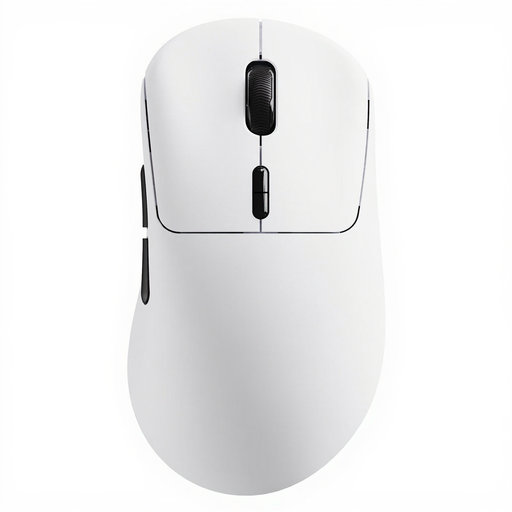
Why It Stands Out The VT3 focuses on two extreme specifications: an ultra-low weight and exceptional battery life. At just 53 grams, this is one of the lightest mice on the market. Additionally, thanks to the energy-efficient Nordic nRF54L15 MCU, Rapoo claims a battery life of up to 750 hours at 1000Hz. The mouse also supports a native 8000Hz wireless polling rate without an extra dongle.
Key Features
- Weight: Extremely light 53 grams for minimal effort.
- Battery Life: Up to 750 hours at 1000Hz, making recharging a rare event.
- Polling Rate: Native 8000Hz wireless for top-tier performance.
- Sensor: 26K DPI sensor with independently adjustable X/Y axes.
- Switches: Mechanical switches rated for a 100-million-click lifespan.
Who Is It For? For gamers who prioritise a lightweight gaming mouse and are tired of constantly recharging. The stable 8K polling rate also makes it an interesting choice for use in environments with heavy wireless interference, such as at tournaments.
Corsair M75 Gaming Ambidextrous Bluetooth Optical Mouse
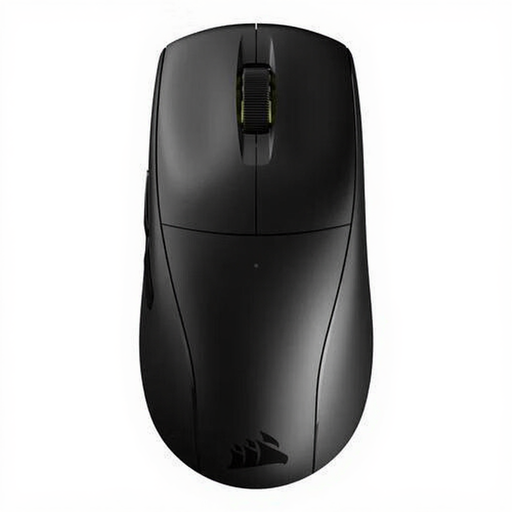
Why It Stands Out The Corsair M75 distinguishes itself with its versatility and symmetrical design. As one of the few high-performance mice that is fully ambidextrous, it's an excellent option for left-handed gamers. Weighing in at a very light 60 grams, the addition of Bluetooth connectivity alongside the standard 2.4GHz connection makes it highly flexible.
Key Features
- Design: Fully ambidextrous, suitable for both left- and right-handed users.
- Weight: Very light at just 60 grams.
- Sensor: Precise optical sensor with a resolution of up to 26,000 DPI.
- Connectivity: Offers both 2.4GHz wireless and Bluetooth for broad compatibility.
Who Is It For? The ideal choice for left-handed gamers who don't want to compromise on performance. It's also great for users who want a single mouse for both high-performance gaming on their PC and productivity on a laptop via Bluetooth. A great FPS gaming mouse for a wide range of users.
Haven't Found the Right Match Yet?
The world of gaming peripherals is vast and highly personal. You might be looking for a different shape, a specific brand, or a mouse that better fits your budget. Every player has unique preferences.
Discover more options in our full collection. Browse through different models and find the perfect mouse for your playstyle.
? Explore all our gaming mice and keyboards here
Frequently Asked Questions (FAQ)
1. Is a wireless gaming mouse really as good as a wired one? Yes, modern 2.4GHz wireless technology used in performance-focused mice offers latency that is imperceptible compared to wired mice. The connection is stable and fast enough for even the highest level of competitive gaming.
2. What is a good DPI for gaming? This is highly personal and depends on the game and your own preference. Most professional players use a relatively low DPI (between 400 and 1600) combined with lower in-game sensitivity for more precise control. A mouse with a high maximum DPI value gives you the flexibility to experiment and find the setting that works best for you.
3. How important is the polling rate? The polling rate determines how smoothly the cursor moves across your screen. 1000Hz is the gold standard for gaming. A higher polling rate (like 4000Hz or 8000Hz) can make tracking even smoother, which is especially noticeable on high-refresh-rate monitors (144Hz and above). However, keep in mind that a higher polling rate can be more demanding on your CPU.