
Choosing the Right Wireless Gaming Mouse for PC Gamers
A stuttering connection, a dead battery mid-fight, or a mouse that feels too heavy after a long gaming session. These are common frustrations for many PC gamers. Switching to a wireless gaming mouse can significantly upgrade your setup, but the market is vast, and the specifications aren't always clear.
This article serves as a practical guide. We'll help you understand the specs that truly matter and highlight several popular models. This way, you can make an informed choice that fits your playstyle and budget, without getting lost in marketing jargon.
What to Look for in a Wireless Gaming Mouse
Before we dive into the products, it's helpful to understand a few key features. These determine how the mouse performs in real-world use.
Weight and Ergonomics: Speed Without Fatigue
A lightweight gaming mouse isn't just a trend. A lower weight, often under 80 grams, allows you to react faster and reduces arm fatigue. This is especially noticeable in fast-paced shooters where every millisecond counts. Besides weight, also consider the shape: it should fit comfortably in your hand, whether you use a palm, claw, or fingertip grip.
Connectivity: 2.4GHz, Bluetooth, or Both?
Wireless gaming mice primarily use two technologies:
- 2.4GHz (via dongle): This is the standard for competitive gaming. The connection is designed for extremely low latency (input lag), meaning your movements are registered on-screen almost instantly.
- Bluetooth gaming mouse: This option is convenient for versatility. You can easily connect the mouse to laptops or other devices without sacrificing a USB port. The response time is typically slightly slower than 2.4GHz, but it's more than sufficient for many games and daily use.
Models with both options offer the best of both worlds: speed for gaming and convenience on the go.
Sensor Precision (DPI) and Programmable Buttons
DPI (Dots Per Inch) indicates the mouse's sensitivity. A higher DPI means the cursor travels further on the screen with a small movement of the mouse. Although manufacturers advertise extremely high DPI values, most gamers use settings between 800 and 3200 DPI. More important is a high-quality sensor that accurately tracks your movements without acceleration.
A gaming mouse with programmable buttons allows you to assign complex actions (macros) or specific functions to extra buttons. This can provide a strategic advantage in MMO or MOBA games.
Popular Wireless Gaming Mouse Choices
Based on specifications and features, we've lined up some interesting options for you.
HyperX Pulsefire Haste 2 Wireless
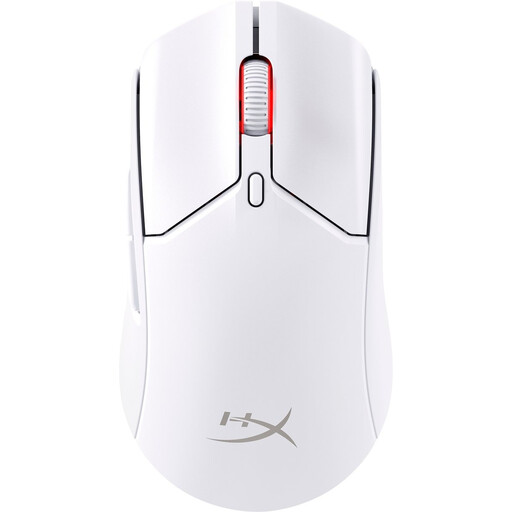
Why it stands out: The HyperX Pulsefire Haste 2 Wireless combines an ultra-light design with a solid, closed shell. Weighing just 60 grams, it's one of the lighter models on the market, without the perforated 'honeycomb' structure you often see. The mouse offers dual connectivity: a fast 2.4GHz connection for gaming and Bluetooth for general use. According to HyperX, the battery lasts up to 100 hours.
Pros:
- Extremely lightweight (60 grams) for swift movements.
- Dual wireless modes (2.4GHz and Bluetooth 5.0).
- High precision with the HyperX 26K sensor (up to 26,000 DPI).
- Can be used wired while charging with the included USB-C cable.
Who is this for?: This is an excellent choice for competitive gamers who prioritise speed and agility. If you're looking for a lightweight gaming mouse that still offers a solid feel and long battery life, the Pulsefire Haste 2 is a strong contender.
ASUS ROG Strix Impact III Wireless
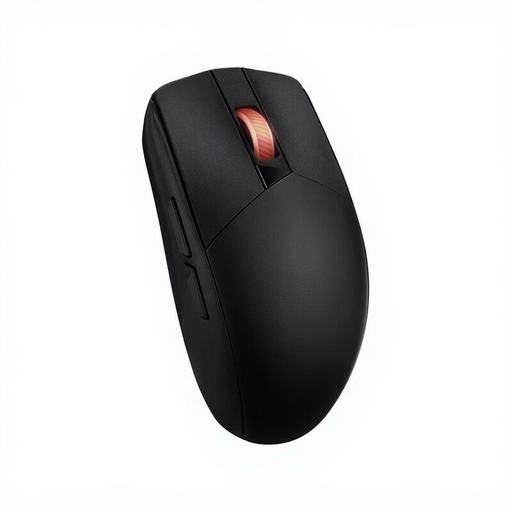
Why it stands out: The ASUS ROG Strix Impact III Wireless focuses on precision and exceptionally long battery life. Its optical sensor has an impressive maximum resolution of 36,000 DPI. However, what's most striking is the battery life: ASUS claims up to 450 hours when using Bluetooth. The symmetrical (ambidextrous) design makes the mouse suitable for both left- and right-handed users.
Pros:
- Very high sensor resolution up to 36,000 DPI for extreme precision.
- Long battery life, especially in Bluetooth mode.
- Ambidextrous design, suitable for left- and right-handed gamers.
- Wireless connectivity via 2.4GHz RF and Bluetooth 5.1.
Who is this for?: Gamers who value a high-spec sensor and don't want to constantly charge their mouse. The long battery life and symmetrical design make it a reliable and versatile rechargeable gaming mouse for long gaming sessions.
ET Wireless Gaming Mouse (Tri-Mode)
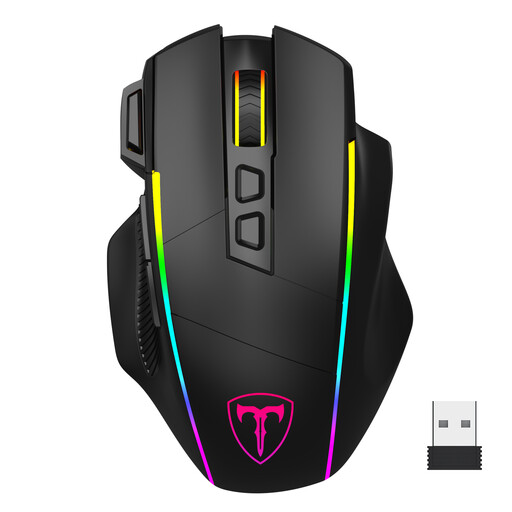
Why it stands out: This model from ET offers a remarkable number of features at an accessible price point. It's a 'tri-mode' mouse, meaning you can connect via 2.4G, Bluetooth, and wired via USB-C. With 8 programmable buttons, including a dedicated 'fire button' next to the left mouse button, this mouse is aimed at gamers who want a lot of control. The customisable RGB gaming mouse lighting completes the package.
Pros:
- Highly versatile with three connection modes.
- 8 programmable buttons including a rapid-fire button.
- Extensive and customisable RGB lighting.
- Ergonomic design aimed at medium to large hands.
Who is this for?: The budget-conscious gamer looking for maximum functionality. If you highly value a gaming mouse with programmable buttons and extensive RGB options without paying a premium price, this model offers great value for money.
Haven't Found the Right Match Yet?
The models above are just a selection from the wide range available. Are you looking for a different model, a specific shape, or want to compare more options? Browse our full assortment to find the perfect mouse for your gaming mouse for PC setup.
Frequently Asked Questions
Is a wireless gaming mouse really as fast as a wired one?
Modern wireless gaming mice using a 2.4GHz connection have latency so low that the difference from a wired mouse is imperceptible to almost everyone. The technology has improved significantly in recent years, making 'input lag' a non-issue on quality models.
How much DPI do I need?
More DPI isn't automatically better. Most professional gamers use a relatively low DPI setting (e.g., 800 or 1600) combined with lower in-game sensitivity for more precise control. What's most important is that the mouse's sensor is accurate across its entire DPI range. Experiment with different settings to see what works best for you.
What is the advantage of a lightweight gaming mouse?
A lighter mouse allows you to react and change direction more quickly. This can be an advantage in fast-paced games. Additionally, it reduces the strain on your wrist and arm, which can help prevent fatigue during long gaming sessions.