
Choosing the Right White Gaming Mouse: A No-Hype Guide
A white gaming mouse can complete the aesthetic of your setup, but the search is often frustrating. Manufacturers throw around impressive numbers and marketing terms that mean very little in practice. Before you spend money on features you don't need, it's important to know what really matters. We'll cover the most common pitfalls and help you understand the specs that truly make a difference.
Pitfalls When Buying a Mouse
Many buyers fall for the same marketing traps. Here are two common missteps you can avoid:
- The DPI Myth: Brands advertise with extremely high DPI (Dots Per Inch) values, like 20,000 or even 30,000. This sounds like a performance advantage, but the reality is different. Most gamers, including professionals, use a setting between 400 and 1600 DPI for precise control. An extremely high DPI makes the cursor uncontrollably fast. A high-quality sensor is far more important than an impractically high DPI number.
- Lightweight at All Costs: A lightweight mouse can make quick movements easier, but some designs take this too far. Mice with a honeycomb structure are indeed light, but they collect dust and debris and are harder to clean. Furthermore, the use of paper-thin plastic can compromise durability. A solid, well-built mouse that weighs a few grams more is often a better long-term investment.
Core Specs That Actually Matter
Focus on the specifications that directly impact your user experience. These are the three most important factors to consider.
- Shape and Weight (Ergonomics): Comfort is crucial, especially during long sessions. An ergonomic mouse is shaped to support your hand naturally, which can reduce strain. Symmetrical mice are suitable for both left- and right-handed users, but a model designed specifically for your dominant hand, like a left-handed mouse, often provides superior comfort. Weight also plays a role: models under 70 grams are ideal for fast-paced, competitive games, while a slightly heavier mouse can offer more stability.
- Sensor and Connectivity: A good optical sensor from a reputable brand like Logitech, Razer, or HyperX ensures precise, stutter-free tracking. Look beyond just DPI. The polling rate, measured in Hertz (Hz), determines how often the mouse reports its position to the PC. A value of 1000 Hz is the standard for a responsive wireless mouse. Wired mice can achieve even higher values, further minimising input lag.
- Click Sound and Features: Not everyone likes loud, tactile clicks. A silent mouse with dampened switches is a great solution for office environments or if you don't want to disturb housemates. For gamers, however, the feedback from a distinct click can be desirable. Also, pay attention to the number of programmable buttons and the software support for customising the mouse to your liking.
Our Recommendations for Different Users in 2026
We have selected a few popular models that suit different needs and budgets, based on their objective specifications.
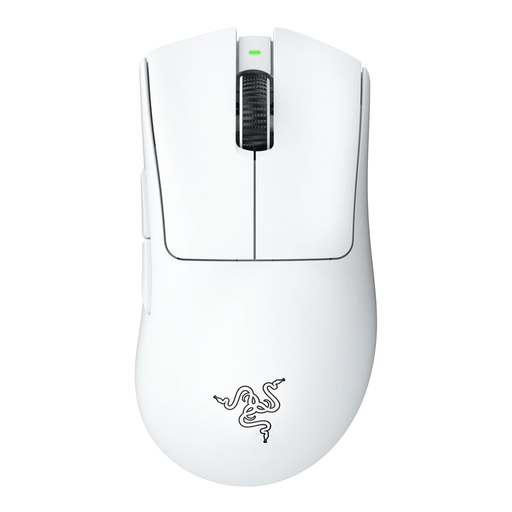
Razer DeathAdder V3 Pro White
Why This Fits Their Persona: For gamers who demand speed and precision. This mouse combines an ultra-lightweight design with a proven ergonomic shape for right-handed users, ideal for fast-paced FPS games.
The focus is on the combination of low weight (63 grams), a solid body, and a high-quality sensor, not just a high DPI. Its durable, closed construction avoids the disadvantages of a honeycomb design.
The Razer HyperSpeed Wireless technology provides a fast and stable wireless connection. According to Razer, the battery life lasts up to 90 hours.
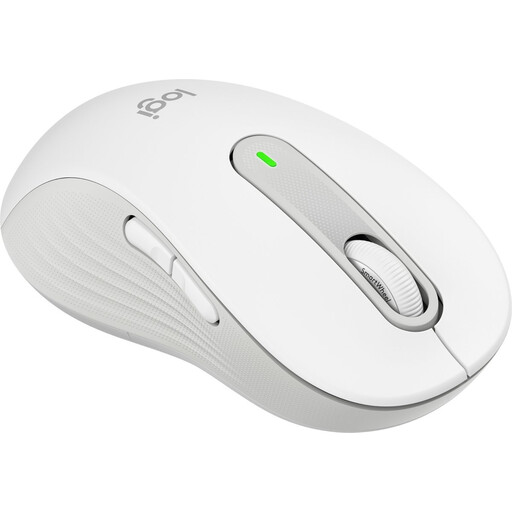
Logitech Mouse Signature M650 L Left White
Why This Fits Their Persona: Left-handed users are often overlooked. This model is specifically designed for comfort and ease of use for left-handers with medium to large hands.
This model directly solves the ergonomics problem by opting for a dedicated left-handed design instead of a symmetrical compromise. The specs are focused on comfort and productivity, not on superfluous gaming features.
According to Logitech, the SilentTouch technology reduces click noise by 90%, which is ideal for a quiet office or home workspace. The battery lasts up to two years on a single AA battery.
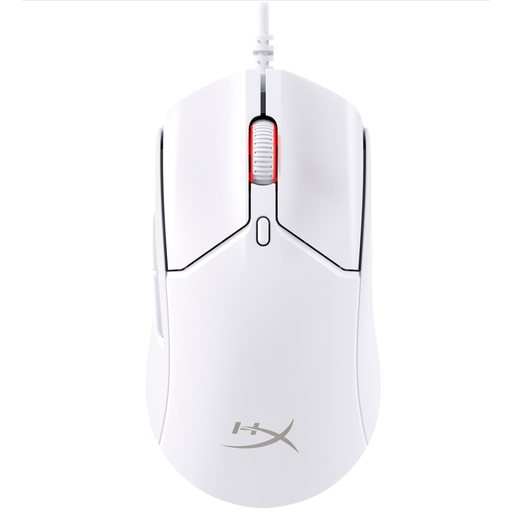
HyperX Pulsefire Haste 2 - Wired Gaming Mouse - White
Why This Fits Their Persona: For those seeking ultimate responsiveness without paying a premium. This wired mouse offers top-tier performance at a competitive price, perfect for both casual and serious gamers who want a clean white setup.
This mouse focuses on a measurable performance advantage: its 8000 Hz polling rate provides extremely low input lag. It's a concrete spec that counts in competitive games, rather than a uselessly high DPI number.
Weighing just 52 grams (without the cable), this is an extremely light mouse. The combination of its low weight and high polling rate makes it exceptionally responsive.
Looking for more options?
We have compiled a complete, up-to-date list of products that fully meet these strict selection criteria and local regulations.
Frequently Asked Questions
Is a wireless gaming mouse as fast as a wired one? Modern 2.4GHz wireless technologies, like those from Logitech and Razer, have such low latency that the difference is unnoticeable for most users. Bluetooth, however, can have noticeable lag and is better suited for office work. For the most demanding competitive players, a wired mouse—especially one with a high polling rate—remains the preferred choice for guaranteed minimal delay.
How much DPI do I really need for my white gaming mouse? Don't be tempted by sky-high DPI numbers. Most gamers set their mouse between 400 and 1600 DPI for optimal control. A higher setting actually makes precise movements more difficult. The quality of the sensor and the ability to adjust DPI in increments are far more important than the maximum number.
How do I keep a white mouse clean? A white mouse is more susceptible to visible dirt and discolouration from skin oils. Clean the mouse regularly with a slightly damp microfibre cloth. For more stubborn grime, you can use a cloth with a small amount of isopropyl alcohol. Always ensure that no liquid gets inside the mouse, near the sensor, or between the buttons. Do not use harsh cleaning agents.