
Choosing the Right Vertical Ergonomic Mouse to Prevent Wrist Strain
Long days at the computer can take their toll. A nagging pain in the wrist, a stiff arm, or shoulder discomfort are familiar complaints for many. A standard mouse forces your hand and wrist into an unnatural, twisted position. A vertical ergonomic mouse is designed to change this by promoting a more neutral "handshake" posture.
But the market is flooded with models promising the world. Before you invest in a solution for your computer-related wrist pain, it's important to know a few common pitfalls that could render your purchase useless.
- The "One-Size-Fits-All" Myth: Many manufacturers promote a universal design. However, an ergonomic mouse that is too large or too small for your hand can actually worsen the discomfort. A comfortable mouse for small hands has different dimensions than a model for larger hands.
- The Pitfall of Unnecessarily High DPI: Marketing often highlights high DPI (Dots Per Inch) values as a sign of quality. For office work and general use, however, an extremely high DPI is impractical. It makes the cursor too sensitive and difficult to control, leading to more frustration and less precision.
What to Look For: The Core Specifications
To avoid a bad purchase, focus on a few objective specifications that truly make a difference for daily comfort and productivity.
Fit and Hand Size: The Foundation of Comfort
The most important feature of a vertical mouse is the angle at which it positions your hand. Most models have an angle between 50 and 60 degrees to approximate the natural handshake posture. However, pay special attention to the dimensions of the mouse in relation to your hand. A right-handed vertical mouse model should fully support your hand, without your fingers cramping or your pinky dragging on the desk. Measure the width of your palm to compare it with the mouse's specifications.
Wireless or Wired: What Suits Your Workspace?
A wireless ergonomic mouse offers a clutter-free desk and more freedom of movement. There are two common connection types:
- Bluetooth: Ideal for a Bluetooth mouse for the office as it doesn't require a USB port. Many modern laptops and tablets have built-in Bluetooth. Some mice can pair with multiple devices simultaneously.
- 2.4GHz USB Receiver: Often provides a more stable and faster connection than Bluetooth, which is important for preventing lag. The small USB receiver does occupy a port.
A wired model is a reliable and cost-effective option. You never have to worry about batteries or connection issues.
Buttons and Sound: Efficiency and a Silent Mouse
Pay attention to the placement and type of buttons. Programmable buttons can speed up your workflow by assigning frequently used actions to a thumb button. Do you work in an open office or at home while others are resting? Then a silent mouse with muted clicks is worth considering. This feature significantly reduces noise without sacrificing the tactile click feel.
Our Product Recommendations
Based on these objective criteria, we have matched several popular models to specific user profiles.
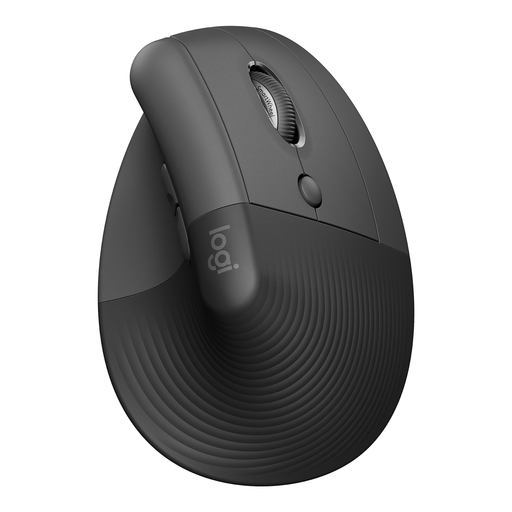
Logitech Lift Vertical Ergonomic Mouse Graphite
Why This Fits Their Persona: The Logitech Lift is specifically designed for small to medium-sized hands. Its compact shape and soft rubber grip provide all-day comfort, ideal for long workdays at the office or at home.
This model directly addresses the "one-size-fits-all" pitfall by offering a specific fit, which is essential for effective ergonomics.
The 57-degree vertical angle promotes a natural posture. The silent buttons and SmartWheel scroll wheel ensure a quiet and productive work environment.
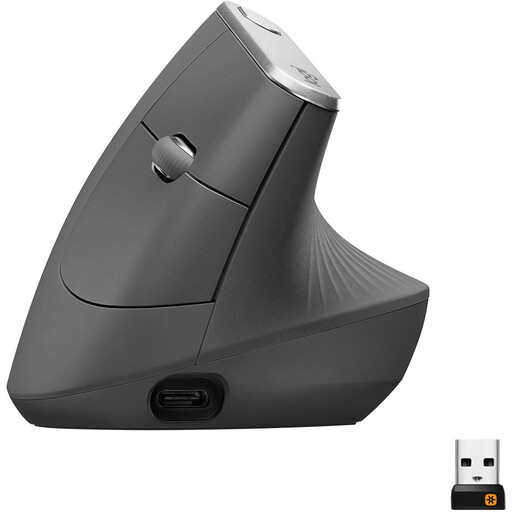
Logitech MX Vertical, Ergonomic Wireless Mouse
Why This Fits Their Persona: For professionals who demand peak performance and advanced features. The MX Vertical is designed for users with medium to large hands who frequently switch between tasks and devices.
The 4000 DPI sensor is highly accurate but not overly sensitive. The cursor speed switch allows you to adjust the DPI on the fly, making the mouse versatile for both precision work and fast navigation.
The rechargeable battery lasts up to four months and provides three hours of use from a one-minute charge. The mouse can connect to three devices simultaneously via Bluetooth or the Unifying USB receiver.
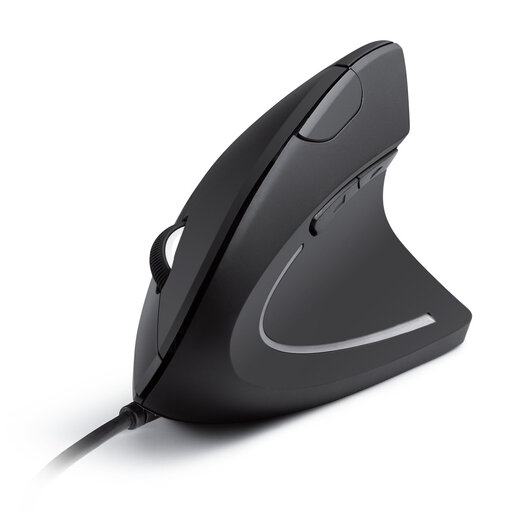
Anker CE100 USB Wired Vertical Mouse
Why This Fits Their Persona: An accessible option for those who want to try the benefits of a vertical mouse without a major investment. Ideal for home use or as a first step toward an ergonomic workspace.
With its wired USB connection, this model bypasses the pitfalls of an unstable wireless connection or dead batteries. It's a reliable plug-and-play solution.
It offers the essential ergonomic benefits of a vertical mouse in a simple and affordable package. The optical sensor with adjustable 1000/1600 DPI is more than sufficient for most office tasks.
Looking for more options?
We have compiled a complete, up-to-date list of products that fully meet these strict selection criteria and local safety regulations.
Frequently Asked Questions
How long does it take to get used to a vertical mouse?
Most users experience an adjustment period of a few days to a week. At first, the control might feel a bit awkward as you are using different muscles in your arm and hand. Start with tasks that require less precision and give yourself time to master the new posture.
Can a vertical mouse help with RSI symptoms?
A vertical mouse is designed to reduce strain on the wrist and forearm by promoting a more neutral, anatomical posture. According to manufacturers like Logitech, this can lower muscle activity compared to a traditional mouse. While many users report relief from their symptoms, it is not a medical device. For persistent or severe RSI-related complaints, it is advisable to consult a doctor or physical therapist.
What is the difference between the Logitech Lift and the MX Vertical?
The main differences are the target audience and size. The Logitech Lift is specifically designed for users with small to medium-sized hands. The MX Vertical is larger and aimed at users with medium to large hands. Additionally, the MX Vertical has a rechargeable battery and more advanced features like Logitech Flow for use across multiple computers, while the Lift runs on a replaceable AA battery with a very long lifespan.