
Choosing USB-C headphones: a practical guide for music, calls and everyday use
A USB-C headset may seem simple to choose: plug it in or pair it, start your music and you’re ready to go. However, models vary considerably in terms of connection, comfort, microphone, battery life and possible uses. A USB-C port also does not automatically mean that you can play audio through a cable. On many wireless models, USB-C is intended solely for charging the battery.
If you focus mainly on marketing terms, you could end up buying a product that does not suit your situation. Pay particular attention to these three pitfalls:
- Confusing USB-C with USB-C audio: on wireless models, the port is often for charging only. Check whether the product supports wired audio.
- Overestimating noise cancelling: active noise cancellation only works on models that actually have this feature. An in-ear fit or closed earcup usually provides passive sound insulation, but that is different from ANC.
- Comparing battery life without context: the stated playback time may depend on volume, codec, features and conditions of use. Also check the charging time and whether you can listen while charging.
Which USB-C headphones suit your needs?
For a smartphone without a 3.5mm jack, USB-C earbuds are a practical wired solution. They do not need a battery or Bluetooth pairing. This makes them suitable for travel, work and devices on which you do not want to use a wireless connection.
Wireless headphones or a Bluetooth model offer greater freedom of movement. On the other hand, you need to charge the battery, and audio playback depends on the wireless connection. Compact in-ear headphones are often more convenient for sport. If you listen for hours at a time, you may benefit more from over-ear headphones with an adjustable headband.
Three specifications to check in advance
1. Connection and compatibility
First, check which type of USB-C use you need:
- Wired audio: the device receives audio directly through the USB-C cable.
- USB-C for charging: the headphones work via Bluetooth; USB-C only charges the battery.
- Bluetooth plus charging port: suitable for wireless listening, but not automatically for USB-C audio.
With wired models, cable length is also relevant. A 1.2-metre cable works well with a phone in a coat pocket, while a longer cable may be more practical at a desk or in a meeting room. Also check whether your laptop, tablet or phone supports USB-C audio.
2. Wearing style, weight and fit
In-ear headphones sit directly in the ear and are easy to carry. Check whether several sizes of ear tips are included. The right size helps keep the product securely in place and prevents you from turning the volume up unnecessarily high.
An on-ear or over-ear model distributes its weight differently. Pay attention to the weight, the adjustability of the headband and the shape of the ear cushions. According to the product information, the Anker Space One’s weight is not included in the specifications provided, but it does have an over-ear design and a stated battery life of up to 55 hours. The stated weight of the Apple AirPods Max is 384.4 grams, which is an important consideration if you are looking for a lightweight model.
3. Microphone, controls and protection
For headphones for music and calls, the number and position of the microphones, as well as the controls, are important. A mute button, volume control or answer button can be useful during online meetings.
An IP rating indicates the types of dust or moisture against which a product is protected according to its specifications. IP54 and IPX5 do not mean the same as waterproof. It is best not to use a model without a protection rating during an intense workout or in heavy rain. Brand claims about call quality or noise cancellation come from the brand’s product information, so treat them as product specifications rather than a guarantee for every environment.
Our recommendations by user profile
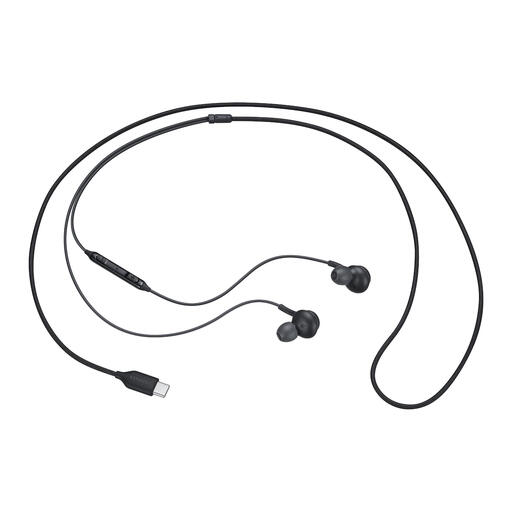
Samsung EO-IC100 Headset Wired In-ear Calls/Music USB Type-C Black
Why it suits this profile: This wired in-ear model is suitable for everyday listening and calls without a battery or Bluetooth pairing. The cable has a USB Type-C connection and, according to the product information, the model weighs 18.35 grams.
The USB-C audio connection is clearly specified as wired. You therefore do not need to factor battery life or the Bluetooth version into your decision.
In-ear design, built-in microphone, button controls and a frequency range of 20 to 20,000 Hz.
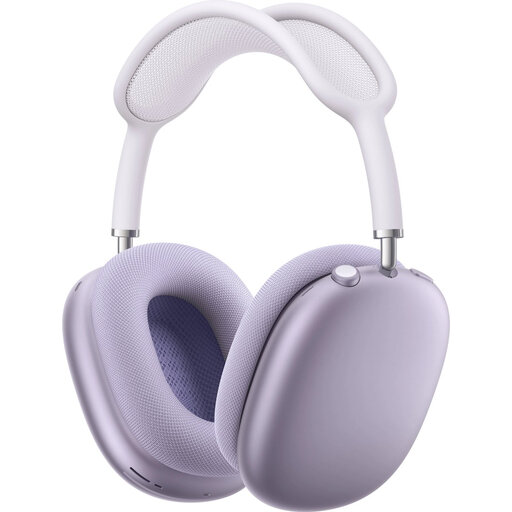
Apple AirPods Max (USB-C) - purple
Why it suits this profile: This over-ear Bluetooth model is aimed at users looking for active noise cancellation, a headband design and extensive controls.
The product information explicitly mentions Bluetooth, active noise cancellation and a maximum battery life of 20 hours. Here, the USB-C port is part of the charging and connection concept, rather than a wired in-ear solution.
Over-ear fit, active noise cancellation, transparency mode, Bluetooth 5.0 and USB-C support.
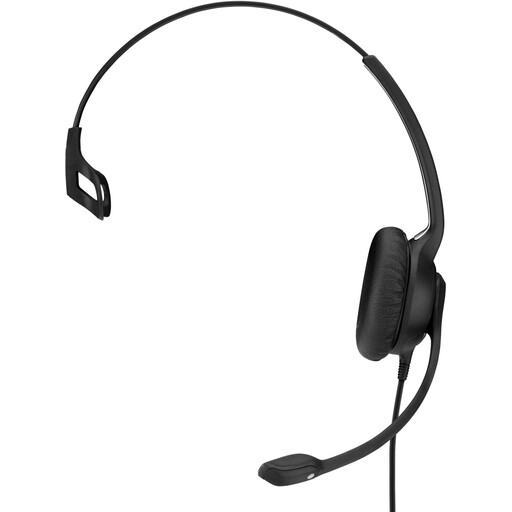
EPOS | SENNHEISER IMPACT SC 230 USB MS II Wired OE Headset Black
Why it suits this profile: The single-sided on-ear design is intended for extended use in an office or contact centre. The cable is 2.9 metres long and the stated weight is 58 grams.
The wired USB 2.0 connection and in-line controls make the operation straightforward. The microphone boom is flexible, and the product comes with additional ear cushions.
Single-sided headset, microphone with noise cancellation according to the product description, volume control on the cable and a 2.9-metre cable.
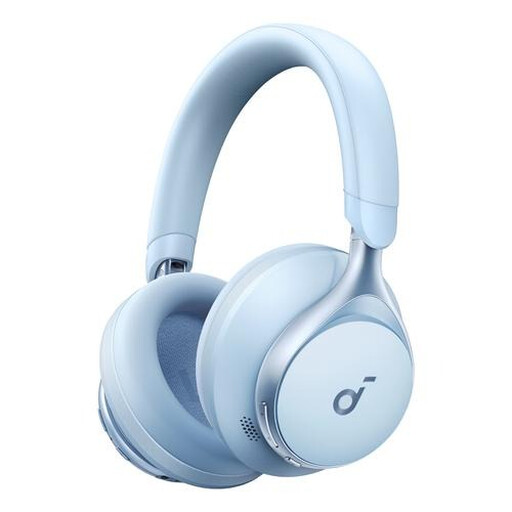
Anker Space One Wireless Headphones Music/Everyday USB Type-C Bluetooth Blue
Why it suits this profile: This over-ear Bluetooth model is designed for music, calls and everyday use. Its stated battery life of up to 55 hours is ideal for long working days or travel.
The product information makes it clear that USB-C on this model is associated with wireless Bluetooth headphones. You can therefore compare battery life directly, rather than expecting wired audio.
Over-ear wearing style, Bluetooth, USB Type-C and up to 55 hours of battery life according to the product specification.
Looking for more options?
We have put together a complete, up-to-date list of products that fully meet these strict selection criteria and the applicable European safety regulations.
How to avoid buying the wrong product
Use this quick checklist before ordering:
- Choose wired or wireless first. Wired earbuds do not need a battery; wireless models offer greater freedom of movement.
- Check device compatibility. See whether your phone, tablet or laptop supports USB-C audio or only uses Bluetooth.
- Compare the wearing style. In-ear is compact, on-ear often keeps ambient sounds more audible, while over-ear completely covers the ear.
- Check the microphone and controls. This is important if you often make calls, attend online meetings or game.
- Read the safety information. Do not use headphones at high volume for extended periods, and stay aware of your surroundings in traffic.
- Check the warranty and seller information. For consumers in the EU, many new products come with a statutory minimum warranty of two years; additional rights may depend on the applicable national regulations.
Frequently asked questions about USB-C headphones
Can I listen to music with any USB-C headphones?
No. On wired USB-C headphones, the port is intended for audio. On wireless headphones, USB-C is often only a charging port. Therefore, check the specifications for “wired”, “USB audio” or, conversely, “Bluetooth”.
Are USB-C earbuds suitable for calls?
They can be, provided the model has a built-in microphone and your device supports USB-C audio. A wired headset with in-line controls can be practical for calls. With Bluetooth models, performance depends on the pairing and the settings of your phone or computer.
What does it cost to use wireless headphones?
The electricity costs of charging are generally limited. The main recurring considerations are the lifespan of the built-in battery, the availability of replacements and charging habits. Wired headphones do not have a battery, but the cable and USB-C connector can still wear out with intensive use.