
Choosing the Right USB-C Power Strip: Our Recommendations
Does this sound familiar? Your laptop, smartphone, tablet, and monitor are all fighting for a spot on the power strip. The cables are a tangled mess, and you always need a separate adapter to fast-charge your newest devices. A modern workspace demands a smarter power solution. A power strip with USB-C is no longer a luxury but a necessity for a clean and efficient desk.
In this article, we'll help you make the right choice. We'll discuss what to look for and highlight several popular models that meet different needs. This way, you can find a solution that fits your devices and workflow.
What to Look for When Buying a USB-C Power Strip?
Before you make a decision, it's wise to consider a few specifications. This ensures you choose a model that aligns with your daily usage.
1. Power and Fast Charging: USB-C Power Delivery (PD)
Not all USB-C ports are created equal. To fast-charge laptops, tablets, and modern smartphones, you need a port that supports Power Delivery (PD). Pay attention to the maximum power output, expressed in watts (W). A port with 20W is fine for phones and tablets. For most laptops, you'll need at least 45W to 65W to charge at full speed. A good power strip with a fast charger can completely eliminate the need for separate, bulky laptop adapters.
2. Safety and Functionality
A power strip is more than just an extension cord. Features like surge protection safeguard your valuable equipment against voltage spikes, for instance, from a nearby lightning strike. Additionally, a power strip with a switch can be very convenient. Some models have a single master switch, while others offer individual switches for each socket. This allows you to easily prevent phantom power consumption from devices in standby mode.
3. Design and Mounting for Your Workspace
Aesthetics matter, especially in a space where you spend a lot of time. Think about where you want to place the power strip. A desk power strip with a long cable offers flexibility. Some models, like a clamp-on desk power strip, can be attached directly to your desktop. This creates a very clean look and provides easy access to the ports. Also, consider the orientation of the sockets; 90-degree rotated outlets are useful for large adapters that would otherwise block multiple spots.
Popular USB-C Power Strip Choices
Based on functionality and design, we've compiled a list of interesting options for you.
DEWENWILS 6-Outlet Power Strip with Individual Switches
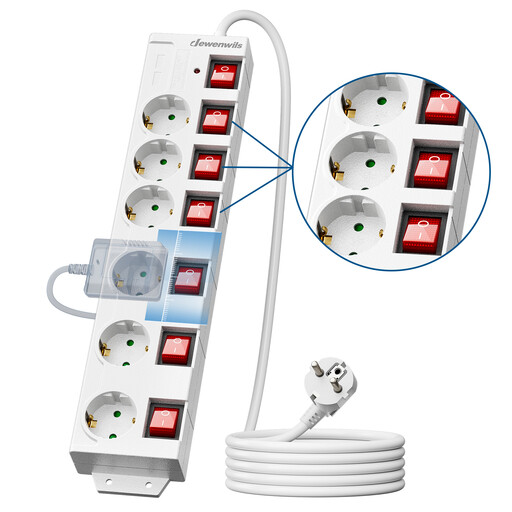
Why this model stands out: This model from DEWENWILS combines a classic design with modern functionality. The six individually switchable outlets give you complete control over your power consumption. The addition of two USB-A ports, a long 3-meter cable, and surge protection make this a very complete and safe choice for home or office.
Advantages:
- Six outlets with individual switches to reduce standby power consumption.
- Built-in surge protection and child safety features.
- Spacious layout with 90-degree rotated outlets for large adapters.
- Long 3-meter cable for flexible placement.
Who is this for?: For users who need to connect many traditional devices and want maximum control over each connected appliance. It's a practical and safe all-rounder for a comprehensive workspace.
Neomounts DS22-840WH6 Desk Power Strip with Clamp
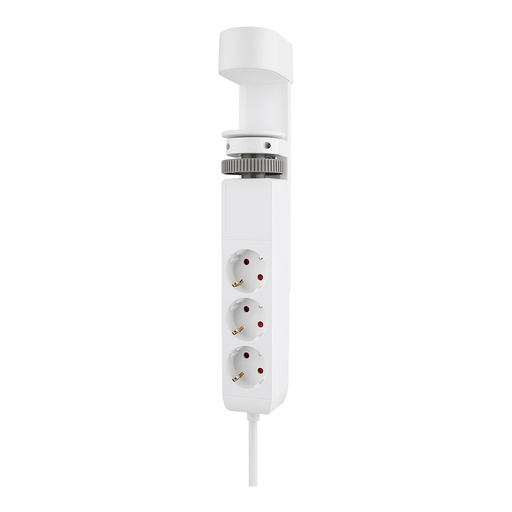
Why this model stands out: The Neomounts VOLT is the definition of a tidy desk. This clamp-on desk power strip easily attaches to the edge of your desk. The three standard outlets are neatly tucked away under the desk, out of sight, while the USB ports are on top for quick access. Two of the USB-C ports deliver 20W Power Delivery, ideal for fast-charging your phone or tablet.
Advantages:
- Clamp mount for a sleek and organized desk.
- Two USB-C ports with 20W Power Delivery and one USB-A port.
- Three hidden Schuko outlets for printers, monitors, or other devices.
- Simple, tool-free installation.
Who is this for?: Ideal for remote and office workers who want to create a minimalist and organized workspace. Perfect if you want to keep the cables of fixed equipment out of sight while having fast-charging options within easy reach.
Baseus PowerCombo Digital PowerStrip 65W
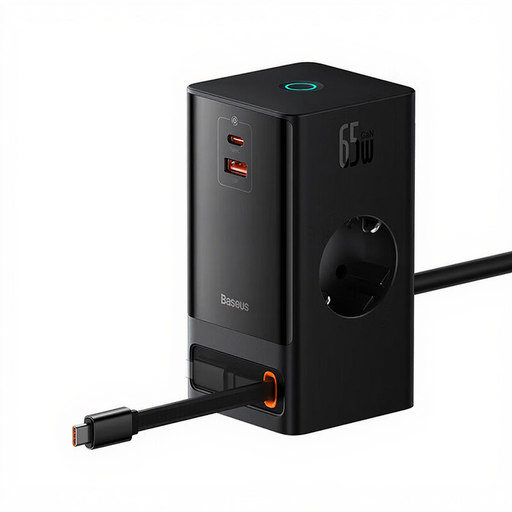
Why this model stands out: The Baseus PowerCombo is a technological marvel. Its most unique feature is the built-in, 80 cm retractable USB-C cable that delivers a massive 65W of Power Delivery. This allows you to charge most laptops at full speed without a separate adapter. The digital touch control and compact, futuristic design make this a premium power hub for your desk.
Advantages:
- Built-in retractable USB-C cable with 65W fast charging.
- Modern and intuitive touch control instead of a physical button.
- Compact 6-in-1 design with 2 AC outlets, 1 USB-A, 1 USB-C, and the retractable cable.
- High power capacity of 4000W for heavy-duty equipment.
Who is this for?: For the tech enthusiast and mobile professional looking for an all-in-one charging station. If you frequently charge your laptop via USB-C and dislike loose cables, this is a very elegant solution.
Still Haven't Found What You're Looking For?
Is one of these models not quite what you need? No problem. For more options, such as compact travel adapters or models with even more ports, you can browse our full range. A good power supply is the foundation of any productive workspace.
View all multi-socket adapters here
Frequently Asked Questions
What is the difference between a regular USB port and a USB-C port with Power Delivery (PD)?
A standard USB-A port typically delivers 5 to 12 watts, which is fine for charging older phones or accessories. A USB-C port with Power Delivery (PD) can deliver much higher power levels (from 20W up to 100W or more). This makes it possible to charge larger devices like tablets and laptops quickly and efficiently through the same compact port.
Is surge protection really necessary for a power strip on my desk?
Yes, it is highly recommended. Surge protection shields your connected electronics from unexpected voltage spikes. These spikes can permanently damage your devices. For the relatively small additional cost, it provides a crucial extra layer of protection for your expensive laptop, monitor, and other gadgets.
How many watts do I need to charge my laptop via USB-C?
This depends on your laptop model. An ultrabook or a MacBook Air is often fine with 45W. A more powerful laptop, such as a MacBook Pro or a Dell XPS 15, usually requires 65W or even 95W to charge at full speed while in use. Check the specifications of your laptop's original charger; the wattage listed there is a good guideline.