
How to Choose the Right USB-C Adapter and Avoid a Bad Purchase
A new laptop, tablet or smartphone often means switching to USB-C. While this connection is convenient, the search for the right USB-C adapter can feel like navigating a maze. The market is flooded with cables, chargers and hubs that promise the world. Unfortunately, vague specifications and marketing jargon often lead to a bad purchase.
Before you spend any money, it's wise to understand the most common pitfalls. Many users only discover after their purchase that their new accessory doesn't do what it's supposed to.
- The 'fast charging' that's actually slow pitfall: An adapter is marketed as a fast charger, but your phone charges at a painfully slow pace. This is often because the power output (wattage) is too low, or the correct charging technology, like Power Delivery, isn't supported by the adapter, the cable or your device.
- The 'all-in-one' hub that can't quite do it all: You buy a USB-C hub to complete your workspace, only to find that the Ethernet adapter for a stable internet connection is missing, or that the USB-C to HDMI port can't drive your 4K monitor at the desired refresh rate.
- The unusable cable: You buy a USB-C cable for your new iPhone, but then realise you needed a Lightning to USB-C model, or vice versa. Compatibility is crucial, but it's not always clearly stated.
What to Look For: The Specs That Matter
To avoid a bad purchase, it's important to look beyond the product title. Pay attention to a few technical details that determine if an adapter is right for you.
1. Power (Watts) and Power Delivery (PD)
For charging, two things are essential: the power output, expressed in watts (W), and the charging protocol. Most modern devices use Power Delivery (PD) for fast and safe charging.
- Wattage (W): A smartphone typically needs 20–30W for fast charging. A laptop, however, requires 45W, 65W or even 100W. A USB-C charger with insufficient wattage will charge your laptop slowly or not at all.
- Power Delivery (PD): This is a smart charging standard. A PD charger communicates with your device to deliver the correct amount of power. For optimal charging speed, check that the charger, the cable and your device all support PD. Without it, a charger will revert to a much slower speed.
2. Data and Video Functionality
Not all USB-C ports are created equal. Some are only for charging, while others can also transmit data and video.
- DisplayPort Alt Mode (DP Alt Mode): Want to connect an external monitor via a USB-C to HDMI adapter? Your laptop's USB-C port must support "DisplayPort Alt Mode." Without this feature, you won't get a video signal, no matter how expensive your adapter is.
- Data Transfer Speed: A USB-C hub or docking station often has multiple USB-A ports. Note the difference between USB 2.0 (slow, up to 480 Mbps, fine for a mouse) and USB 3.0/3.1/3.2 (fast, 5 Gbps or more, necessary for external hard drives).
- Network Connection: For stable internet at home or in the office, a built-in Ethernet adapter (RJ45 port) in your hub or docking station is a must-have.
Product Picks for Every User
To help you make the right choice, we've highlighted a few products that fit specific needs.
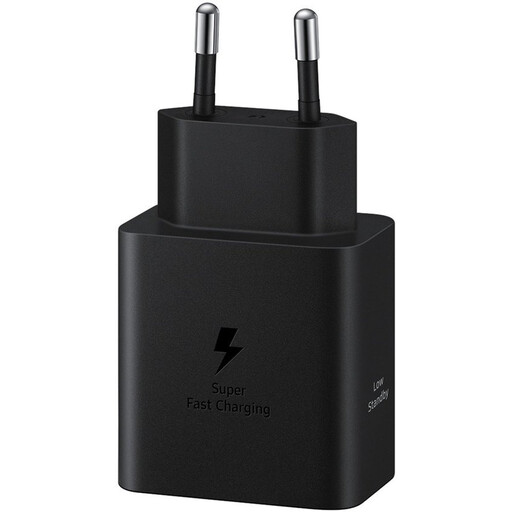
Samsung Charger Super Fast Charging 45W (without cable)
Why This Fits Your Persona: Ideal for those seeking a powerful and reliable fast charger for a modern smartphone or tablet. This charger is designed to charge compatible devices, especially from Samsung, at maximum speed.
This charger delivers a specific output of 45W and supports Power Delivery. This helps you bypass the pitfall of a 'fast charger' that turns out to be slow in practice.
Supports Super Fast Charging for compatible Samsung devices. Built-in protection against overvoltage and overheating.
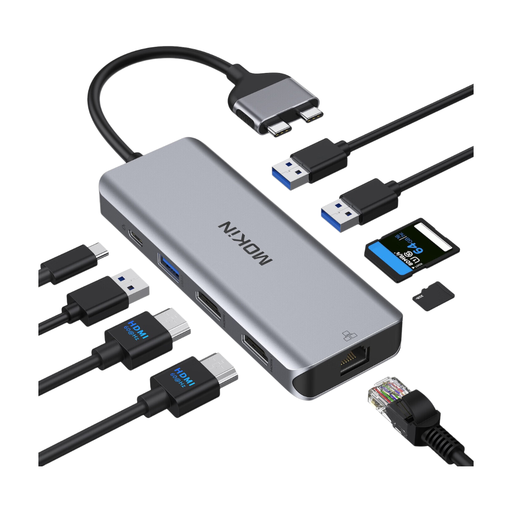
Mokin 9-in-1 USB-C Docking Station
Why This Fits Your Persona: For the professional who wants to transform their laptop into a fully-fledged workstation with a single cable. Connect two monitors, a wired network and multiple accessories simultaneously.
This docking station solves the 'not-quite-everything' pitfall by offering a complete suite of ports, including 2x HDMI, a Gigabit Ethernet port and fast USB 3.0 ports.
Supports dual-monitor setups. Offers PD pass-through charging up to 100W, so your laptop charges while you use all the ports.
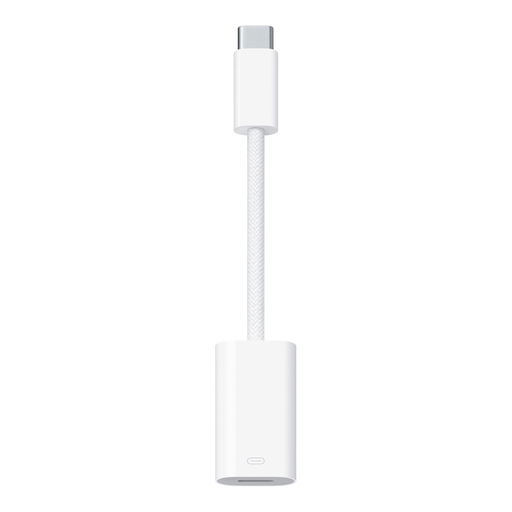
Apple USB-C to Lightning Adapter
Why This Fits Your Persona: Perfect for those with a new USB-C iPhone or iPad who want to continue using their existing Lightning cables, earbuds or other accessories. A simple solution for a common problem.
This is an official Lightning to USB-C adapter from Apple. This guarantees compatibility and functionality, preventing the issues often seen with uncertified third-party adapters.
Supports charging, data transfer and audio. The braided cable provides extra durability.
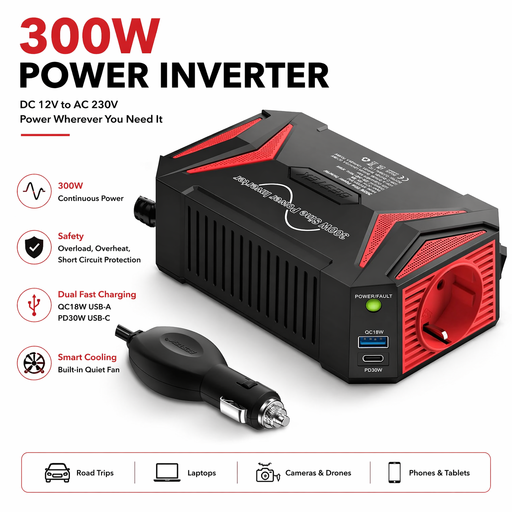
BESTEK 300W Pure Sine Wave Car Inverter
Why This Fits Your Persona: For those who need serious power on the go. This car charger is more than a simple USB port; it's an inverter that provides 230V, allowing you to charge even a laptop in the car.
While a standard car charger often lacks the power for a laptop, this inverter offers 300W and a standard AC outlet. The addition of dedicated PD and QC USB ports also guarantees fast charging for phones.
Delivers a pure sine wave, which is safe for sensitive electronics. Features two AC outlets and multiple fast-charging USB ports.
Looking for more options?
We have compiled a complete, up-to-date list of products that fully meet these strict selection criteria and relevant safety standards.
Frequently Asked Questions About USB-C Adapters
Can every USB-C cable fast charge?
No, not every USB-C cable is suitable for fast charging. The ability to fast charge depends on the power the cable can handle (expressed in watts or amps) and whether it supports the Power Delivery protocol. A cheap cable designed only for data transfer can limit charging speed, even if you're using a powerful fast charger. Always check the cable's specifications.
Why isn't my USB-C to HDMI adapter working?
The most common reason is that your laptop, tablet or phone's USB-C port does not support video output. For a USB-C to HDMI connection, the port must support "DisplayPort Alt Mode" (DP Alt Mode). This is a hardware feature that isn't present on every device. Check your device's specifications or contact the manufacturer to verify if your USB-C port can output video.
What is the difference between a USB-C hub and a docking station?
A USB-C hub is typically a compact, portable adapter that expands a single USB-C port into a few extra ports, such as USB-A, HDMI or an SD card reader. They are powered by the laptop itself. A docking station is a more robust solution for a fixed workstation. It often has its own power supply, can support more ports, including more powerful ones (like multiple video outputs and an Ethernet adapter), and simultaneously charges your laptop at high power.