
Ultrawide Monitors for Work and Gaming: A Buyer’s Guide
Juggling two screens, endlessly switching between windows, and a desk cluttered with cables. For many professionals and gamers, this is a daily reality. An ultrawide monitor offers a solution by combining the screen space of two monitors into a single, seamless display. This not only leads to a cleaner desk but also a more productive workflow and a more immersive gaming experience.
The market for ultrawide monitors is diverse, with various sizes, resolutions, and features. This guide will help you understand the specifications and find a model that suits your needs, whether you're a developer, a creative professional, or a serious gamer.
What to Look for When Buying
Before you make a choice, it's helpful to consider a few key specifications. These will determine how the monitor performs for your specific tasks.
Size and Resolution: 34-inch or 49-inch?
The two most common sizes are 34 and 49 inches.
- A 34-inch monitor with a 21:9 aspect ratio (usually 3440x1440 pixels) is a popular choice. It offers significantly more horizontal space than a standard 16:9 monitor, ideal for opening two documents side-by-side.
- A 49-inch monitor with a 32:9 aspect ratio goes a step further. With a resolution of 5120x1440, it's effectively two 27-inch QHD monitors side-by-side, without the distracting bezel in the middle. This is the ultimate setup for anyone looking for a monitor for multitasking.
Refresh Rate for Smooth Visuals
The refresh rate, expressed in Hertz (Hz), indicates how many times the image is updated per second. Standard monitors have 60Hz, but a higher value is desirable for gaming. A 144hz monitor or higher provides noticeably smoother motion, which is an advantage in fast-paced games. Even during normal use, like scrolling through web pages, a higher refresh rate feels calmer and more responsive.
Connectivity: A Clutter-Free Desk with USB-C
Modern workspaces demand flexibility and minimal cables. A monitor with USB-C is the perfect solution. With a single cable, you can connect a laptop for video, data transfer, and charging the laptop itself. Some monitors also have a built-in KVM switch, allowing you to switch between two connected computers—like a work and a personal computer—using a single mouse and keyboard.
Our Ultrawide Monitor Recommendations
Based on specifications and functionality, we have selected a few models that are compelling for different users.
Philips 499P9H/00 - Curved Monitor - 49-inch
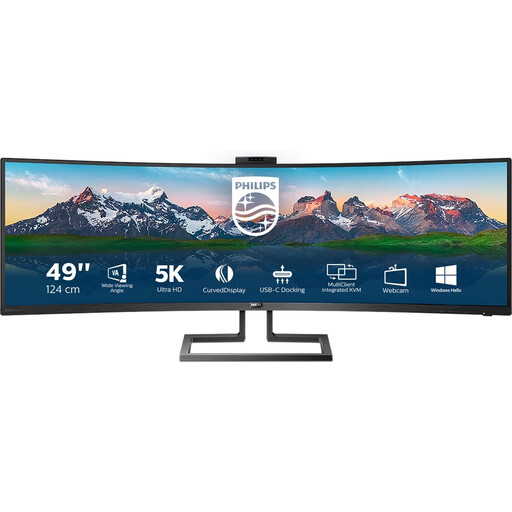
Why It Stands Out This model is geared towards maximum productivity. The enormous 49-inch screen and built-in docking features make it a powerful workstation.
Benefits
- Screen Size: 49 inches with a 32:9 aspect ratio.
- Resolution: Sharp 5120x1440 resolution.
- Refresh Rate: Smooth 120Hz for general use and light gaming.
- Connectivity: Built-in USB-C docking station and a pop-up webcam for a clutter-free workspace.
Who Is It For? For professionals such as financial analysts, programmers, and content creators who need to view multiple applications simultaneously. The integrated features help reduce cable clutter.
iiyama G-MASTER GCB3486WQSCP-B1 Gold Phoenix
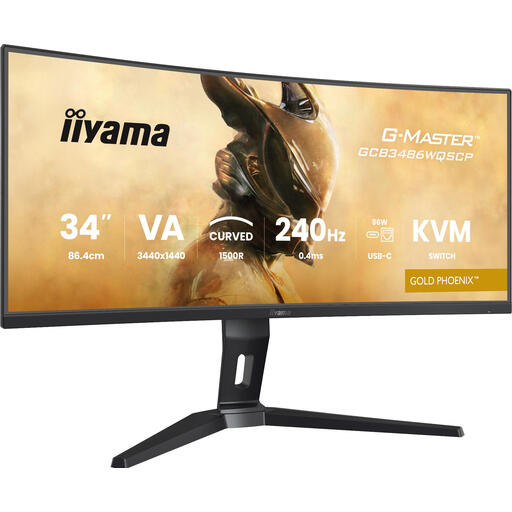
Why It Stands Out This monitor focuses on pure gaming performance with an extremely high refresh rate and fast response time.
Benefits
- Refresh Rate: A very fast 240Hz for competitive gaming.
- Response Time: A manufacturer-claimed response time of 0.4ms for minimal motion blur.
- Functionality: Built-in KVM switch for controlling two devices.
- Synchronisation: FreeSync Premium for a smooth, stutter-free gaming experience.
Who Is It For? This is a curved gaming monitor for the serious and competitive gamer seeking the highest possible performance in a 34-inch monitor. The KVM switch is also useful for those who game and stream from two different systems.
Samsung G55T Computer Monitor 86.4 cm (34")
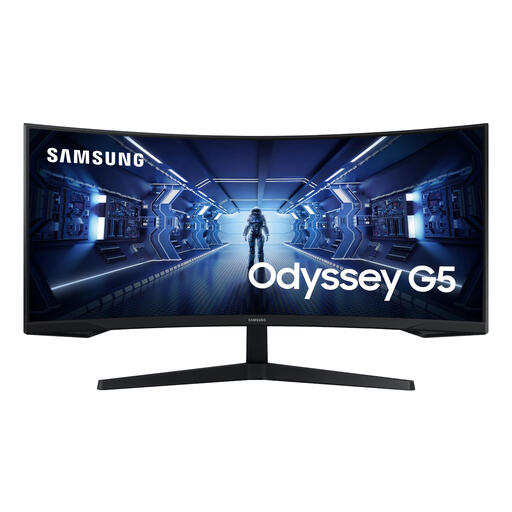
Why It Stands Out The Samsung G55T offers a strong balance between immersive gaming features and an accessible price, with a remarkably steep 1000R curvature.
Benefits
- Refresh Rate: A solid 165Hz for a smooth gaming experience.
- Curvature: A deep 1000R curve that fills your field of view for greater immersion.
- Response Time: Fast 1ms response time.
- Resolution: Standard ultrawide QHD resolution of 3440 x 1440.
Who Is It For? For gamers and all-around users looking for an immersive curved gaming monitor without breaking the bank. The high refresh rate and deep curve make it a popular choice for single-player and multiplayer games.
Haven't Found What You're Looking For?
The world of ultrawide monitors is vast. Are you looking for a different size, a higher resolution, or specific features not mentioned here? More options are available that might better suit your needs.
Check out our full range of Ultrawide 4K Monitors for more choices.
Frequently Asked Questions About Ultrawide Monitors
Is an ultrawide monitor good for work?
Yes, an ultrawide monitor is excellent for work, especially for multitasking. It allows you to place multiple windows side-by-side without the physical separation of two monitors. This is useful for tasks like data analysis, video editing, or comparing documents.
What is the difference between an ultrawide and a curved monitor?
"Ultrawide" refers to the screen's aspect ratio (21:9 or 32:9), which is wider than the standard 16:9. "Curved" refers to the physical curvature of the screen. Many ultrawide monitors are also curved because the curvature helps keep the edges of the wide screen within your field of view, which is more comfortable for your eyes. A curved gaming monitor is a popular combination.
Do I need a powerful graphics card for an ultrawide monitor?
That depends on the resolution and what you use the monitor for. For office work and media consumption, a modern integrated graphics chip is often sufficient. For gaming at a high resolution (like 5120x1440) and with a high refresh rate (as on a 144hz monitor), a mid-range to high-end graphics card is recommended to ensure stable performance.