
Find the Right TV Wall Mount: Our Recommendations
A new flat-screen TV is a great addition to any room, but the standard included stand can be cumbersome. It takes up valuable space on your media console and often creates cable clutter. A TV wall mount offers a practical and stylish solution. Not only do you create a sleek, modern look, but you also improve your viewing experience and safety.
However, choosing the right TV mounting bracket can be overwhelming due to the sheer number of options. That's why we at Joybuy have put together this guide. We'll explain the most important specifications and present a selection of popular models based on their functionality and features. This will help you make an informed choice that suits your TV and living space.
What to Consider When Choosing a TV Mount?
Before you make a decision, there are a few key points to consider. These ensure your TV is mounted securely and you get the viewing experience you're looking for.
1. The Three Types of Wall Mounts
TV mounts can be broadly divided into three categories, each with its own advantages:
- Fixed TV mount: This type of mount positions your TV flat against the wall, much like a painting. It's an excellent choice if you always watch from the same spot and want a minimalist look. A flat TV wall mount is often the most stable and straightforward option to install.
- Tilting TV mount: This mount can be tilted vertically, usually around 10 to 15 degrees. This is ideal if you want to hang the TV a bit higher on the wall, for instance, in the bedroom. By tilting the TV downwards, you maintain an optimal viewing angle.
- Swivel TV wall mount: Also known as a 'full-motion' mount, this type offers the most flexibility. You can not only tilt the TV but also swivel it left and right and pull it away from the wall. This is perfect for open-plan living spaces or rooms with awkward corners, as you can easily adjust the viewing angle to wherever you are sitting.
2. VESA Pattern and Weight: The Foundation of Safety
Every flat-screen TV has four screw holes on the back for mounting. The distance between these holes is a standardised measurement known as the VESA pattern (e.g., 200x200 mm or 400x400 mm).
Check two things before buying a VESA mount:
- VESA compatibility: Ensure that the VESA patterns supported by the wall mount match those of your TV. You can find this information in your television's user manual.
- Maximum weight capacity: Every mount has a maximum weight it can support. Weigh your TV or look up its weight in the specifications and choose a mount that can comfortably handle it.
3. Material and Ease of Installation
A good TV mount is made of sturdy material, such as steel, to ensure safety. Also, look for features that make installation easier. Many modern mounts, like the models from Neomounts wall mount, come with an integrated spirit level. This helps you mount the bracket perfectly straight. Cable management systems are also a plus for neatly concealing cables.
Recommended TV Wall Mounts
Based on functionality and specifications, we've put together a few recommendations for you.
Neomounts WL30-550BL18 – For a Sleek, Fixed Installation
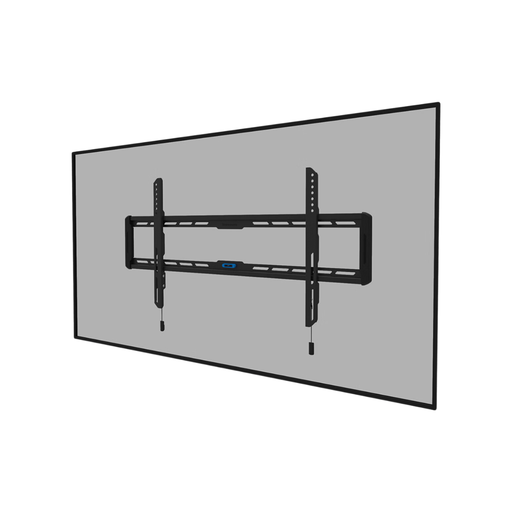
Why this model stands out The Neomounts WL30-550BL18 is a fixed TV mount that excels with its minimalist design. With a distance of just 2.3 cm from the wall, your TV will hang extremely flat, creating a seamless and tidy look. According to the manufacturer Neomounts, the magnetic 'pull & release' system ensures quick and secure attachment. The integrated spirit level also makes installation much simpler.
Key Specs
- Type: Fixed wall mount
- Screen size: 43 to 86 inches
- Max. weight: 60 kg
- VESA: 100x100 to 800x400 mm
- Distance to wall: 2.3 cm
Who is this for? This model is ideal for those who appreciate a clean interior and have their TV in a fixed, central location in the room. Perfect for the living room where the viewing position doesn't change.
View the Neomounts WL30-550BL18 on Joybuy.nl
Neomounts WL35-550BL14 – Flexible Tilting for the Perfect Angle
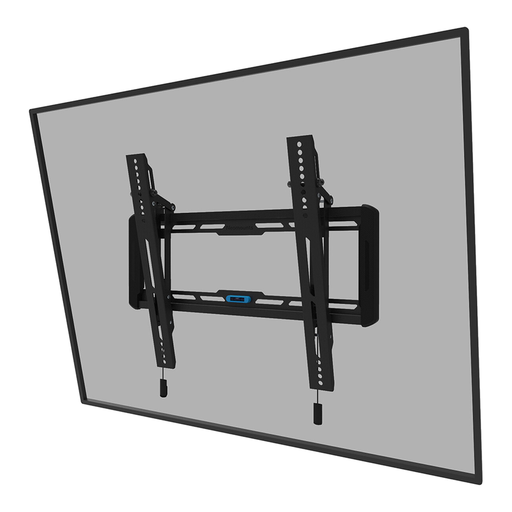
Why this model stands out This tilting TV mount from Neomounts offers a solution for glare or for TVs mounted higher on the wall. With a tilt angle of 12 degrees, you can easily angle the screen downwards for a comfortable viewing experience. Despite the tilting function, the profile remains very slim at a depth of 3.3 cm. According to Neomounts, this model also features the magnetic 'pull & release' system and a built-in spirit level.
Key Specs
- Type: Tilting wall mount
- Screen size: 32 to 75 inches
- Max. weight: 50 kg
- VESA: 100x100 to 400x400 mm
- Tiltable: 12°
Who is this for? A great choice for the bedroom, where the TV is often mounted higher than in the living room. Also suitable for rooms where light from windows sometimes causes reflections on the screen.
View the Neomounts WL35-550BL14 on Joybuy.nl
Neomounts WL40-550BL18 – Complete Freedom of Movement
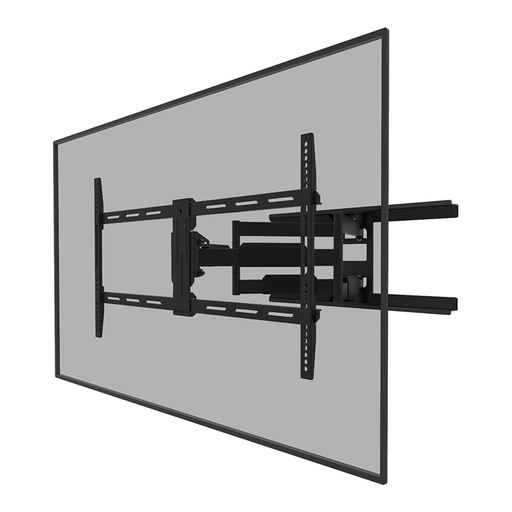
Why this model stands out The WL40-550BL18 is a full-motion, swivel TV wall mount that offers maximum flexibility. You can pull the TV up to 71 cm from the wall, swivel it 54 degrees, and tilt it 18 degrees. This makes it possible to watch TV from almost any angle in the room. The built-in cable management system helps to guide the cables neatly along the arm, even when the mount is extended.
Key Specs
- Type: Swivel and tilting wall mount (full-motion)
- Screen size: 43 to 75 inches (e.g., a 65-inch TV mount)
- Max. weight: 45 kg
- VESA: 200x100 to 800x400 mm
- Distance to wall: 5.5 to 71 cm
Who is this for? Ideal for L-shaped living rooms, open-plan kitchens, or any space where you want to be able to aim the TV towards different seating areas. Also handy for easily accessing the connections on the back of your TV.
View the Neomounts WL40-550BL18 on Joybuy.nl
Still Haven't Found What You're Looking For?
Every home and every TV is different. If the models above don't quite match your specific needs, that's no problem. Many more options are available, from mounts for smaller screens to solutions for extra-heavy televisions.
Browse our full range and find the perfect match for your situation: Secure TV Mounts.
Frequently Asked Questions About TV Wall Mounts
How do I know what VESA size my TV has?
The VESA size is almost always listed in your television's manual or on the manufacturer's specification page. You can also measure it yourself: measure the distance in millimeters between the four screw holes on the back of your TV, first horizontally and then vertically. The VESA size would then be, for example, 400x200.
Can I install a TV wall mount on any wall?
No, this is a critical safety point. A TV wall mount must be installed on a solid, sturdy wall, such as concrete, brick, or solid wood studs. Mounting on hollow walls (like drywall) is not recommended unless you use special hollow-wall anchors and the wall has been reinforced. Always check the load-bearing capacity of the wall and use the correct plugs and screws.
Is it difficult to install a TV mount myself?
For someone with basic DIY experience, installing a TV mount is quite manageable. Most mounts come with a clear manual and all the necessary mounting hardware. Features like an integrated spirit level make the process easier. Make sure you have the right tools (drill, screwdriver, etc.). When in doubt, it's always wise to hire a professional.