
Choosing the Right Tablet Mount: A Practical Buying Guide
A tablet is a versatile device, but using one can sometimes be cumbersome. Whether you're watching a movie, following a recipe in the kitchen, or using a tablet as a POS system in your store, a good mount makes all the difference. Without the right support, your expensive device lies flat on a table, is held awkwardly, or is vulnerable to theft in a public space.
This article is intended as a practical guide. We'll help you understand the different types of tablet mounts and make the right choice for your situation, whether at home, in the office, or in a commercial setting.
What to Consider Before You Buy?
Before making a choice, it's wise to consider a few key factors. This will help you find a model that truly meets your needs.
1. Mounting Type: Desk, Wall, or Floor?
The location where you plan to use the tablet largely determines which type of mount you need.
- Tablet Desk Mount: A tablet stand for a desk or table is ideal for hands-free video calls, as a second screen next to your monitor, or for media consumption. These models are often flexible and adjustable.
- Tablet Wall Mount: A tablet wall mount is a space-saving solution. Perfect for the kitchen, workshop, or as a control panel for smart home devices. In a business environment, this type is often used for information points or reservation systems.
- Tablet Floor Stand: A tablet floor stand offers a professional and freestanding presentation. Think of a digital welcome kiosk at a reception, an interactive catalog on a trade show floor, or a menu at the entrance of a restaurant.
2. Security and Compatibility
Not every mount is suitable for every tablet or every environment.
- Security: Are you using the tablet in a public or commercial space? Then a tablet holder with a lock is essential. An anti-theft tablet holder ensures the device cannot be easily taken, which is crucial for retail stores, hospitality, and healthcare institutions.
- Compatibility: Always check the dimensions (in inches) and thickness of your tablet. Many holders are universal but have minimum and maximum size limits. A universal tablet holder is flexible, but it's wise to double-check the specifications, whether you have an iPad, Samsung Galaxy Tab, or another brand.
Our Recommended Product Picks
Based on functionality and application, we have selected a few models that cater to different needs.
For Fixed Wall Mounting: Neomounts WL15-625BL1
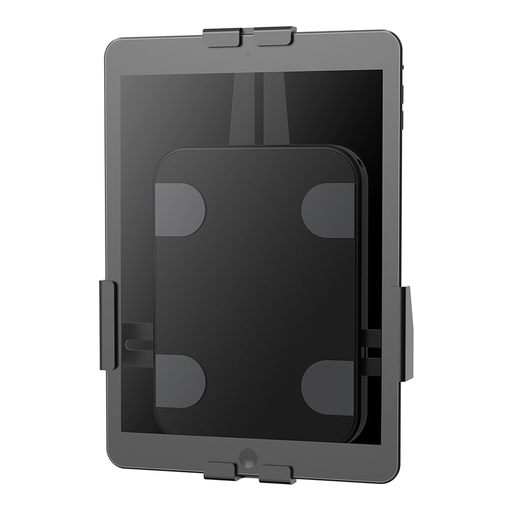
Why This Model Stands Out This tablet wall mount from Neomounts combines a sleek design with robust security. The holder is designed for permanent installation and provides a secure, fixed spot for your tablet.
Key Specifications
- Compatibility: Suitable for tablets from 7.9 to 11 inches with a thickness of up to 8.5 mm.
- Security: Equipped with an anti-theft lock for use in public spaces.
- Flexibility: Supports 360° rotation, allowing for easy switching between portrait and landscape orientation.
- Protection: Anti-slip pads in the clamps protect the device from scratches.
Who Is It For? This is an excellent choice for business users in retail or hospitality who want to use a tablet as a fixed information point, ordering kiosk, or POS system. It is also a solid solution for home users who want to create a dedicated spot for their tablet in the kitchen or living room.
For Flexible Desk Use: Neomounts DS15-550BL1
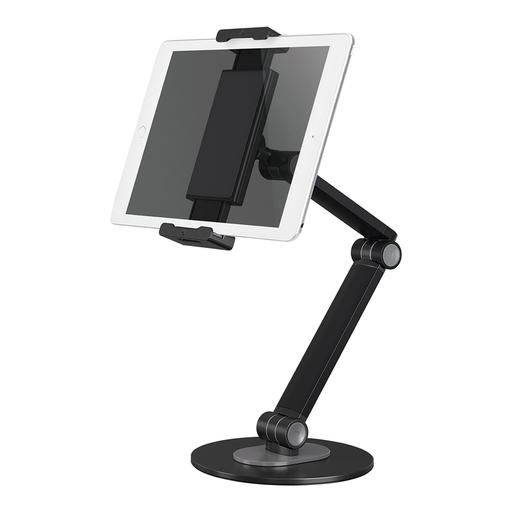
Why This Model Stands Out This tablet desk mount is designed for maximum flexibility. With three pivot points and extensive tilt and swivel options, you can position the tablet exactly as desired for optimal comfort.
Key Specifications
- Compatibility: A highly universal tablet holder, suitable for devices from 4.7 to 12.9 inches (up to 1 kg).
- Adjustability: Features 3 pivot points, a 270° tilt function, and a 104° swivel option.
- Rotation: The ball joint allows for smooth 360° rotation for portrait and landscape modes.
- Stability: The weighted base with anti-slip silicone pads ensures stable placement.
Who Is It For? Ideal for anyone who uses a tablet at a dedicated workspace, such as remote workers, students, or office employees. Its extensive adjustability makes it a perfect companion for video conferences, viewing documents, or as an entertainment hub.
For a Professional Presentation: Neomounts FL15-625WH1
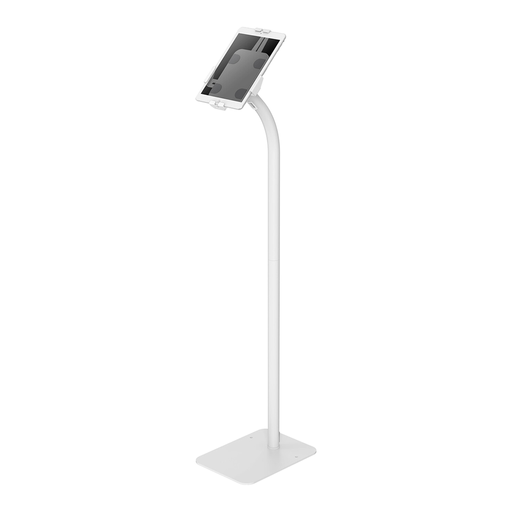
Why This Model Stands Out This tablet floor stand transforms an ordinary tablet into a professional information kiosk. Its sleek design, security features, and internal cable management make it a complete solution for commercial applications.
Key Specifications
- Compatibility: Suitable for tablets from 7.9 to 11 inches.
- Security: Equipped with an anti-theft lock and a weighted base for extra stability and safety.
- Presentation: The viewing angle is adjustable (+20°/-110° tilt) and the holder can rotate 360°.
- Finishing: Cables can be neatly concealed via the internal cable management system in the column.
Who Is It For? This floor stand is primarily aimed at business environments such as showrooms, trade fairs, museums, stores, and reception areas. It is the ideal solution for presenting interactive content, registration forms, or as a digital wayfinding tool.
Haven't Found the Right Tablet Mount Yet?
The right mount depends heavily on your specific tablet and its intended application. If the options above don't quite match what you're looking for, there are many more possibilities available.
Browse our full range for more choices in mounting, size, and functionality.
Frequently Asked Questions
Is a universal tablet holder suitable for my iPad?
Yes, in most cases. A universal tablet holder is designed to work with a range of dimensions. Always check the holder's specifications, particularly the minimum and maximum screen size (in inches) and the supported thickness. Compare these with the dimensions of your specific iPad holder model to ensure a proper fit.
How do I safely install a tablet wall mount?
For a secure installation of a tablet wall mount, it is important to use the correct wall plugs and screws for your wall type (e.g., concrete, drywall). Ensure the mount is attached to a solid part of the wall and follow the included manual carefully. After installation, check that the mount is firmly secured before placing the tablet in it.
What is the advantage of a tablet holder with a lock?
A tablet holder with a lock provides a crucial layer of security, especially in public or semi-public spaces. It prevents theft of the tablet, making it an indispensable feature for businesses that use tablets as POS systems, information points, or for customer registration. This provides peace of mind and protects your investment.