
Choosing the Right RTX 50 Series Graphics Card in 2026: A Practical Guide
Buying a new graphics card is a significant investment. Especially with the arrival of the NVIDIA 50 series, you want to be sure you're making the right choice for your PC. The specifications can be overwhelming: GDDR7, PCIe 5.0, and various models like the RTX 5060, RTX 5060 Ti, and RTX 5070. The wrong choice can lead to disappointing performance or unnecessarily high costs. This guide will help you find the graphics card that fits your needs based on factual specifications, whether you're an avid gamer or a demanding content creator.
What to Look for When Buying an NVIDIA 50 Series Graphics Card?
Before we look at specific models, it's helpful to understand the key technologies and specifications of the RTX 50 series. These factors determine the performance and future-proofing of your purchase.
The Blackwell Architecture and DLSS 4
The RTX 50 series is built on the new Blackwell architecture. This is the technological foundation of the chip, enabling more efficient processing of graphics tasks. A key component of this is support for DLSS 4 (Deep Learning Super Sampling). According to NVIDIA, this AI technology makes it possible to achieve higher framerates while maintaining image quality, which is especially noticeable in demanding games and at high resolutions like 4K and 8K gaming.
Memory: GDDR7 and VRAM Amount
The new standard is GDDR7 memory, which is significantly faster than its predecessors. This allows the graphics card to process data more quickly. In addition to speed, pay attention to the amount of video memory (VRAM):
- 8 GB VRAM: Sufficient for most games at 1080p and 1440p resolution with high settings.
- 12 GB VRAM or more: Recommended for 4K gaming, using ultra-high texture packs, and for professional software like video editing and 3D rendering. A graphics card for creators significantly benefits from more VRAM.
Connectivity: PCIe 5.0 and Display Outputs
The RTX 50 series uses the PCIe 5.0 interface. This offers double the bandwidth compared to PCIe 4.0, speeding up communication between the graphics card and the rest of your system. While the performance difference in most current games is still limited, it does make your system ready for the future. Also, check the available video outputs, such as DisplayPort 2.1 and HDMI 2.1, to ensure you can make the most of your monitor(s).
Cooling and Power Consumption
A powerful gaming graphics card generates a lot of heat. A good cooling system with multiple fans is essential for stable performance. Also, look at the recommended power supply unit (PSU) wattage and the required power connectors (e.g., 8-pin or 16-pin). Make sure your power supply can handle it and that the card physically fits in your computer case.
Our Selection for 2026
Below is a selection of popular models from the RTX 50 series, based on their specifications and intended use cases.
1. MSI GeForce RTX 5060 8G GAMING OC
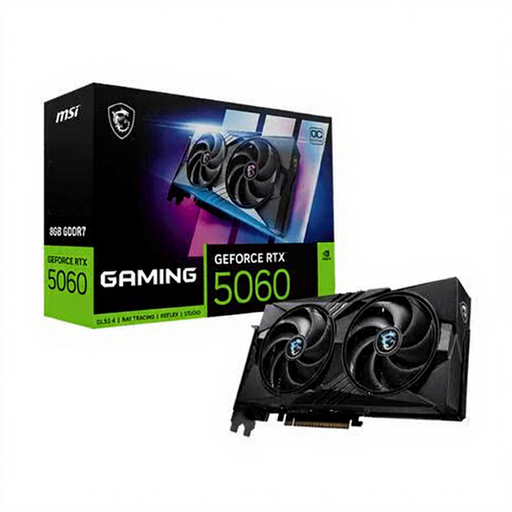
Why this product The MSI GAMING OC variant of the RTX 5060 is a solid entry point into the new generation. It offers the benefits of the Blackwell architecture and DLSS 4 in a relatively accessible package. The active cooling with two fans is designed for efficient heat dissipation with relatively modest power consumption.
Pros
- GPU: NVIDIA GeForce RTX 5060
- Memory: 8 GB GDDR7
- Boost Clock: 2625 MHz
- CUDA Cores: 3840
- Interface: PCI Express x16 5.0
- Power Consumption (typical): 155 W
- Recommended PSU: 550 W
Who is this for? This card is an excellent choice for gamers who primarily play at 1080p or 1440p resolution and want to take advantage of the latest features like DLSS 4. It's an efficient upgrade for those coming from an older generation (RTX 20 or 30 series) and looking for a future-proof card without paying a premium price.
2. GIGABYTE GeForce RTX 5060 Ti GAMING OC 8G
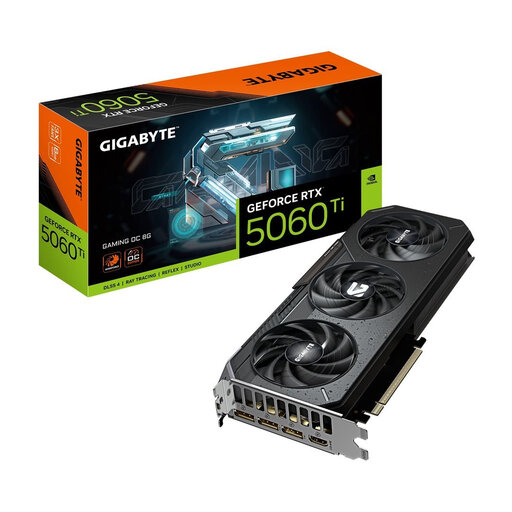
Why this product The RTX 5060 Ti positions itself as a more powerful mid-range option. This GIGABYTE version is equipped with the WINDFORCE cooling system, featuring three fans for better thermal performance under heavy load. The higher clock speed and Dual BIOS offer extra flexibility for enthusiasts.
Pros
- GPU: NVIDIA GeForce RTX 5060 Ti
- Memory: 8 GB GDDR7
- Boost Clock: 2647 MHz
- Cooling System: WINDFORCE (3 fans)
- Extras: RGB lighting, Dual BIOS
- Recommended PSU: 650 W
Who is this for? The serious 1440p gamer aiming for high framerates in the latest titles will find the RTX 5060 Ti offers a great balance between price and performance. For entry-level content creators seeking faster render times, this card also provides a noticeable performance boost over the base model.
3. GIGABYTE GeForce RTX 5070 EAGLE OC ICE 12G
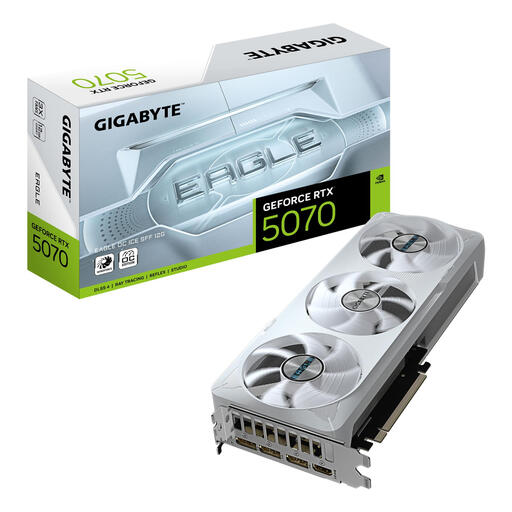
Why this product The GIGABYTE EAGLE version of the RTX 5070 is aimed at the high-end user. With 12 GB of GDDR7 memory and a wide 192-bit memory bus, this card is designed for demanding tasks. The 'ICE' edition, with its white colour scheme, is also an aesthetic choice for builds with a specific theme.
Pros
- GPU: GeForce RTX 5070
- Memory: 12 GB GDDR7
- Memory Bus: 192-bit
- CUDA Cores: 6144
- Boost Clock: 2587 MHz
- Resolution: Supports up to 7680 x 4320 pixels (8K)
- Recommended PSU: 750 W
Who is this for? This graphics card for creators and high-end gamers is ideal for those who want to game at 1440p with a high refresh rate or at 4K. The 12 GB of VRAM is a significant advantage for video editing, 3D modelling, and other productivity tasks that require a lot of graphics memory.
Didn't Find What You Were Looking For? Explore Alternatives
The models above are popular choices, but the graphics card market is vast. Perhaps you're looking for a model from a different brand, a card with specific dimensions for a compact case, or you want to compare prices with models from a previous generation. For a broader overview of available options, you can browse our full collection of gaming components.
Frequently Asked Questions (FAQ)
1. Is an RTX 50 series graphics card worth the upgrade from an RTX 30 or 40 series? The jump is most noticeable if you're coming from an RTX 20 series or older. From an RTX 30 or 40 series, it depends on your needs. The main advantages of the 50 series are the efficiency of the Blackwell architecture, the speed of GDDR7 memory, and the improvements in AI performance with DLSS 4. If you need the highest framerates in the latest games or faster render times for creative work, the upgrade can be worthwhile.
2. How much VRAM do I need for gaming in 2026? For 1080p gaming, 8 GB of VRAM is generally sufficient. For 1440p, 8 GB is a good baseline, but 10-12 GB provides more headroom for future games with high texture settings. For 4K gaming, 12 GB or more is highly recommended to ensure a smooth experience without compromising on graphics quality.
3. What is the difference between the Blackwell architecture and the previous generation (Ada Lovelace)? According to NVIDIA, the Blackwell architecture focuses on higher performance-per-watt (efficiency) and improved ray tracing and AI capabilities. This translates into potentially higher framerates and better image quality through technologies like DLSS 4, while keeping power consumption in check. The move to PCIe 5.0 and GDDR7 are also significant hardware improvements.
Written by: Joybuy Product Recommendation Officer, Joybuy.nl