
How to put together an RGB gaming setup without making a costly mistake
An RGB gaming setup can look impressive in product photos. But a colourful light show tells you little about ease of use, compatibility or durability. A desk might look great with its lights on, for example, but turn out to be too small for two screens. An RGB LED strip might offer plenty of effects but not work with the power socket you have available. And an RGB PC fan will only work properly if its connector and controller are compatible with your computer.
Use this practical checklist to put together a setup that suits gaming, streaming, working from home or a combination of all three.
Common pitfalls with RGB gaming products
1. Focusing only on the lighting effects
RGB lighting is mainly decorative, so check the practical features too. For an LED gaming desk, dimensions, load capacity, cable grommets and legroom matter more than the number of lighting modes. A 120 cm desk might suit one monitor, while a 140 or 160 cm model gives you more room for multiple screens and accessories.
2. Overlooking compatibility
Not every light, fan or controller works with the same software or connector. An RGB PC fan, for example, may need a specific controller. Before buying, check:
- the size: for example, 120 mm or 140 mm;
- PWM support for fans;
- the required RGB controller or hub;
- whether it uses USB, mains power or batteries;
- compatibility with your PC, monitor or operating system.
3. Mistaking specifications for guarantees
Brands often use terms such as “professional”, “ultra-quiet” or “ergonomic”. Assess these claims against measurable information. According to Corsair’s product information, for example, the iCUE LINK RX140 MAX RGB has a speed range of 300 to 1600 rpm, a stated airflow of 102.9 CFM and PWM support. These are verifiable specifications; how loud it sounds in practice still depends on the speed setting and your PC case.
The key specifications for making a smart choice
Desk dimensions and load capacity
First, measure the available wall and legroom. Also consider the depth of the desktop: a deeper surface gives you more room between your eyes and the screen, but takes up more space. The XINZI and Aufun gaming desks, along with the models with Y-shaped legs, are listed as supporting up to 150 kg. This can be useful if you have several monitors, speakers and a heavy PC, but make sure you distribute the weight evenly.
An ergonomic gaming desk is not necessarily height-adjustable. Check that the product information specifically mentions height adjustment. A rounded front edge, cable grommets and plenty of legroom are practical features, but they are no substitute for an adjustable frame.
Lighting and controls
An RGB gaming desk with a remote is easy to operate, but check the range and power supply. A smart lamp or RGB LED strip may offer more settings, but can require extra configuration.
According to the product information, the Yeelight Obsid RGBIC LED Light Strip is designed for use with a desk, TV or gaming room, among other things. The set includes a 2-metre strip, and a 1-metre extension is also available. Measure the route you want to light first and check that the cable and connector are long enough.
For a subtler accent, you could choose a Yeelight Cube smart lamp. Matrix and spot expansions let you create a modular layout. If you’re buying an expansion pack, check whether you already have a compatible base and power supply.
Cooling and noise
For PC cooling, airflow, speed, size and connections matter more than RGB alone. According to the product information, the Corsair iCUE LINK RX120 MAX RGB comes as a set of three fans, with PWM support, a stated speed range of 400 to 2000 rpm and eight RGB LEDs per fan. Before installation, check that your case supports 120 mm fans and that the included controller is suitable for your setup.
Switch off your computer and unplug it from the mains before installing a fan. Keep fingers, hair and loose clothing away from the moving blades.
Recommended products for different needs
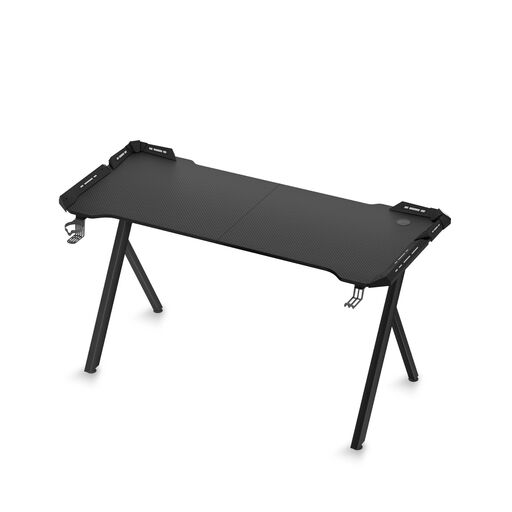
Gaming Desk with RGB LED Lighting, 140 cm
Why it suits this profile: This desk combines a spacious top with built-in lighting and practical accessories, so you won’t need to buy several separate products straight away.
The product information lists a 140 cm desktop, a load capacity of up to 150 kg and a remote control for the RGB lighting.
140 cm of workspace, two cable grommets, a cup holder, a headphone hook and a water-resistant mouse mat, according to the product description.
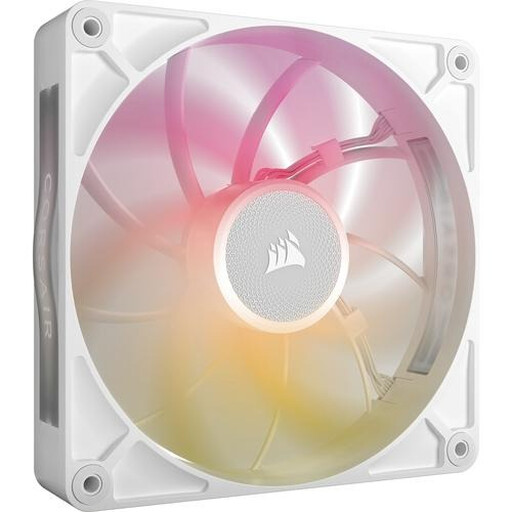
Corsair iCUE LINK RX140 MAX RGB Computer Case Fan
Why it suits this profile: A good choice for PC enthusiasts who want to combine RGB lighting with adjustable fan speeds and cooling specifications they can check.
The 140 mm size, PWM support and required iCUE LINK controller are listed. Check that these connections are compatible before buying.
Stated airflow of up to 102.9 CFM, eight RGB LEDs and a speed range of 300 to 1600 rpm, according to the product information.
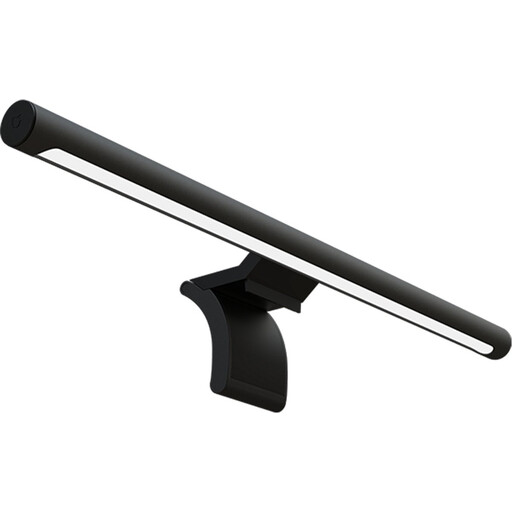
Xiaomi Computer Monitor Light Bar
Why it suits this profile: A practical choice for gamers and people working from home who want to add lighting to their gaming desk without taking up extra desktop space.
The product information lists dimming, a remote control and a USB connection. That gives you more detail about how it works than a simple claim about mood lighting.
Metal casing, a length of 48 cm, dimming and wireless control, according to the stated product specifications.
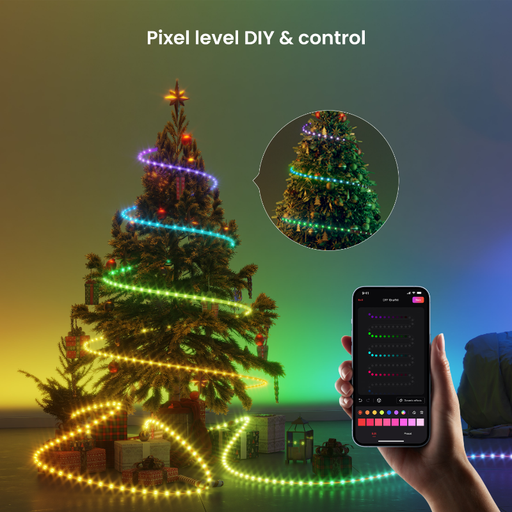
Yeelight Obsid RGBIC LED Light Strip
Why it suits this profile: The strip is suitable for indirect lighting behind a desk, TV or monitor, and can help create a cohesive look in your streaming room.
The 2-metre length is clearly stated. Measure where you want to place it and check whether you need an extension before ordering.
RGBIC lighting for use in a room, with a TV, at a desk or for gaming, according to the product description.
Looking for more options?
We’ve put together a complete, up-to-date list of products that meet these strict selection criteria and current European safety regulations.
Frequently asked questions about RGB gaming setups
How much does a complete RGB gaming setup cost?
That depends on what you already have. You can add targeted lighting with just an RGB LED strip or a gaming monitor lamp. A new desk, PC fans, smart lamps and gaming accessories require a bigger investment. Start with the item you use every day and add to your setup later.
Does RGB lighting use a lot of power?
Power consumption varies depending on the product, brightness and how long you use it. A USB-powered monitor lamp and an LED strip have different requirements from several PC fans. Check the stated wattage where available, and switch the lights off when you’re not using your setup.
How long does RGB lighting last?
Lifespan is affected by heat, dust, installation and the number of hours in use. For PC fans, leave enough space around the air intake and carefully clean away dust regularly. Don’t place LED strips in damp areas, and only use the supplied or a suitable power supply. Keep the manuals and proof of purchase too, in case you need to make a warranty claim or exercise your statutory consumer rights.