
Office Document Scanners: Find the Right Match for Your Business
Piles of invoices, contracts waiting to be archived, and a desk slowly disappearing under paperwork. It's a familiar scenario in many offices. Digitising documents is no longer a luxury but a necessity for an efficient workflow. But where do you start? A quality document scanner is the first step.
My name is Joybuy Product Recommendation Officer. I'm here to help you look past the specifications and marketing jargon to make an objective choice. In this article, we'll discuss what to look for and highlight several popular models that suit different business needs.
What to Look for When Buying a Document Scanner?
The right scanner depends entirely on what, how much, and how you plan to scan. Here are a few practical considerations to get you started.
Scanner Type: Flatbed, ADF, or a Combination?
The type of scanner you choose determines what kinds of documents you can process.
- Scanner with an ADF (Automatic Document Feeder): An ADF is ideal for processing stacks of loose-leaf paper, such as invoices or forms. You place the stack in the tray, and the scanner pulls the sheets through one by one. Many models also support double-sided scanning (duplex), which further speeds up the process.
- Flatbed Scanner: A flatbed scanner has a glass platen on which you place documents. This is essential for scanning bound materials like books, passports, brochures, or fragile documents that cannot pass through a feeder.
- Combination Model: Some scanners offer the best of both worlds: an ADF for speed and a flatbed for flexibility.
Speed and Volume: How Much Do You Scan?
For a business scanner, processing speed is a key factor. This is expressed in pages per minute (ppm). An office that processes hundreds of documents daily needs a faster scanner than a freelancer who occasionally digitises a contract. Also, pay attention to the recommended daily scan volume, which indicates the durability of the office scanner.
Connectivity and Footprint: Flexibility in the Workplace
How do you connect the scanner, and where will it fit? A scanner with Wi-Fi offers the flexibility to place the device anywhere in the office and share it with multiple colleagues without the hassle of cables. A traditional USB connection is often faster and more stable. Additionally, the size is important. A compact scanner is a great solution for smaller offices or a home office.
Popular Document Scanner Choices
Based on specifications and features, we have selected a few models that provide solutions for common business scenarios.
Epson WorkForce DS-1660W Flatbed Scanner
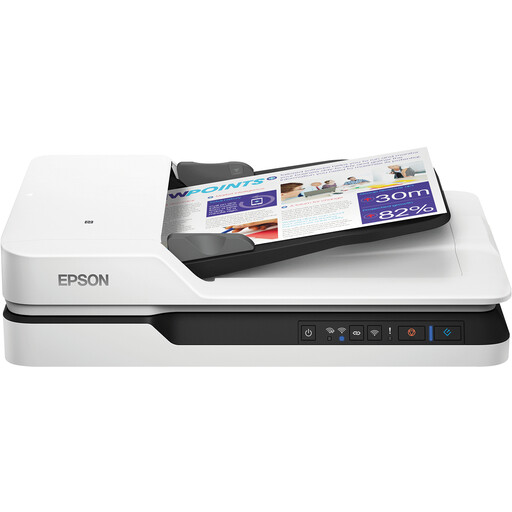
Why this model stands out: The Epson WorkForce DS-1660W combines a fast ADF with a flatbed, making it a versatile choice. Its wireless connectivity and relatively compact design for a combination model make it suitable for various office environments.
Key Specifications:
- Scan Type: Flatbed and ADF
- Scan Speed (ADF):25 ppm (pages per minute)
- Features: Automatic double-sided scanning
- Connectivity:USB 3.2 and Wi-Fi
- Resolution: 1200 x 1200 DPI
- Paper Size: A4, A5, A6, B5
Who is this scanner for? This Epson scanner is a solid option for offices that process a mix of documents. Think of administrative departments that need to digitise documents like loose invoices (via the ADF) as well as ID cards or bound reports (via the flatbed).
View the Epson WorkForce DS-1660W on Joybuy.nl
Epson WorkForce DS-530 II Sheet-Fed Scanner
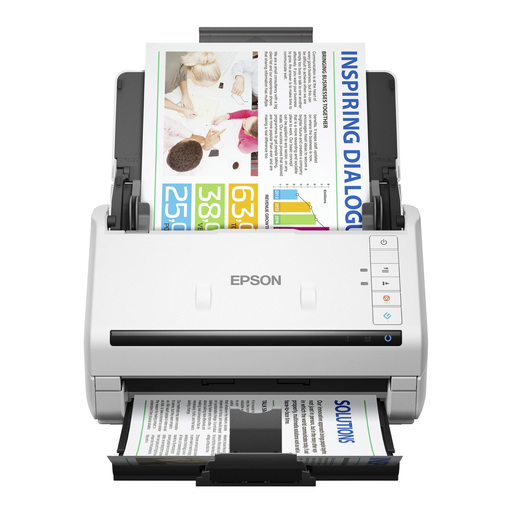
Why this model stands out: The WorkForce DS-530 II is purely focused on speed and efficiency for processing loose documents. With a high scan speed and a large ADF capacity, this model is built to quickly work through large volumes of paper.
Key Specifications:
- Scan Type: Sheet-fed (ADF only)
- Scan Speed (ADF):35 ppm / 70 ipm (images per minute for duplex scanning)
- ADF Capacity: 50 sheets
- Features: Single-pass duplex scanning
- Connectivity:High-speed USB 3.0
- Resolution: 600 x 600 DPI
Who is this scanner for? This is a typical business scanner for departments with a high paper flow, such as a mailroom, a legal archive, or a finance department. The focus is on quickly and reliably processing stacks of A4 scanner documents.
View the Epson WorkForce DS-530 II on Joybuy.nl
Epson DS-C330 ADF + Sheet-fed Scanner
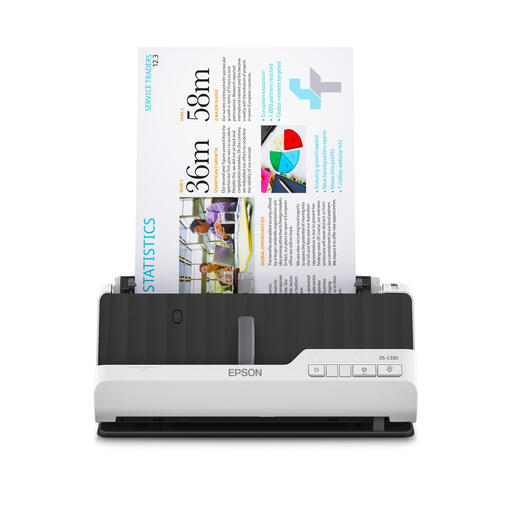
Why this model stands out: The most striking feature of the Epson DS-C330 is its size. This compact scanner is designed to take up minimal desk space. Thanks to a clever U-turn paper path, paper can be fed and ejected vertically, allowing the scanner to sit flush against a wall.
Key Specifications:
- Scan Type: Sheet-fed (ADF) with U-turn and straight path
- Features: Can scan booklets and passports up to 5 mm thick via the straight path
- Connectivity: USB
- Resolution: 600 x 600 DPI
- Special Features: Ultra-compact design, low power consumption
Who is this scanner for? Ideal for freelancers, small offices with limited space, or for staff at a reception or front desk. The ability to scan thicker documents like passports without needing a large flatbed scanner is a practical advantage.
View the Epson DS-C330 on Joybuy.nl
Looking for Something Else?
An efficient scanner is a major step toward an organised, paperless office. To further optimise your workspace, a functional and sleek desk can make all the difference.
Explore our selection of black and white desks for a modern and productive environment.
Frequently Asked Questions About Document Scanners
What is the difference between a document scanner and an all-in-one printer?
An all-in-one printer can also scan, but a dedicated document scanner is designed for volume, speed, and quality. Features like a fast ADF, advanced image processing, and reliable double-sided scanning are typically superior to the scan function of a multifunction printer.
How important is scan speed (ppm) for a business scanner?
For an environment where large stacks of documents are processed daily, a high scan speed (ppm) is crucial. It saves a significant amount of time and increases productivity. For occasional use, a lower speed is often sufficient.
Can I use a document scanner for passports or books?
Yes, but you typically need a flatbed scanner for that. The glass platen makes it possible to scan thick, bound, or fragile originals. The Epson WorkForce DS-1660W is an example of this. Some compact sheet-fed scanners, like the Epson DS-C330, offer a special straight-through path for thicker cards or passports.