
How to Choose the Right Monitor Stand for Your Workspace
Long days at a desk can take their toll. A stiff neck, nagging back pain, or a cluttered desk full of cables are common complaints. A good monitor stand is often a simple and effective solution. It raises your screen to the correct eye level, improves your posture, and helps keep your workspace organised.
But the options are vast: from a simple monitor riser to a flexible monitor arm. This guide will help you understand the different options and find a model that suits your workspace and needs, based on objective specifications.
Choosing the Right Monitor Stand: 3 Key Considerations
Before making a choice, it's helpful to consider a few practical matters. This ensures you select a product that is right for your situation.
1. Type: Monitor Riser or Monitor Arm?
The first choice is between a riser and an arm.
- Monitor riser: This is a platform on which you place the monitor (with its own base). It's a simple solution to give your screen a fixed height. They are often more affordable and require no installation. Some models offer extra storage space.
- Monitor arm (or monitor bracket): This clamps to your desk or is mounted through a grommet hole. The monitor's original base is removed, and the screen is attached directly to the arm. This gives you complete freedom to adjust the height, depth, and angle. It also creates extra space on your desk. There are versions for a single screen or a dual monitor stand for two screens.
2. Compatibility: Will It Fit Your Screen and Desk?
Always check the specifications. For a monitor arm, pay close attention to the VESA size. This is the standard distance between the screw holes on the back of your monitor (e.g., 75x75 mm or 100x100 mm). Ensure the arm's VESA size matches your screen's.
Other important specifications include:
- Maximum weight: The stand must be able to support the weight of your monitor.
- Screen size: Manufacturers provide a recommended screen size (in inches).
- Desk clamp: Check the maximum desk thickness that the clamp can accommodate.
3. Ergonomics and Adjustability
A good ergonomic monitor mount is flexible. A height-adjustable monitor stand is the foundation, but a monitor arm often offers more:
- Tilt: To reduce reflections.
- Swivel: To share your screen with colleagues.
- Rotate (pivot): To switch between landscape and portrait mode, which is useful for programmers or writers.
The more adjustment options, the better you can tailor the setup to your ideal working posture.
Our Recommended Monitor Stands
Based on functionality and specifications, we have highlighted some popular choices for different users.
Neomounts NSMONITOR20 Monitor/Laptop Riser
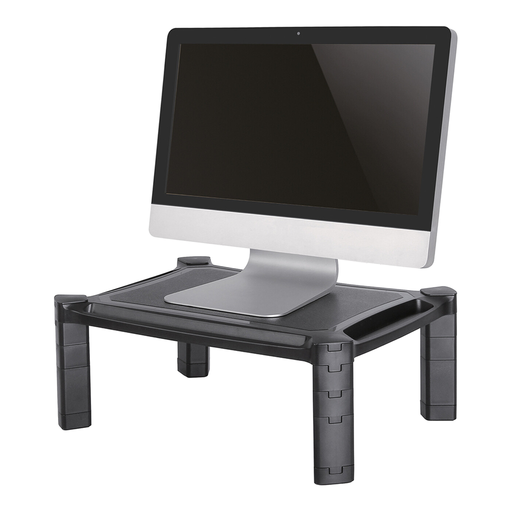
Why It Stands Out The Neomounts NSMONITOR20 is a straightforward and practical solution. It's a monitor riser that requires no installation: you simply place it on your desk. The height is adjustable from 4.6 to 16.8 cm, allowing you to easily set the correct viewing height for your monitor or laptop. Handy extras include storage compartments on the front and back for pens, a tablet, or notepads, and a cutout for cable management.
Advantages
- Suitable for monitors and laptops up to 10 kg.
- Height-adjustable (4.6 - 16.8 cm).
- Integrated storage compartments for a tidy desk.
- Cable management at the rear.
- No installation required.
Who Is This For? This is a great choice for home office workers, students, or office employees looking for a quick and affordable way to improve their workspace ergonomics. It's ideal if you don't want to make permanent modifications to your desk.
View the Neomounts NSMONITOR20
Neomounts DS60-425BL1 Monitor Arm 17-27"
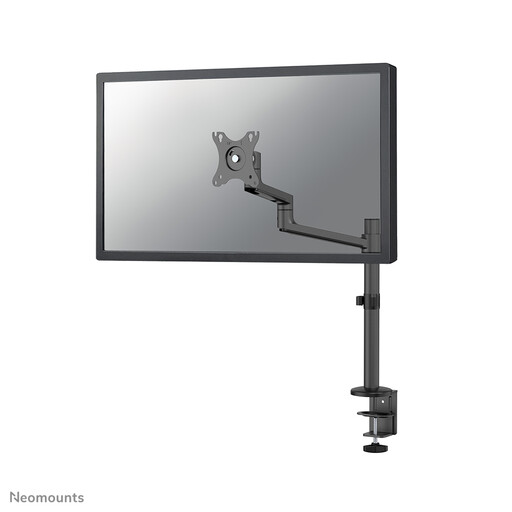
Why It Stands Out This monitor arm from Neomounts offers a full range of motion for a single screen. Thanks to its tilt (120°), rotate (360°), and swivel (180°) technology, you can position the screen exactly how you want it. A clever feature is its short upper arm, which means the arm requires little depth if your desk is close to a wall. This creates more distance between you and the screen and maximises your desk space.
Advantages
- Full range of motion (tilt, rotate, swivel).
- Manual height and depth adjustment.
- Suitable for screens up to 27 inches and 8 kg.
- Compatible with VESA 75x75 and 100x100 mm.
- Internal cable management system for a clean finish.
Who Is This For? This monitor bracket is ideal for professionals and gamers who want maximum flexibility for their single monitor. It's an excellent upgrade for anyone looking to create more desk space and achieve a fully adjustable, ergonomic setup.
View the Neomounts DS60-425BL1
Neomounts DS70-700BL2 Dual Monitor Stand with Gas Spring
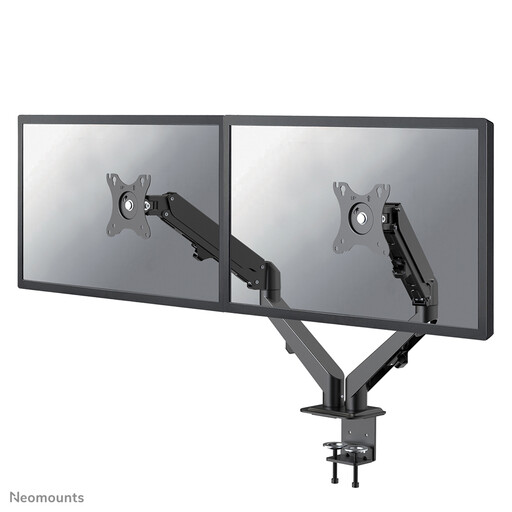
Why It Stands Out Working with two screens? Then this dual monitor stand is a powerful solution. The DS70-700BL2 is equipped with a gas spring, allowing you to adjust the height of both screens (from 15.2 to 40.2 cm) effortlessly with one hand. Each screen can be independently tilted, rotated, and swivelled. This makes it easy to create a seamless setup for multitasking or gaming.
Advantages
- Suitable for two screens up to 27 inches (max. 7 kg per screen).
- Smooth height adjustment thanks to a gas spring.
- Full range of motion for both screens.
- Sturdy desk clamp for stable mounting.
- Supports VESA 75x75 and 100x100 mm.
Who Is This For? This model is aimed at the power user: multitaskers, programmers, data analysts, and gamers who need an efficient and ergonomic monitor mount for two screens. The gas spring makes height adjustment exceptionally easy, which is ideal for flexible workspaces or if you alternate between sitting and standing.
View the Neomounts DS70-700BL2
Haven't Found What You're Looking For?
The right monitor stand depends on your screens, your desk, and your personal preferences. The models mentioned above are popular choices, but many more options are available, such as stands for three screens or models with wall mounts.
Explore our full range of Rack Monitors for more choices.
Frequently Asked Questions About Monitor Stands
How high should my monitor be?
A general ergonomic guideline is to place the top edge of your screen at or just below eye level. Your head should be in a neutral, relaxed position, with your gaze directed slightly downwards. A height-adjustable monitor stand helps you find this ideal position.
What is a VESA mount?
VESA is a standard that defines the distance between the four mounting holes on the back of a monitor. The most common sizes are 75x75 mm and 100x100 mm. When purchasing a monitor arm or monitor bracket, it is crucial that the VESA size of the arm matches that of your monitor.
Is a monitor arm better than a monitor riser?
Not necessarily better, but different. A monitor riser is a simple, stable, and often more affordable solution that improves height. A monitor arm offers superior flexibility in height, depth, and angle, and it frees up desk space. The choice depends on your budget, your desire for flexibility, and whether you want to make modifications to your desk.