
Choosing a Mechanical Keyboard in 2026: A Practical Guide
Choosing a new keyboard can be overwhelming. The market is flooded with terms like 'tactile', 'linear', 'hot-swappable', and various form factors. The wrong choice can lead to an unpleasant typing experience or a purchase that doesn't suit your needs. This article will help you make an informed decision based on factual specifications, ensuring it aligns with your requirements, whether you're a gamer, programmer, or home user.
What to Look For: A Buyer's Guide
Before we look at specific models, it's helpful to understand the key features of a mechanical keyboard.
1. Switches: The Heart of the Keyboard
The switches determine the feel and sound of every keystroke. There are three main types:
- Linear: These switches have a smooth, consistent motion from top to bottom, without a tactile 'bump'. They are popular for gaming because they allow for rapid, repeated keystrokes.
- Tactile: These offer a noticeable 'bump' halfway through the keypress. This provides feedback that the key has been actuated, which many people prefer for typing. A silent mechanical keyboard often uses dampened tactile switches.
- Clicky: These switches provide both a tactile 'bump' and an audible 'click'. They offer the most feedback but are also the loudest and can be disruptive in an office environment.
2. Size and Layout
The size of the keyboard is a crucial factor for ergonomics and desk space.
- Full-size (100%/104-108 keys): The traditional format with a numeric keypad. Ideal for data entry and office work.
- Tenkeyless (TKL, 80%): A full-size keyboard without the numeric keypad. This saves space and is popular among gamers.
- Compact (75%, 65%, 60%): These form factors are even smaller. A 75% keyboard still has the function keys (F1-F12) and arrow keys, while a 60% compact keyboard often places these under a function layer (FN key) for maximum space-saving. Pay close attention to the layout when purchasing; most custom models use a QWERTY US layout.
3. Key Features
Modern mechanical keyboards offer features that can significantly enhance the user experience.
- Hot-swappable: This means you can replace the switches without needing to solder. It's a crucial feature for anyone wanting to build a custom keyboard or experiment with different switch types.
- Connectivity: Choose between a stable, fast wired connection or the flexibility of a wireless mechanical keyboard (via Bluetooth or a 2.4GHz dongle).
- Build Quality: The case is typically made of plastic or metal. An aluminum keyboard feels sturdier and heavier, which can improve the typing experience.
- Extras: Features like an RGB keyboard for customizable lighting or a dedicated keyboard with a volume knob can increase convenience.
Our Top Picks for 2026
Below are some recommended models, selected based on their specifications and use cases.
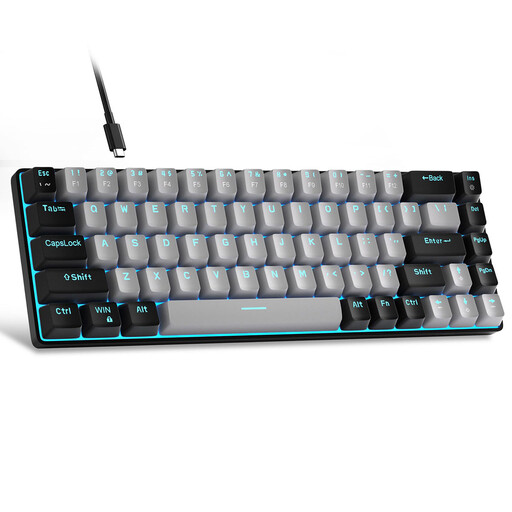
1. MageGee MK-Box 60% Wired Mechanical Keyboard
-
Why this product: The MageGee MK-Box is an accessible entry point into the world of mechanical keyboards. Its compact 60% form factor is ideal for users with limited desk space or for those who need a portable keyboard for work or gaming.
-
Pros:
- Form Factor: Very compact with 68 keys, leaving plenty of room for your mouse.
- Switches: Equipped with Blue switches, which provide distinct tactile and audible feedback with every press.
- Connectivity: A reliable wired connection via a detachable USB-C cable.
- Layout: Standard QWERTY US layout.
-
Who is this for: This model is a great choice for entry-level gamers, students, or home users looking to switch from a membrane to a mechanical keyboard without a major investment.
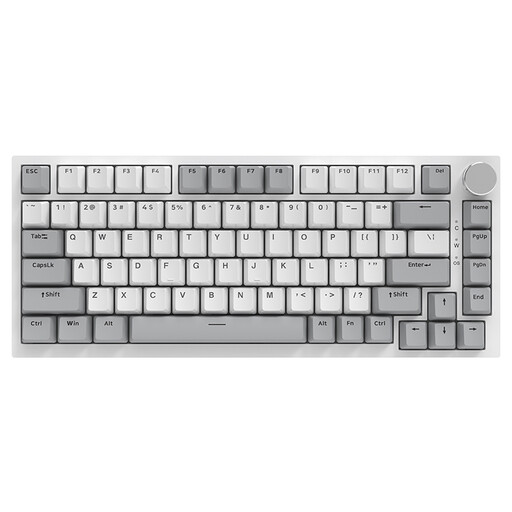
2. AJAZZ AK820 75% Wired Mechanical Keyboard
-
Why this product: The AJAZZ AK820 offers an excellent balance of functionality, customizability, and a pleasant typing experience. It's a popular model among keyboard enthusiasts for its premium features in an affordable package.
-
Pros:
- Typing Feel: The Gasket Mount construction, combined with multiple layers of dampening foam (Poron and IXPE), delivers a soft and muted typing experience.
- Customizability: The keyboard is hot-swappable, allowing you to easily swap out switches.
- Functionality: The 75% form factor retains the F-keys and arrow keys while remaining compact. The addition of a CNC volume knob is a practical bonus.
- Durability: The PBT keycaps are more wear-resistant and have a more premium feel than standard ABS keycaps.
-
Who is this for: This gaming keyboard is ideal for both serious gamers and professionals (like programmers and writers) who need a comfortable, customizable, and functional keyboard for daily use.
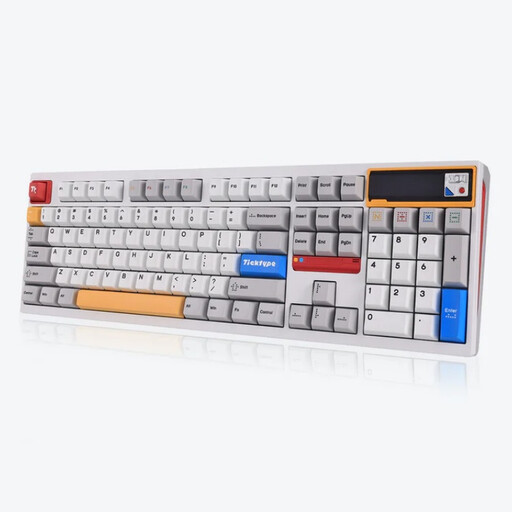
3. Ticktype DP104 Custom Tri-Mode Wireless Mechanical Keyboard
-
Why this product: The Ticktype DP104 is a high-end option for users who refuse to compromise. It combines a full aluminum construction with extensive wireless capabilities and a full-size layout.
-
Pros:
- Build Quality: A heavy and robust full-size aluminum case ensures maximum stability.
- Connectivity: Tri-mode connectivity (wired, Bluetooth, 2.4GHz) offers ultimate flexibility for any setup.
- Battery: A massive 8000mAh battery provides extended usage in wireless mode.
- Typing Feel: The Leaf Spring Mount and Silent Tactile Switches create a unique, soft, and quiet typing feel, ideal for office environments.
- Extras: Fully hot-swappable, equipped with a customizable pixel screen and a fully controllable RGB keyboard.
-
Who is this for: This wireless mechanical keyboard is aimed at power users, professionals, and enthusiasts seeking a premium, full-size, and quiet keyboard for a clean and wireless desk setup.
Didn't Find What You Were Looking For?
The world of mechanical keyboards is vast and diverse. If the models above don't perfectly meet your requirements, or if you're looking for specific switches, keycaps, or layouts, you can explore a wider range.
See more options in the mechanical keyboards category.
Frequently Asked Questions (FAQ)
1. What is the advantage of a hot-swappable keyboard? A hot-swappable keyboard allows you to remove and replace the mechanical switches without any soldering. This makes it easy to repair, upgrade, or customize the typing feel by installing different types of switches (e.g., from linear to tactile). It is the foundation of a truly custom keyboard.
2. Are mechanical keyboards always loud? No, that's a common misconception. The sound is primarily determined by the switch type. 'Clicky' switches (like Blue switches) are indeed loud. 'Linear' (like Red switches) and 'Tactile' (like Brown switches) are significantly quieter. For a near-silent experience, you can opt for a silent mechanical keyboard with special 'silent' switches, which have internal dampeners to minimize sound.
3. What is the difference between a QWERTY US and an ISO layout? The most visible difference is the Enter key: the US (ANSI) layout has a wide, horizontal Enter key, while the European (ISO) layout has a tall, vertical Enter key. Additionally, the US layout has a longer left Shift key. Most custom and gaming keyboards use the QWERTY US layout, so it's important to be aware of this when purchasing the keyboard and any potential replacement keycaps.
Written by: Joybuy Product Recommendation Officer