
Mechanical Keyboard Buying Guide: Recommendations and Tips
Are you tired of the standard, somewhat mushy-feeling keyboard on your desk? Whether you're a gamer seeking faster response times, a programmer writing thousands of lines of code a day, or simply someone who values a pleasant and durable typing experience, switching to a mechanical keyboard can make a world of difference.
However, the market is flooded with options, specifications, and jargon. As a Joybuy Product Recommendation Officer, it's my job to guide you through this information. In this article, I'll provide practical tips and present a selection of models that stand out for their specifications and functionality, so you can make an informed decision.
What should you look for when buying?
Before we get to the recommendations, here are a few key points to consider. These will help you determine which type of mechanical keyboard best suits your needs.
1. Layout and Size: Compact or Complete?
The size of a keyboard directly impacts your desk setup and workflow.
- Full-size (100%): The traditional format with a numeric keypad. Useful for data entry and office work.
- Tenkeyless (TKL): A full-size board without the numeric keypad. This saves space and keeps the mouse closer.
- Compact (75%, 65%, 60%): These sizes are popular with fans of minimalist setups and gamers. A compact keyboard like a 65% model omits the function keys and numpad but retains the arrow keys. A 75% layout is a good middle ground that keeps the function keys in a compact form.
2. Switches and Personalisation: The Core of the Feel
The "mechanical" in a mechanical keyboard comes from the individual switches under each key. These determine how a keystroke feels and sounds. The most important feature to look for is hot-swappable. A hot-swappable keyboard allows you to easily change the switches without soldering. This is ideal if you want to experiment with different types or build a custom keyboard that is perfectly tailored to your preferences.
3. Connectivity and Materials: Flexibility and Durability
How do you want to connect your keyboard?
- Wired (USB-C): Offers the most stable and fastest connection, often preferred for a competitive gaming keyboard.
- Wireless (Bluetooth / 2.4GHz): A wireless mechanical keyboard ensures a clutter-free desk. Bluetooth is useful for switching between multiple devices (like a laptop and a keyboard for Mac), while a 2.4GHz dongle often provides lower latency.
Additionally, the material plays a role. Plastic cases are lightweight and affordable, while an aluminium keyboard offers a heavier, more premium feel and greater durability.
Our Top Product Recommendations
Based on specifications, functionality, and design, we have selected some interesting models for you.
Lofree OE907 65% Mechanical Keyboard
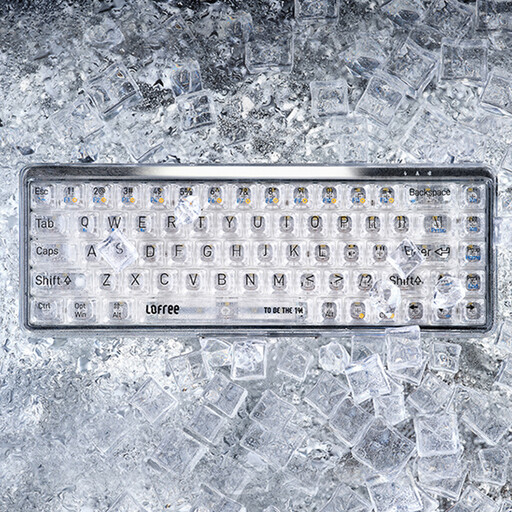
Why it stands out: The Lofree OE907 immediately catches the eye with its unique, fully transparent design. This keyboard is not just functional, but also an aesthetic statement on your desk. The combination of transparent keycaps and a compact 65% layout makes it a striking choice.
Pros:
- Design: Fully transparent case and keycaps for a unique look.
- Layout:Compact 68-key (65%) design saves desk space while retaining arrow keys.
- Connectivity: Dual-mode with Bluetooth 5.1 and wired USB-C.
- Switches: Equipped with MX Jellyfish linear switches for a smooth and consistent typing experience.
Who is it for? For the design enthusiast and the user looking for a stylish, compact, and functional keyboard for both work and light gaming. It is also an excellent keyboard for Mac users due to its broad compatibility.
Ticktype EVO75 Custom Wireless Mechanical Keyboard
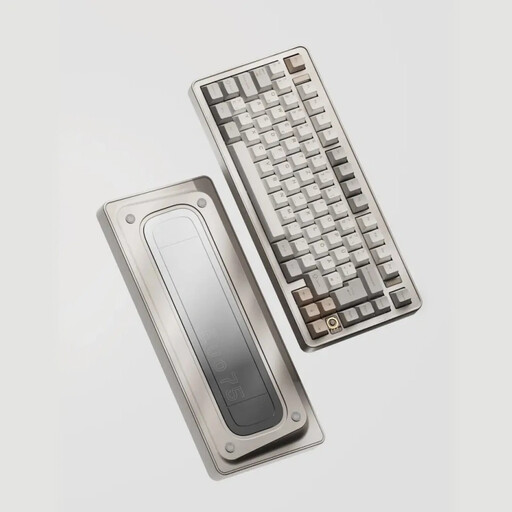
Why it stands out: The Ticktype EVO75 is designed for the true enthusiast. With a full aluminium keyboard case, an advanced 'leaf spring' mounting structure, and hot-swappable functionality, this model offers a premium and highly customisable experience. The massive 8000mAh battery also ensures exceptionally long wireless usage.
Pros:
- Build Quality: Fully anodised aluminium case for a robust and premium feel.
- Personalisation:Hot-swappable for 3-pin and 5-pin switches and compatible with VIA software for full key remapping.
- Connectivity: Tri-mode connection (2.4GHz, Bluetooth, USB-C).
- Battery: A very large capacity of 8000mAh.
- Extras: Features RGB keyboard lighting and a unique 'leaf spring' mount for a soft, bouncy typing experience.
Who is it for? For the tech enthusiast, programmer, or gamer looking for a high-end custom keyboard experience without having to build it themselves. Its robust build and extensive features justify the investment for those who prioritise performance and personalisation.
RK ROYAL KLUDGE S98 Mechanical Keyboard
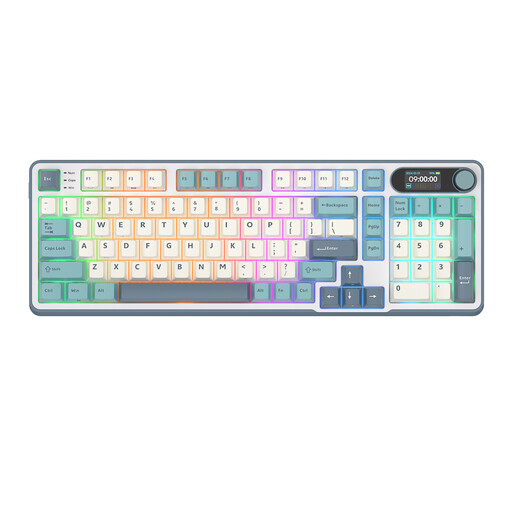
Why it stands out: The Royal Kludge S98 offers an impressive feature set in an efficient 96% layout. This model combines near-full functionality, including a numeric keypad, with a more compact form factor. The addition of a smart display and a multi-function rotary knob makes it a versatile powerhouse.
Pros:
- Layout:96% (98-key) layout offers the functionality of a full-size board in a more compact form.
- Extras: A smart display for system information and a metal rotary knob for volume, lighting, and mode selection.
- Connectivity: Tri-mode connection (2.4GHz, Bluetooth, USB-C).
- Personalisation:Hot-swappable sockets and extensive RGB keyboard lighting with 16.8 million colours.
- Sound Dampening: An internal structure with 5 layers of dampening material for a pleasant typing sound.
Who is it for? For professionals and gamers who don't want to give up the functionality of a numeric keypad but still want a more efficient and modern keyboard. The combination of features makes it an excellent all-rounder.
Looking for something else?
These recommendations are aimed at desktop use for work, gaming, and personalisation. If you are specifically looking for an ultra-portable solution for on the go, such as a keyboard for tablet, there are other models that might be a better fit.
See our selection of keyboards for tablets here
Frequently Asked Questions
What is the advantage of a mechanical keyboard?
The main advantages are the superior typing experience, durability, and potential for personalisation. Each keystroke provides clear feedback, which can lead to fewer typos and more comfort during long sessions. The switches are rated for millions of keystrokes, making them last much longer than the rubber domes in standard keyboards.
Are mechanical keyboards better for gaming?
For many gamers, yes. A gaming keyboard with mechanical switches often offers faster and more reliable key actuation. Features like N-key rollover (where every keystroke is registered, no matter how many are pressed at once) and their durability make them highly suitable for intensive gaming use.
How do you maintain a mechanical keyboard?
Maintenance is relatively simple. You can remove the keycaps with a keycap puller to clean them. Use a soft brush or compressed air to remove dust and debris from between the switches. Avoid liquids near the keyboard unless it is explicitly marked as water-resistant. Regular cleaning will ensure your keyboard performs optimally for years to come.