
Choosing a Logitech Gaming Mouse: A Guide Beyond the Marketing Hype
If you're serious about gaming, you know your mouse is more than just a pointer. It's your sword, your scope, your command module. But the search for the right Logitech gaming mouse can feel like a maze of marketing terms and sky-high specs. Manufacturers throw around terms like 44,000 DPI and "zero-latency," but what does that actually mean for your in-game performance?
As a Product Recommendation Officer at Joybuy, I'm here to filter out the noise for you. Let's discuss the three most common pitfalls that cause gamers to spend money unnecessarily and how you can avoid them.
- The DPI Race: Higher DPI (Dots Per Inch) isn't always better. Much of the marketing focuses on extreme DPI values, but most professional FPS players use settings between 400 and 3200 DPI. An extremely
high DPImakes your cursor uncontrollably fast. The quality and consistency of the sensor are far more important than a number you'll never use in practice. - The Myth of Wireless Lag: The idea that a
wireless gaming mouseis inherently slower than a wired one is outdated. Modern technologies, like Logitech's LIGHTSPEED, offer a response rate that, according to the manufacturer, is equal to or even faster than many wired mice. Freedom of movement without sacrificing performance is now a reality. - Underestimating Shape and Weight: A mouse can have the best sensor in the world, but if it doesn't fit comfortably in your hand, you'll never reach your full potential. A
lightweight gaming mousecan reduce fatigue during quick movements, but the shape must match your grip style (palm, claw, or fingertip).
What to Actually Focus On: Sensor, Weight, and Connectivity
To avoid a bad purchase, focus on the specifications that truly matter. For a Logitech G mouse, these are primarily the sensor, weight, and connection.
The HERO Sensor: Precision and Efficiency
The core of any good professional gaming mouse is its sensor. Logitech's proprietary HERO (High Efficiency Rated Optical) sensor is a common name. Why is it relevant? According to Logitech, this sensor is designed for 1:1 tracking without artificial acceleration or filtering. This means your hand's movement is accurately translated to the screen. Additionally, the sensor is energy-efficient, which is crucial for the battery life of a wireless mouse. So, don't just look at the maximum DPI, but at the reputation of the sensor itself.
Lightweight or Customizable? The Shape and Weight
The weight of your mouse has a direct impact on your gameplay, especially in fast-paced FPS games. A lightweight gaming mouse (often under 70 grams) makes quick flicks and target tracking easier and less fatiguing for your wrist. Models like the G PRO X SUPERLIGHT are a prime example of this.
For other genres, like MMOs or strategy games, a slightly heavier, ergonomic mouse with more buttons, such as the G502 HERO, might be more comfortable. Some models even offer customizable weights. Think about the games you play and what feels comfortable for you during long sessions.
Wireless Without Compromise: The Reality of LIGHTSPEED
If you're hesitant about a wireless gaming mouse, look at the connection technology. Logitech's LIGHTSPEED wireless technology was specifically developed for gaming and, according to the brand, delivers a 1 ms report rate. This is a level of performance that is accepted in the esports world. The advantage is clear: no cable snag or drag, ensuring pure freedom of movement.
Popular Choices for Gamers
Based on objective specifications and different user profiles, here are some recommendations.
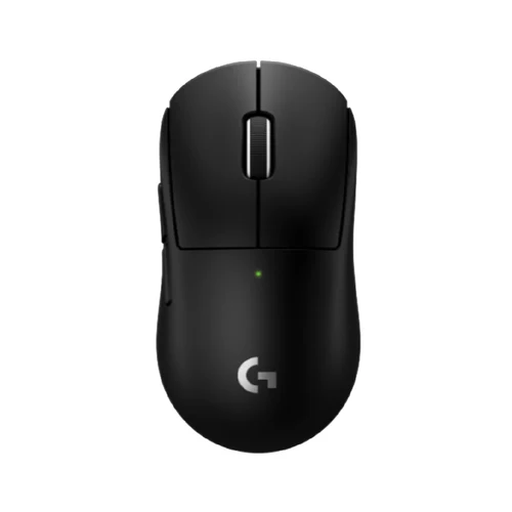
Logitech G PRO X Superlight 2c Wireless Gaming Mouse Black
Why This Fits Their Persona: For the player where every millisecond and every gram counts. This mouse is designed for pure performance in competitive games like Valorant or CS2, where speed and precision are decisive.
This mouse focuses on what truly matters: an extremely low weight (53 grams) and a precise HERO 2 sensor. It proves that a wireless connection (LIGHTSPEED) is reliable at the highest level.
The ultra-lightweight design reduces wrist fatigue and enables fast, consistent movements. The battery life of up to 95 hours (according to Logitech) means you'll rarely need to charge.
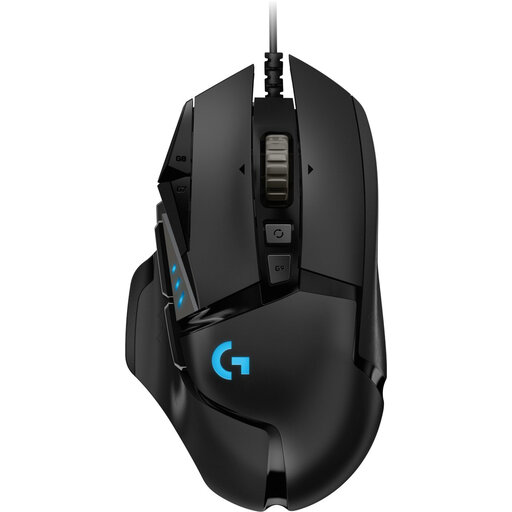
Logitech G502 HERO Wired Gaming Mouse
Why This Fits Their Persona: For the gamer who plays a bit of everything, from RPGs and MMOs to the occasional shooter. This mouse is a workhorse that excels in customisation and functionality.
The G502 HERO doesn't focus on a single gimmick. Instead of just being lightweight, it offers a customizable weight system (5 x 3.6g weights) and 11 programmable buttons. You adapt the mouse to you, not the other way around.
Unmatched personalization. The combination of the HERO 25K sensor, the numerous buttons, and the weight tuning makes it suitable for virtually any type of game. The wired connection ensures a constant, reliable power supply.
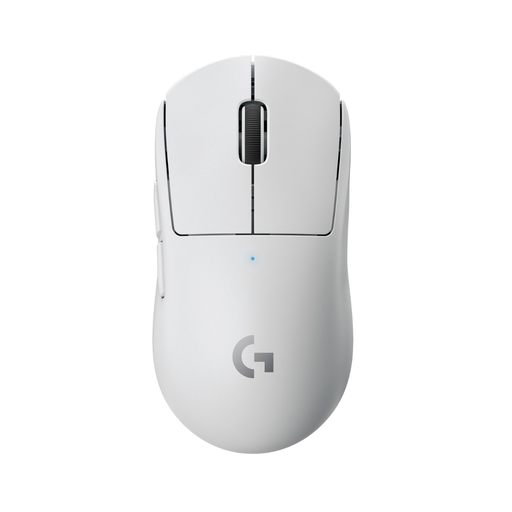
Logitech G Pro X SUPERLIGHT Wireless Gaming and eSports Mouse White
Why This Fits Their Persona: For the gamer who wants top-tier performance but also values a sleek, minimalist setup. This mouse performs at a pro level without the gaudy aesthetics of much other gaming gear.
This model proves you don't have to compromise. It's a lightweight gaming mouse (<63 grams) with a top-tier sensor and wireless technology, packaged in an understated design that wouldn't look out of place in an office.
Combines esports performance with a sleek design. The reliable LIGHTSPEED connection and the efficient HERO sensor ensure a smooth experience, both during gaming and for daily use.
Looking for more options?
We have compiled a complete, up-to-date list of products that fully meet these strict selection criteria and local regulations.
Frequently Asked Questions
What is the difference between the Logitech HERO sensor and a standard optical sensor?
The HERO sensor was developed in-house by Logitech with two goals: maximum precision and high energy efficiency. According to the manufacturer, the sensor provides tracking without acceleration or filtering across the entire DPI range. Its efficiency allows wireless mice with this sensor to have a significantly longer battery life compared to mice using other high-performance sensors.
How long does the battery of a wireless Logitech gaming mouse last?
This varies greatly by model and usage. Models equipped with the HERO sensor and LIGHTSPEED technology are very efficient. The Logitech G PRO X SUPERLIGHT 2c, for example, has a battery life of up to 95 hours of constant use, according to Logitech. In practice, this means most gamers will only need to charge the mouse once every few weeks.
Is a lightweight gaming mouse always better for FPS games?
Generally, yes. A lower weight means less inertia, allowing you to start, stop, and change direction more quickly. This is a clear advantage when flicking and tracking opponents. However, comfort and grip style remain personal. A mouse that is too light or has an uncomfortable shape can actually negatively impact your aim. It's a balance between weight, shape, and personal preference.