
Lightweight Wireless Gaming Mouse Guide: How to Choose the Right One
If you play competitively, you know your gear can make all the difference. However, the search for the perfect lightweight wireless gaming mouse can feel like navigating a maze of marketing terms and specifications. Manufacturers tout high DPI numbers and promise the world, but what does that really mean in an intense firefight?
Before you invest in a new professional gaming mouse, it's important to recognise the common pitfalls. Many gamers fall for them, resulting in unnecessary expenses and disappointing performance.
- The DPI Trap: An extremely high DPI (Dots Per Inch) of 30,000 or more is often presented as the key feature. In practice, most professional players use a setting between 400 and 1600 DPI. A high maximum DPI says little about the precision and consistency of the sensor itself.
- Weight Above All Else: An ultra-light mouse can make quick movements easier, but a weight that's too low can come at the expense of build quality, battery life, or ergonomics. A mouse that feels like cheap plastic or starts creaking after a few months won't help you win.
- Vague Wireless Claims: Not all wireless technology is created equal. A standard Bluetooth connection often has higher latency (delay) than a dedicated 2.4GHz connection with its own dongle, like LIGHTSPEED wireless. For an FPS mouse, a stable, fast connection is crucial.
What to Actually Look For
To avoid buyer's remorse, it's better to focus on a few concrete specifications that directly impact your performance.
1. Weight and Shape: The Balance Between Speed and Control
A mouse's weight is a personal preference, but in the world of competitive shooters, a lighter mouse is often favoured. A 53-gram mouse is considered by many to be an ideal balance: light enough for quick flicks, but with enough mass for stable tracking. Don't just look at the weight; consider the shape as well. The mouse must fit comfortably in your hand, matching your grip style (palm, claw, or fingertip).
2. Polling Rate: The Speed of Communication
The polling rate, expressed in Hertz (Hz), indicates how often the mouse reports its position to the computer. A standard mouse has a polling rate of 125Hz, while many gaming mice operate at 1000Hz. The latest generation, often referred to as an esports mouse, offers an 8KHz polling rate. This means the mouse reports 8,000 times per second, resulting in visibly smoother cursor movement and minimal delay between your movement and the on-screen action. This can provide a noticeable advantage in fast-paced games.
3. Sensor: The Heart of the Mouse
The sensor is perhaps the most important component. A good sensor, like the HERO 2 sensor, guarantees accurate tracking without unwanted acceleration, smoothing, or jitter. Instead of fixating on the maximum DPI, it's better to look at the sensor's reputation. A reliable sensor allows your muscle memory to develop because the mouse translates every movement consistently and predictably.
Our Top Product Recommendations
Based on these criteria, we have selected a few models that suit different types of players.
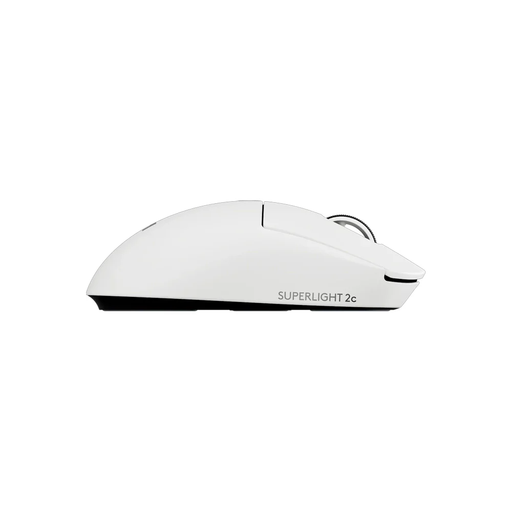
Logitech G PRO X Superlight 2c Wireless Gaming Mouse White
Why This Fits Their Persona: This mouse is a staple in the esports world. Developed in collaboration with professionals, it offers a balanced combination of weight, shape, and reliable performance for a variety of games, from FPS to MOBAs.
Instead of focusing on a single overhyped spec, the Superlight 2 delivers a complete package. The HERO 2 sensor is known for its precision, not just a high DPI number, and the LIGHTSPEED wireless technology ensures a stable, low-latency connection that is essential for competitive play.
Advantage: Proven performance and pro-level reliability. Pros: Extremely light at 53 grams, symmetrical design suitable for many hand sizes, and a highly accurate sensor.
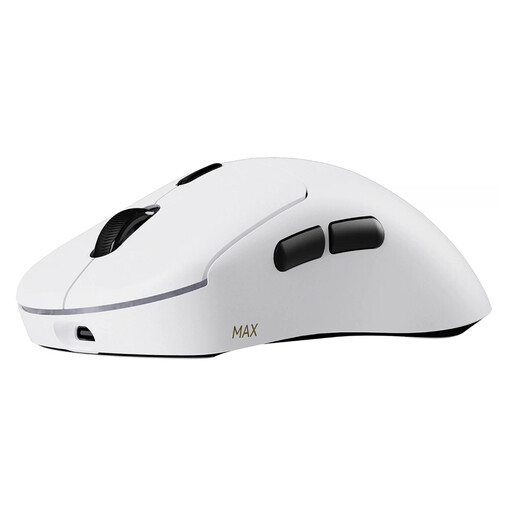
RAPOO VT3 MAX Wireless Gaming Mouse - White
Why This Fits Their Persona: For the FPS player, every millisecond counts. This mouse is designed for maximum responsiveness and endurance during long gaming sessions, with specs that directly contribute to faster reactions.
This mouse combines an ultra-low weight of 53 grams with solid build quality and an exceptionally long battery life. The native 8KHz polling rate is a concrete, measurable improvement for smooth tracking, not a marketing gimmick.
Advantage: Maximum responsiveness and a battery that won't let you down. Pros: Native 8KHz wireless polling rate, up to 750 hours of battery life (at 1KHz), and optical switches that prevent double-clicking.
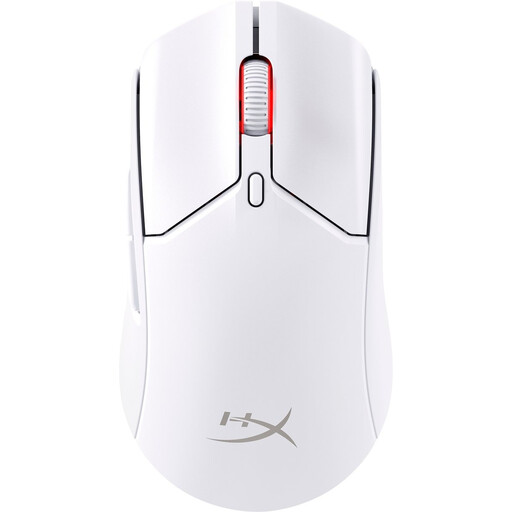
HyperX Pulsefire Haste 2 Wireless Gaming Mouse - White
Why This Fits Their Persona: This gamer is looking for competitive specs without paying a premium price. The Haste 2 Wireless provides a solid foundation for serious performance and is an excellent upgrade from a standard mouse.
The Haste 2 focuses on the essentials: a low weight (61 grams), a reliable sensor, and good battery life. It avoids the pitfall of unnecessary extras and delivers what really counts for a smooth gaming experience, including dual wireless connectivity (2.4GHz and Bluetooth).
Advantage: A strong price-to-performance ratio. Pros: Solid battery life of up to 100 hours, dual wireless mode, and it comes with grip tape for extra control.
Looking for more options?
We have compiled a complete, up-to-date list of products that fully meet these strict selection criteria.
Is an 8KHz polling rate worth it for gaming?
For the average gamer, the difference between 1000Hz and 8000Hz might not be immediately noticeable. However, for competitive players, especially in fast-paced FPS games on a high-refresh-rate monitor (144Hz or higher), an 8KHz polling rate can offer a noticeably smoother and more responsive experience. It further reduces the already minimal delay, which can make a split-second difference.
How important is the weight of a gaming mouse, really?
Weight is largely a matter of personal preference. A lighter mouse reduces the friction and effort required to move and stop it. This can lead to less fatigue during long sessions and potentially faster reactions. A heavier mouse, on the other hand, might feel more stable to some players. There is no "correct" weight, but the trend in the professional scene leans heavily towards models under 70 grams.
What is the difference between optical and mechanical switches?
Mechanical switches, the traditional standard, use a physical contact to register a click. Over time, this can lead to wear and tear and unintentional double-clicks. Optical switches use an infrared light beam. When you click, the beam is interrupted, which registers the click. According to manufacturers, this eliminates the risk of double-clicking and allows for a faster response as no 'debounce delay' is needed. The choice depends on your preference for click feel and the need for maximum durability.