
HyperX Cloud III Buyer's Guide: Choosing the Right Gaming Headset
Buying a new gaming headset can be a minefield. The market is flooded with models that use flashy lights and vague marketing terms to grab your attention. Many gamers fall into the trap and end up with a headset that becomes uncomfortable after a few months, sounds poor, or has a microphone that gives out. Before you consider buying the HyperX Cloud III, it's crucial to know what to look for.
As a Product Recommendation Officer at Joybuy, I see where things go wrong every day. These are the most common pitfalls:
- The "Universal Compatibility" Myth: Many headsets claim to work with every platform, but in practice, you lose crucial features like volume control or surround sound on a console. Sometimes you even need a separate, expensive adapter that isn't included.
- Gimmicky Surround Sound: Manufacturers often advertise "7.1 Surround Sound," but this is usually a software trick that only works on PC and doesn't deliver the promised spatial precision. This can actually put you at a disadvantage in competitive games.
- Short-Term Comfort: A headset might feel comfortable in the store, but after a three-hour gaming session, it can feel like a vise grip. This is often due to cheap foam and a weak, all-plastic frame that loses its shape or breaks over time.
A good gaming headset is an investment in your gaming experience. Let's ignore the marketing hype and focus on the specs that really matter.
What to Look for in a Gaming Headset
To avoid buyer's remorse, there are a few technical specifications you should always check. These determine the sound quality, comfort, and durability.
1. Drivers: The Core of the Sound
The drivers are the speakers inside your headset. Their size and positioning are crucial. Many standard headsets use flat drivers, which can lead to muddy audio where low, mid, and high tones blend together.
Look for models with angled drivers of 50mm or larger, like the 53mm drivers in the HyperX Cloud 3. These have been positioned at an angle by the manufacturer's audio engineers. This creates better separation between different frequencies, allowing you to distinguish footsteps, gunshots, and environmental sounds more clearly and with greater precision. This makes a noticeable difference in games where positional audio is vital.
2. Microphone: Clear Communication Without Noise
A bad microphone is a source of frustration for your teammates. A good headset with a microphone should transmit your voice clearly, without picking up the sound of your keyboard or other background noise.
Look for the following features:
- Noise-Cancelling: A noise-cancelling microphone actively filters out ambient sound.
- Detachable: A detachable microphone is convenient if you also want to use the headset for music.
- Mute Indicator: A visual indicator (often an LED light) that shows if your microphone is muted prevents awkward moments.
Technologies like DTS Headphone:X can further enhance the audio experience by creating a virtual 3D soundscape, which is a major advantage, especially on a PC gaming headset.
3. Build Quality and Comfort
Long gaming sessions demand a comfortable gaming headset. Pay attention to the materials. A full-metal frame is significantly more durable than a plastic one. For the earcups and headband, memory foam with a soft leatherette finish is a popular choice because it conforms to the shape of your head and distributes pressure evenly. This prevents painful pressure points, even after hours of wear.
Our Recommended Product Picks
Based on these criteria, we have selected a few headsets that suit different types of gamers.
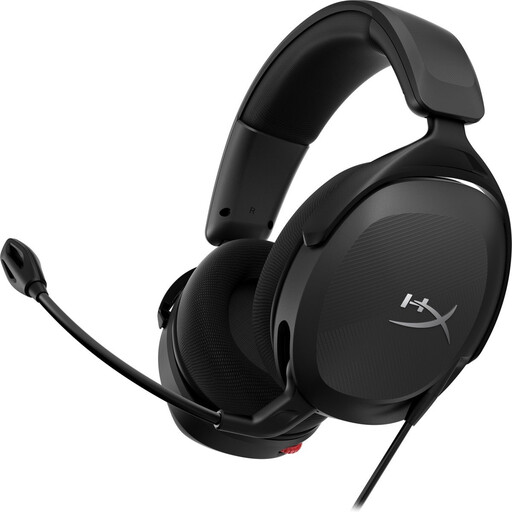
HyperX Cloud III Gaming Headset - PC, PS5, Xbox Series X|S - Black
Why This Fits Their Persona: For the serious gamer who plays on PC, PS5, and other consoles and doesn't want to compromise on sound, comfort, or durability. This is a reliable choice for long, competitive sessions.
This headset comes with USB-C, USB-A, and 3.5mm connections for true multi-platform compatibility. The metal frame and memory foam provide lasting comfort, instead of the short-term comfort of cheap plastic.
The angled 53mm drivers and DTS Headphone:X ensure accurate sound reproduction. The 10mm noise-cancelling microphone with an LED indicator is a clear upgrade for team communication.
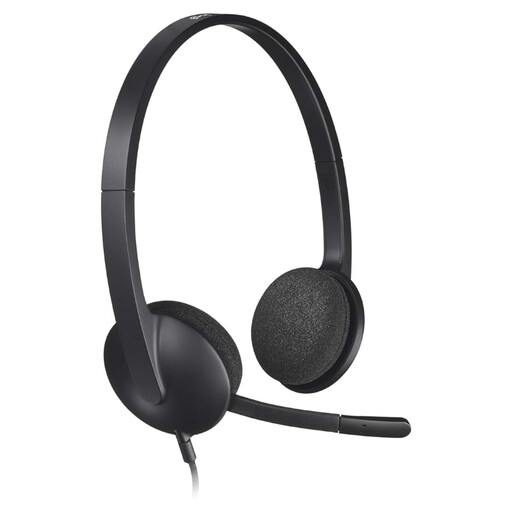
Logitech H340 USB Headset Black, Wired
Why This Fits Their Persona: Ideal for those starting with PC gaming or looking for a reliable, no-frills headset for online calls and casual games. No complex setup, just plug and play.
This model avoids the pitfall of superfluous features. It does what it promises: clear digital sound and a noise-cancelling microphone via a simple USB connection, without making surround sound claims it can't back up.
The plug-and-play USB connection delivers clear stereo sound instantly. Its lightweight design and flexible microphone make it a practical and affordable choice for daily use.
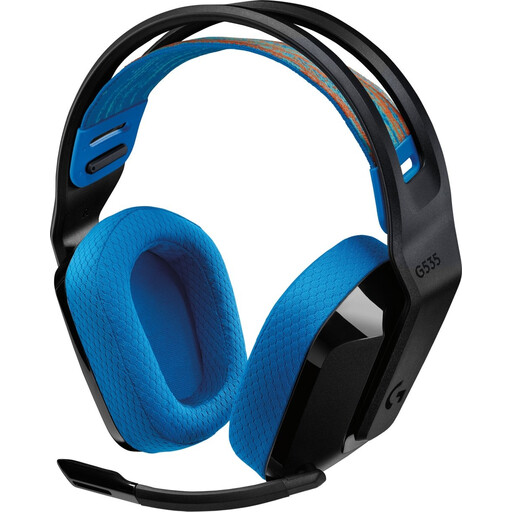
Logitech G535 Black Headphones
Why This Fits Their Persona: For PC and PlayStation gamers who want the freedom of a wireless connection without sacrificing response speed. Its light weight is ideal for those who hate cables.
Instead of unreliable Bluetooth, this headset uses a stable 2.4 GHz connection via a USB receiver. This prevents lag (latency). At 236 grams, it avoids the pitfall of heavy, uncomfortable wireless headsets.
The battery life of up to 33 hours (as stated by the manufacturer) is a major plus. The microphone can be flipped up to instantly mute, which is convenient during gameplay.
A good gaming headset can significantly improve your gaming experience. By focusing on the build quality, comfort, and audio specifications that truly matter, you'll make a choice you'll enjoy for years to come.
If clear communication is your absolute priority, for streaming, for example, a dedicated microphone can be a great addition.
Looking for more options?
If voice quality is paramount, check out our selection of products specializing in clear audio recording.
Frequently Asked Questions
Is the HyperX Cloud III truly compatible with PS5 and Xbox?
Yes, the HyperX Cloud III is designed for broad compatibility. For the PS5 and PC, you can use the USB-C or USB-A adapter to access all features, including DTS Headphone:X on PC. For Xbox, Nintendo Switch, and other devices with a 3.5mm port, you connect the headset directly with the 3.5mm cable. The basic functions (audio and microphone) will work, but additional software features are platform-dependent.
How long does a wired gaming headset like the HyperX Cloud 3 last?
The lifespan heavily depends on build quality and usage. A model with a sturdy, metal frame like the HyperX Cloud III is generally much more durable than an all-plastic headset. With normal use, a well-built wired headset can easily last 3 to 5 years or more. The cable is often the weakest point, so a model with a detachable cable, like its predecessor the Cloud Alpha, can be an advantage for longevity.
Is DTS Headphone:X worth the extra money on a gaming headset?
DTS Headphone:X is a virtual surround sound technology that can create a more spatial soundscape, particularly on PC. According to the developer, this helps you to better pinpoint the position of enemies. Whether it's worth the extra cost is a personal preference. For competitive first-person shooters, it can offer an advantage. For single-player games, it primarily enhances immersion. The HyperX Cloud III includes a lifetime activation for PC, so you don't have to pay for it separately.