
Choosing the Right Gaming Accessories Without Common Pitfalls
Looking for new gaming accessories? The market is saturated with products making lofty promises. Flashy marketing and incomprehensible specs make it difficult to determine what you really need. Many gamers fall into the same traps, ending up with expensive gear that doesn't perform as expected.
Before you pull out your wallet, it's wise to recognise the most common marketing tricks. This will help you avoid buyer's remorse and invest in equipment that genuinely enhances your gaming experience.
- The "Higher DPI is Better" Myth: Manufacturers of a gaming mouse often boast about extremely high DPI (Dots Per Inch) values. In practice, even professional players rarely use more than 3200 DPI. Excessively high sensitivity makes your aim uncontrollable. A consistent, accurate sensor is far more important than a sky-high DPI number.
- Vague "Surround Sound" Claims: Many budget headsets claim "7.1 Surround Sound." Often, this is nothing more than a software gimmick that distorts the audio rather than improving it. A good stereo gaming headset with precise sound reproduction is often more effective for pinpointing enemies than a cheap surround sound headset with vague technology.
- Wireless Isn't Always the Winner: A wireless gaming headset or mouse offers freedom of movement, but can also have drawbacks. Models that only use Bluetooth often have a noticeable delay (latency) that is detrimental in fast-paced games. Additionally, you always have to keep an eye on the battery life.
What to Actually Look For in Your Choice
To find the right PC gaming gear or console accessories, focus on the specifications that truly matter. Don't get distracted by marketing buzzwords; look at the core performance.
1. Connectivity: Wired, 2.4 GHz, or Bluetooth?
The connection is crucial for the responsiveness of your equipment.
- Wired: Offers the most stable and fastest connection without any delay. You never have to worry about a dead battery. Ideal for competitive PC gamers who demand maximum reliability. Pay attention to the cable quality; a flexible, lightweight cable (like a paracord cable) minimises drag.
- Wireless (2.4 GHz): Uses a USB dongle for an ultra-low latency wireless connection. This is the standard for serious wireless gaming on PC, PlayStation, and Xbox. It provides the freedom of wireless without the delay of Bluetooth.
- Wireless (Bluetooth): Convenient for connecting to a wide range of devices like laptops, tablets, and the Nintendo Switch. For gaming, it's less ideal due to higher latency, unless the device has a dedicated "gaming mode."
2. Precision and Comfort: Sensor, Weight, and Shape
For a gaming mouse, precision and comfort are the keys to success.
- Sensor: Look beyond just DPI. The sensor name (e.g., HyperX 26K) and the maximum tracking speed (IPS) give a better indication of quality. A good sensor remains accurate even during fast, sudden movements.
- Weight: A lightweight gaming mouse (under 80 grams) reduces fatigue during long sessions and facilitates quick reactions, which is popular among FPS players. Heavier mice can offer more stability and control for some users.
- Shape: The shape should fit your hand size and grip style (palm, claw, or fingertip). An ambidextrous mouse is suitable for both left- and right-handed users.
3. Audio and Communication: Drivers and Microphone
A good headset with a microphone is indispensable for team-based games and an immersive experience.
- Drivers: The size of the drivers (e.g., 50mm) can contribute to a fuller sound with better bass response. However, how the drivers are tuned is more important. Look for headsets from brands known for their audio quality.
- Microphone: Clear communication is essential. A noise-cancelling microphone filters out background noise, so your teammates hear you loud and clear. A detachable microphone offers extra flexibility.
Recommended Products to Consider
Based on these objective criteria, we have selected a few products that suit different types of gamers.
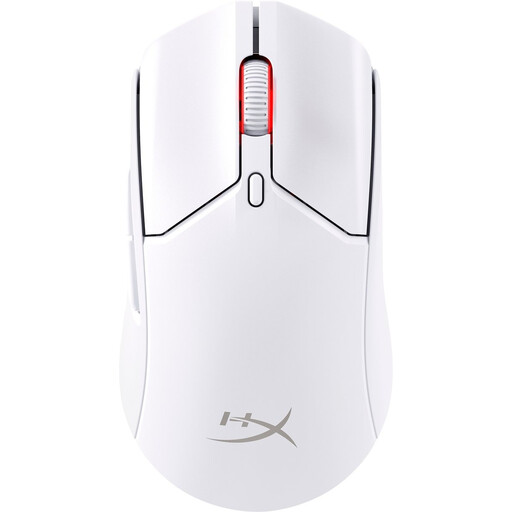
HyperX Pulsefire Haste 2 Wireless Gaming Mouse - White
Why This Fits Their Persona: This mouse is built for speed and precision. Its ultra-light weight of 61 grams and low-latency 2.4GHz wireless connection give competitive players the reaction speed they need. Suitable for PC, PS5, and Xbox.
It doesn't focus on a uselessly high DPI, but on the proven HyperX 26K sensor for true accuracy. The dual-mode connectivity (2.4GHz and Bluetooth) bypasses the pitfall of slow, unreliable wireless connections.
A combination of a lightweight gaming mouse (61g) with a long battery life (up to 100 hours) and a high-end sensor. Can also be used wired while charging.
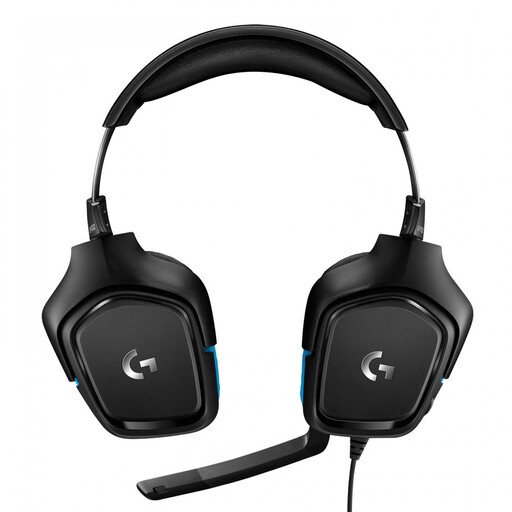
Logitech G G432 7.1 Surround Sound Wired Gaming Headset
Why This Fits Their Persona: This headset is a workhorse for gamers who play on multiple platforms. It's compatible with PC, Mac, PlayStation, Xbox, and Switch. The large 50mm drivers and DTS Headphone:X 7.1 surround sound provide an immersive audio experience.
The 7.1 surround sound isn't a vague claim but is delivered via the well-known DTS Headphone:X technology. As a wired headset, it avoids all potential issues with battery life and wireless latency.
Broad platform compatibility and reliable virtual surround sound via the included USB DAC. The microphone has a convenient flip-to-mute feature.
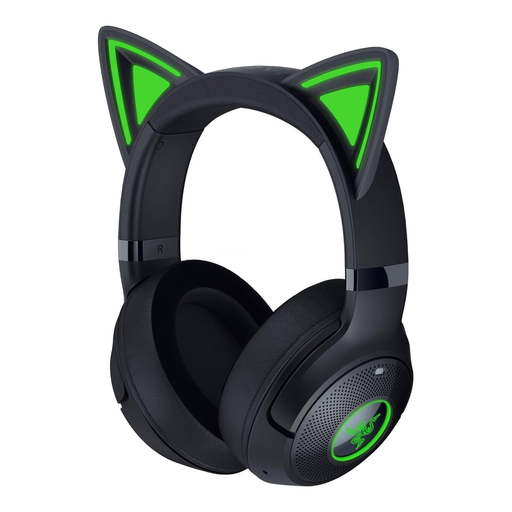
Razer Kraken Kitty V2 BT Black
Why This Fits Their Persona: For streamers who want to show off their personality. The unique Kitty ears with Razer Chroma RGB lighting make this a standout piece. The wireless Bluetooth connection with 'Gaming Mode' and the clear microphone are ideal for IRL streaming and gaming.
This headset balances style with function. Beyond its striking aesthetics, it offers a 'Gaming Mode' to reduce Bluetooth latency, addressing the pitfall of slow, unsuitable 'lifestyle' headsets for gaming.
Unique, stream-friendly aesthetics with customisable RGB gaming accessories. The battery life of up to 40 hours and the integrated noise-cancelling microphone make it practical for long sessions.
Looking for more options?
We have compiled a complete, up-to-date list of products that meet these strict selection criteria. Find the right cables and adapters for your setup here as well.
Frequently Asked Questions
How long does a wireless gaming headset battery last?
The battery life of a wireless gaming headset varies greatly by model, from around 20 hours to over 100 hours for premium models. Just like with a smartphone, the battery's capacity will degrade over time. Fortunately, many modern headsets can be used wired while charging, so you'll never be left without sound.
Is an expensive gaming mouse worth the money?
A higher price often translates to better build quality, a more accurate sensor, more durable switches, and more advanced wireless technology. For a competitive player, the investment in a lightweight gaming mouse with a top-tier sensor can make a difference in reaction time and precision. For the casual gamer, a solid mid-range mouse is usually more than sufficient.
Do I need special software for RGB gaming accessories?
For basic functionality, usually not. However, to customise the lighting of RGB gaming accessories, configure macros, or personalise your mouse's DPI settings, you will need the manufacturer's software (such as Razer Synapse, HyperX NGENUITY, or Logitech G HUB). This software is typically available for free download from the brand's website.