
Choosing the Right Computer Mouse in 2026: A Practical Guide
A computer mouse that doesn't perform well can be a source of daily frustration. A stuttering cursor, an uncomfortable grip, or an overly loud click are all signs that it's time for a new model. However, the market offers a vast array of options: from a wireless mouse for flexibility to a dedicated gaming mouse for performance. Finding the right PC mouse for your needs depends on your specific requirements and tasks.
This guide will help you understand the key specifications so you can make an informed decision.
What to Look for When Buying a PC Mouse
Before making a choice, it's helpful to consider a few fundamental characteristics. These parameters determine how the mouse performs and feels in practice.
Connectivity: Wireless or Wired?
The choice between a wired and a wireless mouse depends on your preference for freedom versus reliability.
- Wired: A mouse with a USB cable doesn't require batteries and offers a stable, lag-free connection. This is often the preference for gamers or for a fixed workstation.
- Wireless: These mice provide more freedom of movement and a clutter-free desk. They connect via a USB receiver (2.4GHz) or Bluetooth. Pay attention to the battery life and charging mechanism.
Ergonomics: Standard, Vertical, or Ambidextrous?
Comfort is crucial, especially during prolonged use. An ergonomic mouse is designed to support the natural posture of your hand and wrist, which can help reduce strain.
- Standard Mouse: Suitable for most users for general tasks.
- Vertical Mouse: Keeps the hand in a "handshake" position, which can reduce tension on the wrist.
- Symmetrical (Ambidextrous): Designed for both left- and right-handed use.
Sensor and DPI: Speed and Precision
DPI (Dots Per Inch) indicates the mouse's sensitivity. A higher DPI value means the cursor travels a greater distance on the screen with a small movement of the mouse.
- For general office and home use, a DPI between 800 and 1600 is typically sufficient.
- A gaming mouse often has a much higher and adjustable DPI (e.g., up to 26,000) for maximum precision and rapid response times.
Extra Features: Silent Clicks and Programmable Buttons
Some mice offer additional features that enhance usability. A silent mouse is ideal for open-plan offices or home use to avoid disturbing others. Programmable buttons can be configured for specific functions or macros, which is particularly useful for gamers and professionals working with specialised software.
Our Top Picks for 2026
Based on the criteria above, we have selected three different computer mice, each tailored to a different use case.
RAPOO 1680: The Silent Wireless Mouse for Everyday Use
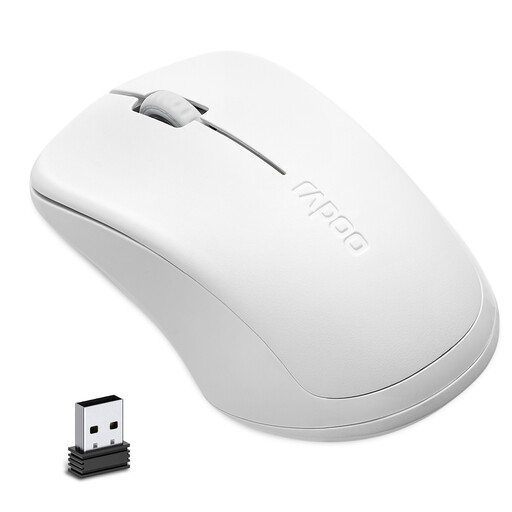
Why this product The RAPOO 1680 is a functional and no-frills wireless mouse. It uses a stable 2.4GHz connection via a small USB receiver. The optical sensor with 1000 DPI provides ample precision for most daily computer and laptop tasks.
Advantages
- Silent Design: According to the manufacturer, the design reduces click noise by 90%, making it a suitable silent mouse for quiet environments.
- Long Battery Life: The mouse runs on a single AA battery, which Rapoo claims can last up to 12 months.
- Symmetrical Design: The shape is suitable for both left- and right-handed users.
Who is this for? This model is a solid choice for students, office workers, and home users looking for a reliable, quiet, and wireless mouse for their laptop or PC without complex features.
View the RAPOO 1680 on Joybuy.nl
RAPOO VT9Pro: Performance for the Serious Gamer
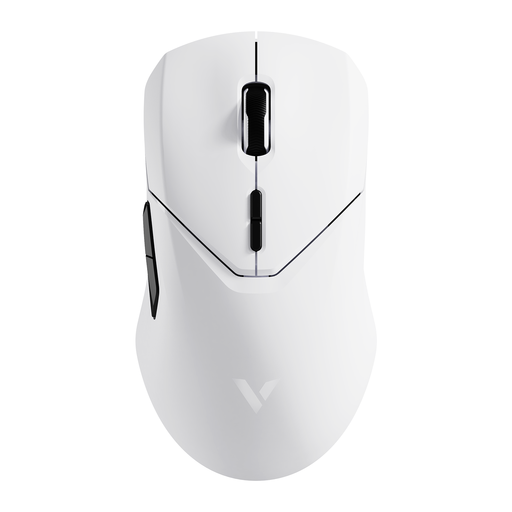
Why this product The RAPOO VT9Pro is a high-performance gaming mouse engineered for speed and precision. The mouse features a Pixart PAW 3398 sensor with an adjustable sensitivity up to 26,000 DPI and a wireless polling rate of 4000Hz, resulting in ultra-low latency.
Advantages
- High Performance: The combination of a high DPI, 650 IPS, and 50G acceleration ensures accurate tracking, even during the fastest movements.
- Lightweight: Weighing only 68 grams, the mouse is designed to minimise drag and enable quick reactions.
- Long Battery Life: The built-in 800mAh battery provides up to 180 hours of use, according to the manufacturer.
- Programmable Buttons: The mouse has 10 programmable buttons and on-board memory to save settings.
Who is this for? This mouse is aimed at competitive gamers and esports athletes who are looking for a wireless mouse with minimal latency and maximum customisation.
View the RAPOO VT9Pro on Joybuy.nl
Anker CE100: An Ergonomic Mouse for Comfort
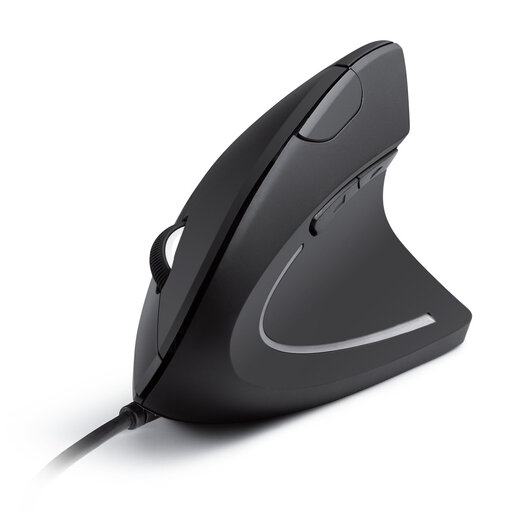
Why this product The Anker CE100 is a wired vertical mouse designed to keep the arm and wrist in a natural "handshake" position. This can reduce the muscle strain often associated with using a traditional mouse.
Advantages
- Ergonomic Design: The vertical shape promotes a neutral wrist posture, which can increase comfort during long work sessions.
- Adjustable Sensitivity: The DPI is switchable between 1000 and 1600, allowing the user to adapt the cursor speed to the task at hand.
- Reliable Connection: As a wired mouse, there are no worries about batteries or signal loss. The setup is plug-and-play.
- Extra Navigation Buttons: The "next/previous" buttons facilitate browsing through web pages and documents.
Who is this for? This ergonomic mouse is an excellent option for office professionals, programmers, and anyone who spends many hours at a computer and is looking for a solution to prevent or reduce wrist and arm strain.
View the Anker CE100 on Joybuy.nl
Didn't Find Your Match? See More Alternatives
The selection above covers three common use cases, but the ideal computer mouse is a highly personal choice. Factors like hand size, specific software requirements, or budget might lead you to a different model. Whether you're specifically looking for a compact mouse for your laptop or a model with unique features, there is a wide range available to explore.
Frequently Asked Questions about Computer Mice
1. What is the difference between an optical and a laser mouse? An optical mouse uses an LED light to illuminate the surface beneath it, while a laser mouse uses a laser. Laser mice are generally more precise and can work on more surfaces, including glass. However, for most users, a modern optical mouse offers more than enough accuracy.
2. How long does the battery of a wireless mouse last? Battery life varies widely by model and usage. Simple wireless mice for office use can last for months or even a year on a single battery. High-performance gaming mice with many features often have a rechargeable battery that lasts from several days to a few weeks, depending on the intensity of use.
3. Is an ergonomic mouse really better for your wrist? An ergonomic or vertical mouse promotes a more neutral, natural posture for the wrist and forearm. For many people who perform long-term computer work, this can reduce tension on muscles and tendons and increase comfort. Whether it is "better" depends on the individual user, but it is a valid option for those experiencing discomfort.
Written by: Joybuy Product Recommendation Officer