
Computer Mouse Buying Guide for Work, Gaming, and Comfort
The wrong computer mouse can seriously impact your day. You might be dealing with a stuttering cursor during a key presentation, feeling input lag in your favorite game, or experiencing a nagging ache in your wrist after a long day at work. The right PC mouse isn't a luxury; it's an essential tool.
However, the market is flooded with options, from high-speed wireless gaming mice to silent mice for the office. This guide is designed to help you make an informed choice. We'll cut through the marketing jargon and focus on what truly matters for your specific needs, so you can buy the right mouse with confidence.
What to Look for When Choosing a Computer Mouse
Before we dive into recommendations, here are a few practical factors to consider.
1. Ergonomics and Design
A mouse should fit comfortably in your hand. A standard model works for many, but if you spend long hours at the computer, an ergonomic mouse can make all the difference. These models are designed to support the natural posture of your hand and wrist. A vertical mouse, which places your hand in a "handshake" position, is a popular choice for reducing forearm strain. Pay attention to the dimensions of the mouse and your own hand size to ensure a good fit.
2. Wireless or Wired?
The choice between a wired and a wireless mouse depends on your use case.
- Wireless: Offers maximum freedom of movement and a clutter-free desk. Ideal as a laptop mouse for when you're on the go. Modern wireless technology, even for gaming, has extremely low latency. However, keep an eye on battery life and how the mouse is charged.
- Wired: You'll never have to worry about a dead battery or connection issues. This is often a reliable and cost-effective choice for a fixed workstation.
3. Key Specifications: DPI, Polling Rate, and Noise
Specifications can be confusing, but these three are the most important:
- DPI (Dots Per Inch): This determines the mouse's sensitivity. A higher DPI means the cursor travels further across the screen with only a small movement of your hand. Gamers often prefer a high, adjustable DPI, while for office work, a value around 1000-1600 DPI is usually sufficient.
- Polling Rate (Hz): This indicates how often the mouse reports its position to the computer. A higher polling rate (measured in Hz) results in smoother, more responsive cursor movement. For standard use, 125-500 Hz is fine, but for a competitive wireless gaming mouse, 1000 Hz or even higher is the norm.
- Silent Clicks: Do you work in an open-plan office, a library, or late at night? A silent mouse with dampened click switches can be a relief for you and those around you.
Our Recommended Product Picks
Based on specifications and use cases, we've compiled a list of popular choices for you.
RAPOO VT9Pro 4K Wireless Gaming Mouse
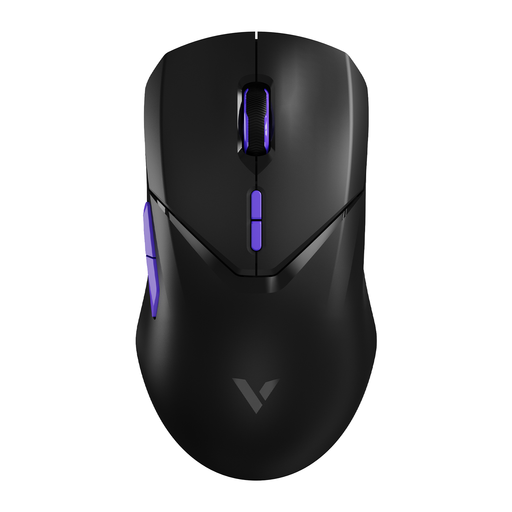
Why It Stands Out: This mouse is engineered for performance. With a wireless polling rate of 4000Hz, Rapoo claims a near-instantaneous response time. The Pixart PAW 3398 sensor is a highly-regarded model in the gaming world, ensuring precision. Despite its advanced technology, it's a lightweight mouse at just 68 grams.
Pros:
- High Responsiveness: 4000Hz wireless polling rate for minimal latency.
- Precise Sensor: PAW 3398 sensor with up to 26000 DPI.
- Long Battery Life: The built-in 800mAh battery lasts up to 180 hours, according to the manufacturer.
- Lightweight Design: At 68 grams, the mouse is easy and quick to move.
Who Is It For? For the competitive gamer seeking a wireless gaming mouse that makes no compromises on speed and precision.
RAPOO 1680 Silent Wireless Mouse
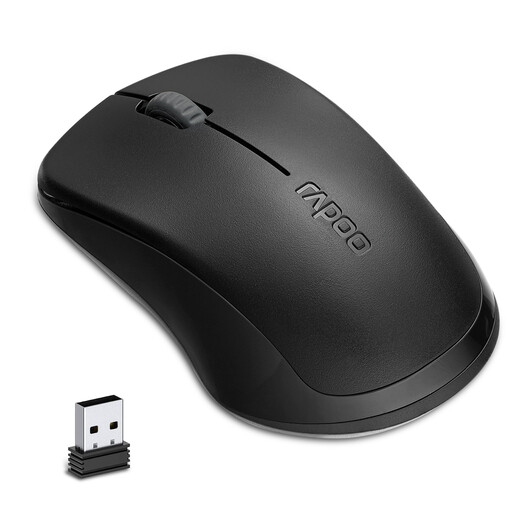
Why It Stands Out: The Rapoo 1680 focuses on simplicity and silence. According to a lab test report from Rapoo, its silent switches reduce click noise by 90%, making it ideal for quiet environments. The mouse runs on a single AA battery and is ready to use immediately thanks to its simple plug-and-play functionality.
Pros:
- Silent Clicks: Minimises noise disruption in shared spaces.
- Long Battery Life: The manufacturer claims it runs for up to 12 months on a single AA battery.
- Simple and Reliable: Stable 2.4GHz wireless connection.
- Comfortable Design: Ambidextrous design, suitable for both left- and right-handed users.
Who Is It For? Ideal for students, office professionals, or home users who need a reliable, no-nonsense, and above all, silent mouse for daily tasks. An excellent choice as a laptop mouse.
Check out the RAPOO 1680 Silent
Anker CE100 USB Wired Vertical Mouse
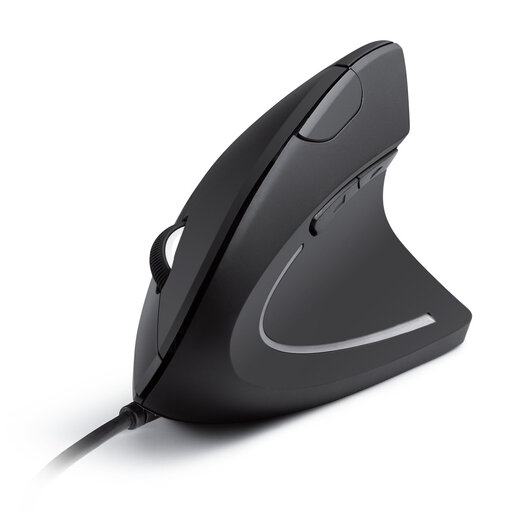
Why It Stands Out: The Anker CE100 is a vertical mouse designed with comfort as a top priority. The "handshake" grip promotes a more natural posture for the wrist and forearm, which can help reduce the strain often associated with prolonged mouse use. It's a wired model, so you never have to worry about batteries.
Pros:
- Ergonomic Design: The vertical posture is designed to reduce wrist and arm strain.
- Adjustable Sensitivity: Easily switch between 1000 and 1600 DPI.
- Convenient Navigation: Extra "next/previous" buttons make browsing easier.
- Plug-and-Play: Works instantly after plugging in the USB cable, no drivers required.
Who Is It For? For anyone who spends many hours at a desk and is looking for an ergonomic mouse to increase comfort or help prevent issues like RSI.
Check out the Anker CE100 Vertical Mouse
Complete Your Workspace
A good mouse is a major step toward a comfortable and productive (home) office. But don't forget the other half. A suitable keyboard can further enhance your comfort and efficiency.
Browse our selection and find the laptop keyboard that fits your setup.
Frequently Asked Questions
1. What does DPI mean for a computer mouse? DPI stands for Dots Per Inch and measures the mouse's sensitivity. A higher DPI value means the cursor on your screen travels a greater distance with a small physical movement of the mouse. For general use, 1000-1600 DPI is sufficient. Gamers often use higher, adjustable DPI values for quick reactions and precision.
2. Is an ergonomic mouse really better? An ergonomic or vertical mouse can be more comfortable for many people because it places the hand and wrist in a more natural position. This can help reduce muscle strain in the arm and shoulder, especially during prolonged use. However, it ultimately comes down to personal preference. If you don't have any discomfort, a standard mouse is also perfectly fine. If you experience wrist or arm pain, an ergonomic model is worth considering.
3. How long does the battery of a wireless mouse last? Battery life varies greatly by model and usage. Some mice, like the Rapoo 1680, use AA batteries that the manufacturer claims can last up to a year. Rechargeable gaming mice, such as the Rapoo VT9Pro, have a battery life measured in hours (e.g., 180 hours) and need to be charged more frequently, depending on usage intensity and settings like the polling rate.