
Choosing the Right Computer Mouse: A No-Nonsense Buyer’s Guide
Buying a new computer mouse seems simple—until you dive into the specifications. Manufacturers throw around terms like DPI, polling rates, and "ergonomic design," making it easy to get overwhelmed. The result? You either overpay for features you don't need or end up with a mouse that feels uncomfortable after just a few months.
As a Joybuy Product Recommendation Officer, I see the challenges consumers face every day. Let's navigate the most common pitfalls so you can make a purchase you'll truly value.
Pitfall 1: The DPI Myth. An extremely high DPI (Dots Per Inch) is often used as a key selling point. A mouse with 26,000 DPI sounds impressive, but in practice, such high sensitivity is unworkable for most users. Your cursor will fly across the screen with the slightest movement.
Pitfall 2: Vague "Ergonomic" Promises. Many standard mice are labeled "ergonomic" simply because they have a slight curve. True ergonomics, however, is about reducing strain on your wrist and arm, which often requires a completely different design, such as a vertical mouse.
Pitfall 3: The Wireless Mouse Battery Trap. The freedom of a wireless mouse is great, but not if you have to recharge the battery weekly. Budget-friendly models often have poor battery life, which negates the convenience.
What Really Matters
To avoid buyer's remorse, focus on a few core specifications that are genuinely important for your needs.
1. DPI and Polling Rate: Sensitivity and Responsiveness
- DPI (Dots Per Inch) determines how sensitive the mouse is. For general office work and browsing, a DPI between 800 and 1600 is more than sufficient. Gamers who prefer low sensitivity for precision often use settings between 400 and 1600 DPI. A high maximum DPI isn't a measure of quality, but adjustable DPI is a useful feature.
- Polling Rate, measured in Hertz (Hz), indicates how often the mouse reports its position to the computer. A standard PC mouse has a 125 Hz polling rate. A gaming mouse often features 1000 Hz for smoother cursor movement. Some advanced models offer 4000 Hz or even 8000 Hz, but be aware that a higher polling rate demands more from your processor.
2. Connectivity: Wired, 2.4GHz, or Bluetooth?
- Wired: The most reliable connection. No worries about batteries or signal loss. A great choice for a fixed workstation or for competitive gamers.
- Wireless (2.4GHz USB Receiver): Offers the freedom of a wireless mouse with low latency, making it suitable for both work and gaming. The small USB receiver is all you need.
- Wireless (Bluetooth): Ideal for laptops and tablets, as it doesn't occupy a USB port. The connection can be slightly less stable than 2.4GHz, making it less suitable for serious gaming.
3. Shape and Weight: Comfort is Personal
Shape is arguably the most important factor. An ergonomic mouse is designed to support the natural posture of your hand. Vertical mice are a prime example of this. For gamers, a lightweight mouse (under 80 grams) can enable faster movements and reduce fatigue. Also, consider the design: some mice are symmetrical and suitable for both left- and right-handed users.
Our Top Product Recommendations
Below are a few products that suit different user profiles, based on their objective specifications.
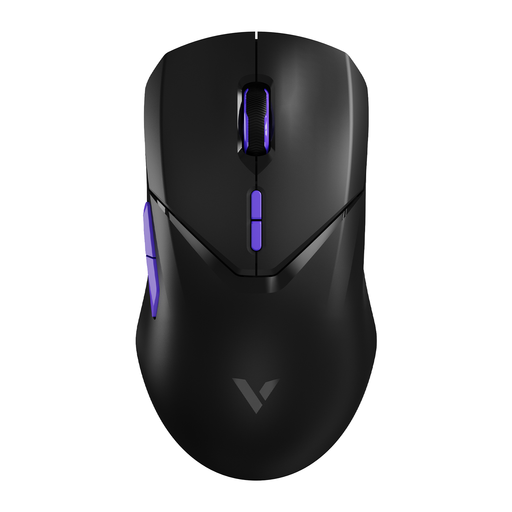
RAPOO VT9Pro 4K Wireless Gaming Mouse
Why This Fits Their Persona: This mouse is all about performance. With a 4000Hz polling rate and a high-end sensor (PAW 3398), it's designed for gamers who want to leverage every millisecond. Its light weight of 68 grams facilitates fast, precise movements.
The high DPI isn't a gimmick here; it's part of a package with a top-tier sensor that delivers precision. The manufacturer is also transparent that the 4000Hz mode is more demanding on your PC's processor.
Extremely low latency thanks to the 4000Hz polling rate. Long battery life (up to 180 hours, according to Rapoo) and a lightweight, symmetrical design.
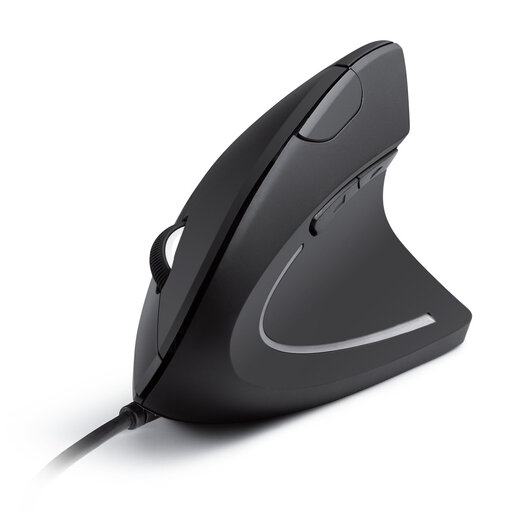
Anker CE100 USB Wired Vertical Mouse
Why This Fits Their Persona: For those who spend long days at a desk, comfort is crucial. This vertical mouse is designed to keep the wrist in a natural "handshake" position, which can reduce muscle strain.
This isn't a vague "ergonomic" promise. The vertical design is a specific, functional choice aimed directly at addressing wrist strain, rather than just being a standard mouse with a slight curve.
The vertical design promotes a neutral wrist posture. Its reliable wired connection means you never have to worry about charging.
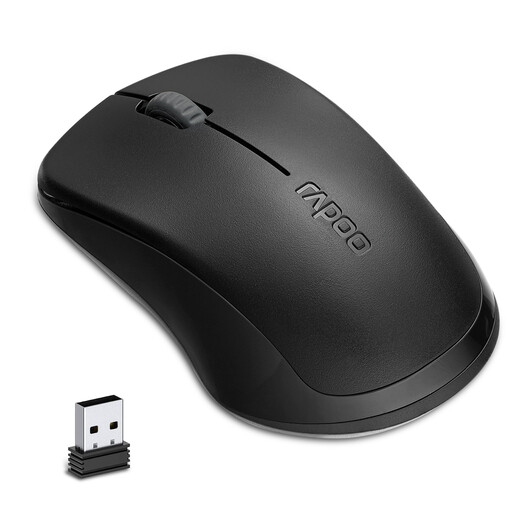
RAPOO 1680 Silent Wireless Mouse
Why This Fits Their Persona: Ideal for students in the library, employees in an open-plan office, or remote workers who don't want to disturb others. This silent mouse is wireless, compact, and focused on practical, unobtrusive use.
This mouse addresses the battery pitfall. According to Rapoo, the battery lasts up to 12 months on a single AA battery. The silent clicks are a concrete, audible (or rather, inaudible) improvement.
Silent buttons significantly reduce clicking noise. The long battery life and simple, symmetrical design make it a reliable choice for everyday use.
Looking for more options?
We've curated a complete, up-to-date list of products that meet these selection criteria and focus on practical usability.
Frequently Asked Questions About Computer Mice
Is a higher DPI always better for a computer mouse?
No, a higher DPI simply means higher sensitivity. For most daily tasks, like browsing and office work, a DPI between 800 and 1600 is ideal. An extremely high DPI can actually make the cursor uncontrollable. It's more important for the DPI to be adjustable, allowing you to tailor the sensitivity to your preference and screen resolution.
How long does a wireless mouse battery last?
This varies enormously by model, ranging from a few weeks to over a year. It depends on the battery type (rechargeable or replaceable), usage patterns, and the presence of a power-saving mode. Always check the manufacturer's specifications. Models that use AA or AAA batteries often have a longer runtime than those with a built-in rechargeable battery.
What is the advantage of an ergonomic mouse?
An ergonomic mouse is designed to support the natural posture of your hand and wrist. This can help reduce muscle strain and discomfort, especially during prolonged computer use. For people who are susceptible to or already experience RSI-related symptoms, such a design can make a noticeable difference in comfort.