
How to Choose the Right Wireless Mouse Without the Marketing Hype
Buying a new wireless mouse seems simple until you get tangled in a web of technical specifications and marketing promises. Manufacturers throw around terms like sky-high DPI values and vague "ergonomic" claims. The result? You overpay for features you don't need, or you end up with a mouse that becomes a source of frustration after just a few months.
Before you make a decision, it's important to recognise the most common pitfalls:
- The DPI Race: Many brands advertise with extremely high DPI (Dots Per Inch) values, sometimes exceeding 20,000. In practice, this is unusable for most people. Excessively high sensitivity makes the cursor uncontrollable. It's often a marketing gimmick that distracts from what truly matters: the quality of the sensor.
- False Ergonomics: A slight curve in the design isn't enough to call a mouse an
ergonomic mouse. A poorly designed shape can actually cause discomfort or even issues like RSI by forcing the hand into an unnatural position. - Unstable Connections: A cheap
bluetooth mousethat constantly stutters or loses its connection is a major source of annoyance. For both focused work and competitive gaming, a stable, lag-free connection is essential.
What Really Matters: The Core Specifications
To avoid a bad purchase, it's better to focus on a few concrete specifications that directly impact your daily use.
Connectivity: 2.4GHz vs. Bluetooth
The way your wireless mouse connects is crucial for its performance.
- 2.4GHz RF (with USB dongle): This type of connection uses a small USB receiver that you plug into your computer. It generally offers a very stable and fast connection with minimal delay (latency). This makes it the preferred choice for a
wireless gaming mouseand for users who demand absolute reliability. - Bluetooth: A
bluetooth mouseconnects directly to the built-in Bluetooth receiver in your laptop or PC. The advantage is that you don't sacrifice a USB port, which is useful for alaptop mousewith limited ports. Some models can pair with multiple devices simultaneously. However, the connection can be slightly more prone to interference and have a fraction more delay than 2.4GHz.
Sensor and DPI: Precision Without the Hype
Don't be dazzled by the highest DPI value.
- DPI (Dots Per Inch): This indicates how sensitive the mouse is. A higher DPI means the cursor travels a greater distance on the screen with a small physical movement. For general office work and browsing, a setting between 800 and 1600 DPI is typically ideal. Gamers benefit from an adjustable DPI, often between 1600 and 4000, for fast actions and precise aiming.
- Sensor: The quality of the optical sensor is more important than an extremely high DPI. A good sensor ensures accurate tracking on various surfaces without the cursor jumping.
Form Factor and Battery: Comfort and Convenience
A mouse is an extension of your hand, so comfort is personal and important.
- Shape and Grip: Pay attention to whether a mouse is designed for right- or left-handed use, or if it is symmetrical (ambidextrous). A true
ergonomic mouse, such as a vertical model, is specifically designed to keep the wrist and arm in a natural posture and can help prevent strain. - Battery: A
rechargeable mousewith a USB-C port is a sustainable and practical choice that saves you money on batteries in the long run. Check the estimated battery life; it can range from tens of hours for a high-performancewireless gaming mouseto months for an energy-efficient office mouse.
Our Product Recommendations
Below is a selection of wireless mice, matched to specific user profiles. These recommendations are based on objective specifications that avoid the pitfalls mentioned earlier.
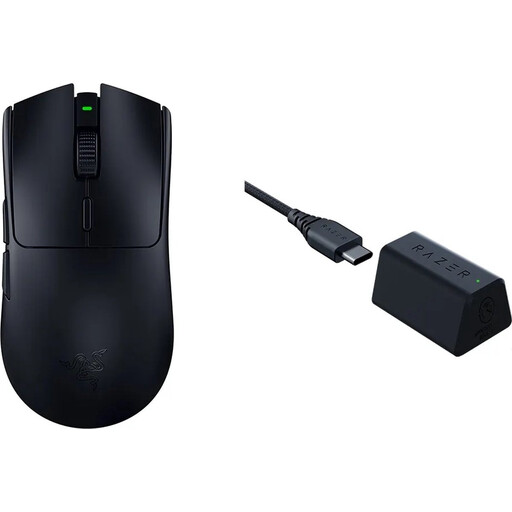
Razer DeathAdder V3 Pro + HyperPolling Wireless Receiver Bundle
Why This Fits Their Persona: Designed for esports athletes where every millisecond counts. Its ultra-lightweight build and refined ergonomic shape for right-handed users provide the speed and control needed at the highest level.
Instead of just offering a high DPI, the combination of the Focus Pro 30K sensor and the HyperPolling receiver delivers extremely low and stable latency. This isn't an empty marketing promise, but a technical advantage that makes a real difference in competitive games.
Razer HyperSpeed Wireless with a polling rate up to 8000Hz for unprecedented responsiveness. Ultra-lightweight (63g) and a proven ergonomic design.
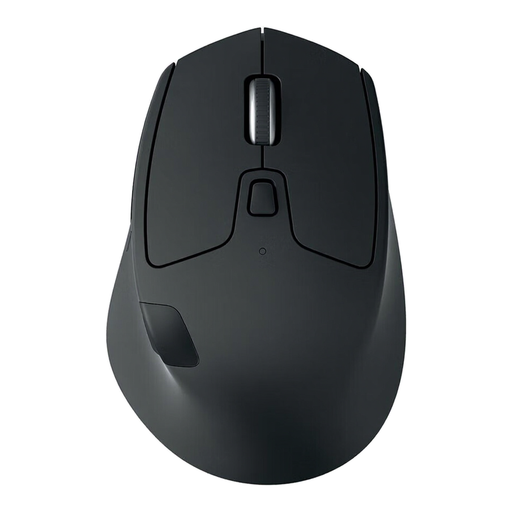
Logitech M720 Triathlon Wireless Right-hand Mouse
Why This Fits Their Persona: Perfect for those who seamlessly switch between a work laptop, a personal desktop, and even a tablet. Its comfortable shape is built for long, productive workdays.
This model avoids the 'false ergonomics' trap with a thoughtful, contoured design for right-handed users. The Easy-Switch technology solves the multi-device connectivity problem without the instability of a basic `bluetooth mouse`.
Switch between 3 devices with a single button (via Bluetooth or Unifying receiver). According to Logitech, the battery life lasts up to 24 months on a single AA battery.
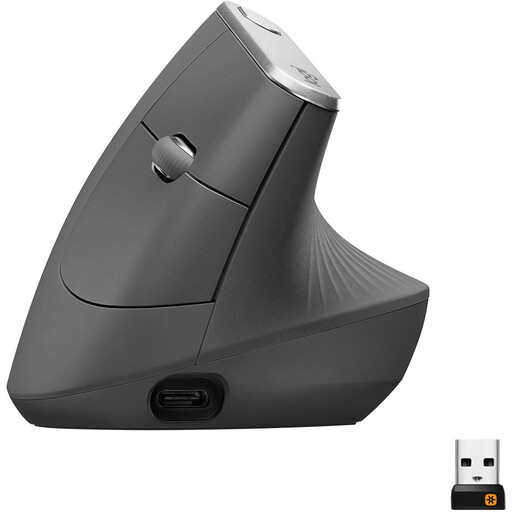
Logitech MX Vertical, Ergonomic Wireless Mouse
Why This Fits Their Persona: Ideal for anyone who spends long days at a computer and is actively looking to prevent or reduce wrist, arm, or shoulder strain.
This is a genuine `ergonomic mouse`, not a marketing gimmick. The unique 57-degree vertical angle is designed to reduce muscle strain by placing the hand in a natural 'handshake' position, which alleviates wrist pressure.
According to Logitech, the natural handshake position reduces muscle activity by 10%. The `rechargeable mouse` features a USB-C port and can connect to multiple devices.
Looking for more options?
We have compiled a complete, up-to-date list of products that fully meet these strict selection criteria and local regulations.
Frequently Asked Questions About Wireless Mice
How long does the battery of a rechargeable mouse last?
Battery life varies greatly by model and usage. An energy-efficient office mouse like the Logitech MX Vertical can last up to four months on a full charge, according to the manufacturer. A high-performance wireless gaming mouse with a high polling rate and RGB lighting consumes significantly more power and often has an active use time of 80 to 100 hours. In the long run, a rechargeable mouse is almost always more cost-effective and better for the environment than models with disposable batteries.
Is a Bluetooth mouse or a 2.4GHz mouse better for my laptop?
That depends on your use case. For general use, presentations, and on-the-go work, a bluetooth mouse is very convenient because you don't need a USB port for a dongle. For gaming or precision work like photo editing, a 2.4GHz laptop mouse with its own dongle provides a more stable and faster connection. Many premium mice now offer both options, so you can choose.
What is DPI and how much do I really need?
DPI (Dots Per Inch) is a measure of the mouse sensor's sensitivity. A higher DPI means the cursor moves faster across the screen. For a standard pc mouse for office work and browsing, a value between 800 and 1600 DPI is more than enough. Gamers often set their DPI between 1600 and 4000 for a good balance of speed and precision. Extremely high values of 10,000 or more are rarely practical and serve mainly as a marketing tool. The quality and accuracy of the sensor itself are far more important.