
Choosing the Right USB-C Cable: A Practical Guide for Your Devices
A drawer full of cables, yet none that can fast-charge your laptop. Or a charging cable that breaks after just a few months. Sound familiar? The switch to USB-C has brought many advantages, but also a dizzying array of choices. Not all USB-C cables are created equal. The wrong one can lead to slow charging or, worse, fail to work at all with more powerful devices like your laptop.
This article is your practical guide. We'll help you understand the specs that truly matter, so you can choose a cable that fits your devices and your needs. We'll highlight a few popular choices suitable for charging everything from an iPhone 15 charging cable to a Dell or HP laptop.
What to Look for When Buying a USB-C Cable?
To make the right choice, it's helpful to keep three key features in mind: power, durability, and compatibility.
1. Power and Fast Charging (Power Delivery)
Not every USB-C cable can charge your laptop. This comes down to its maximum power output, measured in Watts (W). A standard smartphone cable often delivers only 15-30W, which isn't enough for a laptop that requires 65W or even 100W.
Look for cables that support Power Delivery (PD). This is a charging protocol that ensures a fast and safe power supply to compatible devices. A fast-charging cable with PD and a 100W rating is a versatile choice that can efficiently charge both your Samsung smartphone and your MacBook Pro.
2. Durability and Length
A cable's lifespan is often determined by its exterior and connectors. A braided USB-C cable, typically made of nylon, is significantly stronger and more resistant to kinks and frays than a standard plastic cable. This is especially useful if you often take your cable on the go or use it heavily.
Also, consider the length. A 1-meter cable is fine for your desk, but a 2-meter USB-C cable offers significantly more freedom of movement. It's ideal for when the power outlet is just a bit too far from the couch or your bed.
3. Compatibility: USB-C to USB-C
Most modern devices, including the iPhone 15/16 series, Samsung Galaxy phones, and nearly all new laptops, use a USB-C to USB-C connection. This means you have the same connector on both ends of the cable. This type of cable generally supports the highest charging speeds and is the standard for the future. Always check if the cable is suitable for your specific devices, such as a laptop charging cable or a Samsung charging cable.
Recommended Products to Consider
Based on specifications like power, material, and versatility, we've rounded up a few options for you.
UGREEN USB 2.0 100W Braided Cable 2m
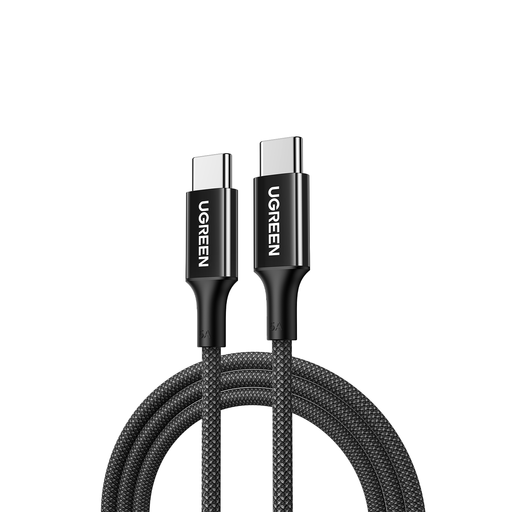
Why It Stands Out This cable from UGREEN is a true all-rounder. With a 100W power rating and Power Delivery support, it's powerful enough for most modern laptops, including models from MacBook, HP, and Dell. The 2-meter length and braided nylon design make it both practical and durable.
Pros
- High Power Output: 100W charging capacity for laptops, tablets, and smartphones.
- Durable Design: Strong, braided nylon exterior that resists kinks and wear.
- Practical Length: 2 meters for extra flexibility.
- Wide Compatibility: Suitable for a wide range of USB-C devices, from the iPhone 16 Pro to the Galaxy S24.
Who Is It For? For the user seeking one reliable cable for home, the office, and on the go. If you want to fast-charge both your laptop and smartphone and dislike short, fragile cables, this is a solid choice.
Check out the UGREEN 100W Cable
PAVAREAL Q59 3-in-1 Charging Cable
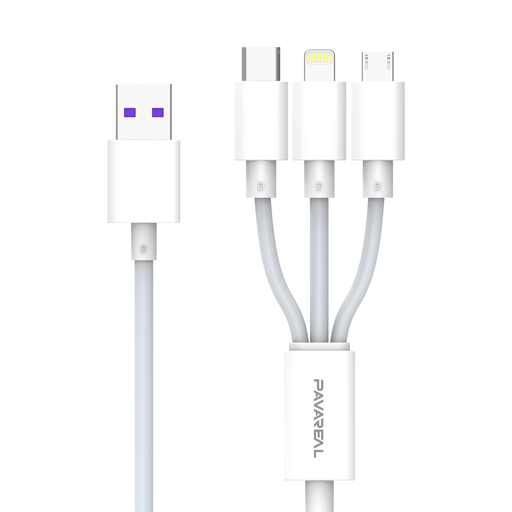
Why It Stands Out The PAVAREAL Q59 focuses on maximum versatility. This 3-in-1 cable combines connectors for Apple (Lightning), Android (Micro-USB), and modern Type-C devices into one. According to the manufacturer, the cable supports a combined output of up to 200W, distributed across the ports. This makes it a convenient solution for charging multiple devices simultaneously.
Pros
- 3-in-1 Design: One cable for different types of devices, ideal for reducing cable clutter.
- High Output (per manufacturer): The Type-C port supports fast charging for recent Apple and Android models.
- Convenient for Travel: Perfect for the car or trips when you have multiple gadgets with you.
Who Is It For? For households with a mix of devices (old and new) or for the person who always wants to be prepared. If you often charge devices for friends or family, or simply want one cable in your bag for everything, this cable offers a practical solution.
Check out the PAVAREAL Q59 Cable
Apple USB-C to USB-C Woven Charge Cable
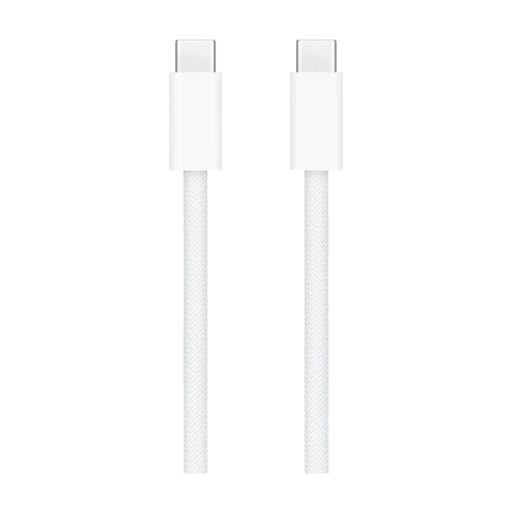
Why It Stands Out For Apple users, the official cable is often the logical choice. This version has been upgraded with a woven (braided) design, a welcome improvement in durability over the older plastic cables. It's engineered for seamless operation within the Apple ecosystem.
Pros
- Designed for Apple: Guarantees perfect compatibility and performance with MacBook, iPad, and iPhone.
- Woven Design: The durable, woven exterior has a premium feel and is more resistant to wear and tear.
- Sleek and Minimalist: Perfectly matches the aesthetic of Apple products.
Who Is It For? For the dedicated Apple user who values design, brand consistency, and guaranteed compatibility. If you're looking for a charging cable for your iPhone 15, iPad, or MacBook and prefer official accessories, this is the go-to choice.
Check out the Apple USB-C Cable
Looking for Other Options?
Didn't find the perfect cable for you here? Sometimes you need a specific length, color, or a different technical specification. For a broader overview of available cables, you can browse our full selection.
Frequently Asked Questions
Can I use any USB-C cable for any device?
For standard, low-speed charging, most USB-C cables will work with most devices. However, for fast charging and powering high-draw devices like a laptop, you need a cable that supports the required power output (wattage) and the Power Delivery (PD) protocol. Always check the specifications of both the cable and your device.
What's the difference between a USB-C and a Thunderbolt cable?
Although they use the same connector, there's a major difference in functionality. Thunderbolt cables are designed for extremely high data transfer speeds (up to 40 Gbps) and connecting external monitors and docks. A standard USB-C cable is primarily focused on charging and basic data transfer (typically 480 Mbps for USB 2.0). For most users who just need a fast-charging cable, a regular USB-C cable is sufficient and more cost-effective.
How do I know if my cable supports fast charging?
Look for terms like Power Delivery (PD) and the maximum power rating, such as 100W, in the product description. Manufacturers usually state this information clearly on the packaging or product page. To achieve maximum speed, you'll need a compatible fast charger (adapter) in addition to the right cable.