
USB 3.2 Stick: The Right Choice for High-Speed Data Transfer in 2026
Buying a new USB stick seems simple until you look at the specifications. A stick that's too slow, has the wrong connector, or offers insufficient storage can lead to frustration and lost time. Especially when working with large files, it's easy to make a poor purchase. This article will help you understand the technical details and choose a model that matches your specific needs, without unnecessary marketing jargon.
What to Look for When Buying a High-Speed USB Stick?
To make an informed decision, it's helpful to understand a few key specifications. These parameters determine the performance and usability of the flash drive.
Speed: USB 3.2 in Practice
The term USB 3.2 refers to a generation of USB standards. Within this standard, there are different speeds:
- USB 3.2 Gen 1: Offers a theoretical speed of up to 5 Gbps (approximately 625 MB/s). This is a significant improvement over the older USB 2.0 standard and is suitable for most daily tasks.
- USB 3.2 Gen 2: Increases the speed to 10 Gbps (approximately 1,250 MB/s).
- USB 3.2 Gen 2x2: Doubles this further to 20 Gbps (approximately 2,500 MB/s) by using two data lanes.
Actual performance depends on the read and write speeds of the stick itself, expressed in megabytes per second (MB/s). A high-speed USB stick with fast read and write speeds is crucial for seamlessly transferring large files like 4K videos, extensive photo collections, or software installations.
Storage Capacity: How Many GB Do You Need?
The required capacity depends entirely on your usage.
- 64GB - 128GB: Sufficient for documents, presentations, and a limited number of photos.
- 256GB USB stick: A balanced choice for students and professionals who regularly need to carry larger files, such as project folders and software.
- 512GB USB stick or more: Essential for creatives, gamers, and users who work with very large files, such as RAW video footage, game installations, or complete system backups.
Connectors: USB-A, USB-C, or a Dual-Connector USB Stick?
The physical connector is a key factor for compatibility.
- USB-A: The traditional, rectangular connector found on most computers and laptops.
- USB-C stick: The newer, oval, and reversible connector. This is standard on modern laptops (including MacBooks), tablets, and smartphones.
- Dual-connector USB stick: These models feature both a USB-A and a USB-C connector. This offers maximum flexibility for data transfer between older and newer devices without needing an adapter.
Material and Build Quality
A metal USB stick often provides better durability and heat dissipation than a plastic version. Some models offer extra protection against water, shocks, magnetic fields, and X-rays, which increases the reliability of your external storage.
Our Recommendations for a USB 3.2 Stick in 2026
Based on the criteria above, we have selected models with clear, functional features.
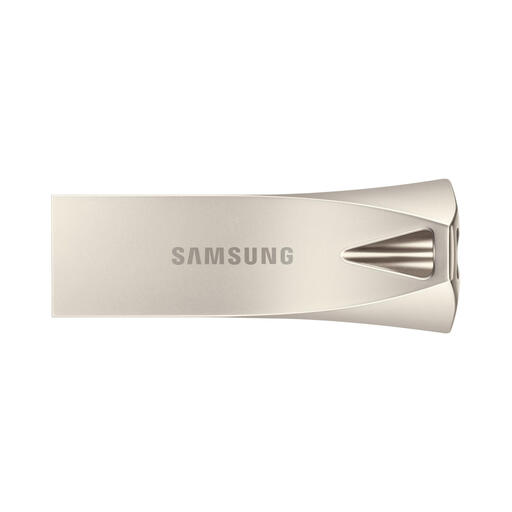
Samsung MUF-512BE USB Flash Drive 512GB (USB-A)
Why This Product?
This Samsung USB stick combines a large storage capacity of 512GB with a robust, metal casing. The USB 3.2 Gen 1 interface ensures solid performance for general use.
Advantages
- High Capacity: With 512GB, there is ample space for large projects, backups, and media collections.
- Fast Transfer: A read speed of up to 400 MB/s makes file transfers efficient.
- Durable Design: The metal casing is capless and features an integrated key ring.
- Comprehensive Protection: According to Samsung, the stick is protected against water, shocks, extreme temperatures, magnets, and X-rays.
Who Is This For?
This model is ideal for users who need a reliable and durable memory stick with plenty of storage for devices with a traditional USB-A port, such as PCs and older laptops.
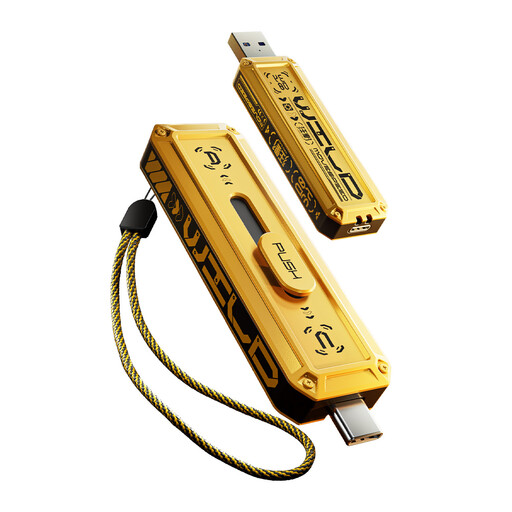
MOVESPEED USB Flash Drive 256GB (Dual USB-A & USB-C)
Why This Product?
This dual-connector USB stick from MOVESPEED is geared towards maximum performance and versatility. With a USB 3.2 Gen 2x1 interface and both a USB-A and a USB-C connector, this is an extremely high-speed USB stick for the demanding user.
Advantages
- Extreme Speed: With read speeds up to 1090 MB/s and write speeds up to 1030 MB/s, 1GB files can be transferred in about a second.
- Dual Interface: The USB-A and USB-C ports provide seamless compatibility with a wide range of devices, from laptops to smartphones.
- Robust Build: The zinc alloy housing and sliding mechanism protect the connectors from dust and impacts.
- Capacity: The 256GB is a practical size for quickly moving active project files.
Who Is This For?
This is the definitive choice for professionals, content creators, and tech enthusiasts who require the highest possible transfer speeds and frequently exchange data between devices with different USB ports.
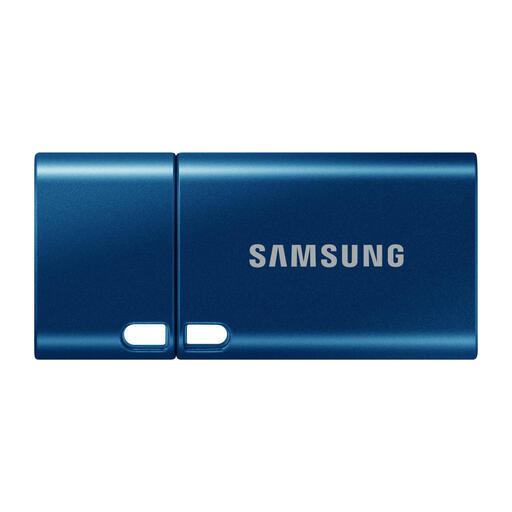
Samsung MUF-512DA USB Flash Drive 512GB (USB-C)
Why This Product?
This USB-C stick from Samsung is designed for the modern user. Its ultra-slim and lightweight design makes it a discreet companion for the latest generation of laptops, tablets, and smartphones, while offering a massive 512GB of capacity.
Advantages
- Compact and Lightweight: Weighing just 3.4 grams and featuring a very small form factor, this stick is extremely portable.
- Focused on USB-C: Designed for direct connection to modern devices without adapters.
- Good Performance: Offers a read speed of up to 400 MB/s via the USB 3.2 Gen 1 interface.
- Reliable Protection: Like other models in the series, Samsung claims protection against water, shocks, temperature, magnets, and X-rays.
Who Is This For?
Perfect for users of MacBooks, ultrabooks, Android smartphones, and tablets who are looking for a compact, high-capacity flash drive that plugs directly into their device.
Didn't Find a Match? Explore More Options
The right choice depends on your specific devices and usage. If these models aren't exactly what you're looking for, perhaps because you prefer a different capacity or design, a wider range is available.
Check out our full range of memory sticks for more options in capacity, speed, and design.
Frequently Asked Questions About USB 3.2 Sticks
What is the difference between USB 3.2 Gen 1 and Gen 2? The main difference is speed. USB 3.2 Gen 1 has a maximum theoretical speed of 5 Gbps, while USB 3.2 Gen 2 doubles this to 10 Gbps. For transferring extremely large files, such as 8K video files, a Gen 2 stick can make a noticeable difference, provided that both the stick and the device's port support this standard.
Is a USB 3.2 stick compatible with an older USB 2.0 port? Yes, USB 3.2 is backward compatible. You can plug a USB 3.2 stick into a USB 2.0 port without any issues. However, the transfer speed will be limited to the maximum speed of the USB 2.0 port, which is significantly lower (around 480 Mbps).
Why does my USB stick get hot during use? It is normal for a high-speed USB stick, especially a model with a metal casing, to become warm during intensive use, such as transferring large amounts of data. The metal casing helps to dissipate the heat generated by the internal components. Avoid touching the stick immediately after a long, intensive transfer.
Written by the Joybuy Product Recommendation Officer