
Keyboard and Mouse Combos: A Practical Buying Guide
A good keyboard and mouse combo is the foundation of a productive workspace. Yet, the search is often frustrating. The market is flooded with sets that promise the world but fall short in practice. Before you invest in a new combo, it's wise to look beyond the marketing hype. We'll discuss the most common pitfalls and provide objective guidelines for your choice.
The 3 Pitfalls of Choosing a Keyboard and Mouse Combo
Many sets look fine at first glance, but problems only reveal themselves after a few weeks of use. Pay attention to the following points to avoid buyer's remorse.
- The "Silent" Set That Annoys Colleagues: Many manufacturers label their products as 'silent', but this is not a protected term. A silent keyboard and mouse combo might be acceptable in a quiet home environment, but it can still be a distraction in an open-plan office. The sound of the spacebar or a noisy scroll wheel is often overlooked.
- The Unstable Wireless Connection: Nothing is as disruptive as a stuttering cursor or keystrokes that don't register. A wireless keyboard and mouse is convenient, but a cheap or poorly implemented Bluetooth connection can be a source of constant frustration. This is especially true in environments with many other wireless signals.
- The Ergonomic Mirage: A set may look modern and sleek, but an unnatural wrist posture or a mouse that's too flat can lead to discomfort or even pain over time. A truly ergonomic combo goes beyond a trendy design; it supports your hands and wrists during long workdays.
What to Look For: Core Specifications Explained
To avoid the pitfalls, focus on the specifications that truly matter. These are the three most important factors that determine the user experience.
1. Connection Type: Wireless or Wired?
Choosing a wireless set for a clutter-free desk seems obvious, but the technology behind it varies.
- 2.4GHz RF (with USB dongle): This is often the most stable wireless option. The connection is direct and typically suffers from less delay (latency). The downside is that you sacrifice a USB port for the dongle.
- Bluetooth keyboard: Connects directly to your laptop or PC without a dongle. Many modern sets can pair with multiple devices simultaneously, which is ideal if you switch between a laptop, tablet, and PC, for example. The stability can sometimes be slightly less than with a 2.4GHz connection.
- Wired: The most reliable and secure option. No batteries, no connection issues. An excellent choice if you have a fixed workstation and seek maximum reliability.
2. Key Switch Type: Feel and Sound
The type of switch under the keys determines the typing experience and noise level.
- Membrane: This is the most common type in a standard office keyboard and mouse. The keys feel soft and are relatively quiet.
- Scissor-switch: Known from laptops. These keys are flatter and more stable than membrane keys, providing a precise and often quiet keystroke.
- Mechanical: Prized for their distinct feedback and durability. They come in different variants: loud and clicky (blue), tactile but quieter (brown), or linear and smooth (red). Red switches are often a good choice for those seeking a quieter mechanical experience.
3. Size and Layout
The physical layout should match your workflow.
- Full-size (100%): Includes a numeric keypad. Indispensable for those who work extensively with numbers, such as in finance or data entry.
- Tenkeyless (TKL): A more compact model without the numeric keypad. This provides more space for the mouse, which can be more ergonomically advantageous.
- Compact (75% or 60%): Even smaller, without function keys or arrow keys in a separate block. Popular with minimalists and people who are often on the go.
Recommended Products to Consider
Based on the criteria above, we have selected a few combos that suit different user profiles.
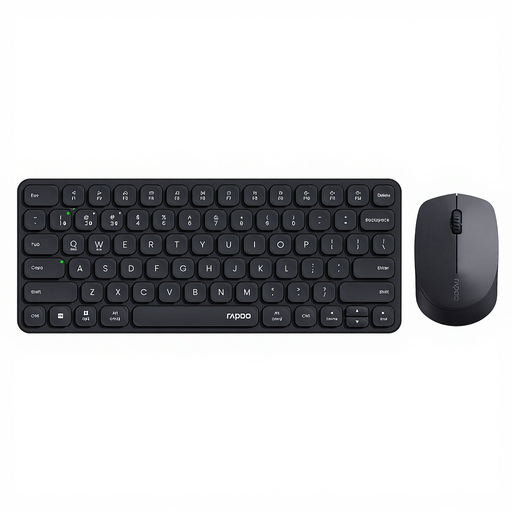
RAPOO 9010M Multi-Device Keyboard and Mouse Combo - Black
Why This Fits Their Persona: Ideal for students and remote workers who seamlessly switch between a laptop, tablet, and PC. The combination of 2.4GHz and Bluetooth offers flexibility for any situation, without breaking the bank.
This set tackles the connection problem by offering both a stable 2.4GHz dongle and Bluetooth 4.0/5.0. You can pair up to 4 devices and switch with a button, which eliminates the frustration of constant re-pairing.
The scissor-switch keys and silent mouse clicks make this set suitable for shared spaces. The mouse's DPI is adjustable, which is useful for precision work.
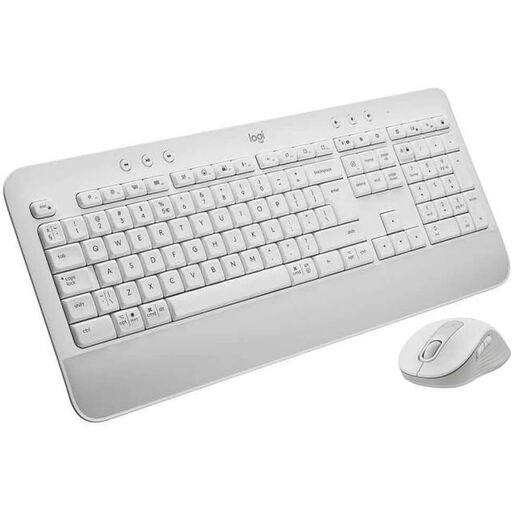
Logitech MK650 Keyboard Mouse Set White
Why This Fits Their Persona: For professionals who spend hours typing every day. This Logitech combo is designed for comfort, with an integrated palm rest and a mouse that fits comfortably in the hand. A reliable choice for the office.
This set addresses the pitfalls of 'false silence' and 'poor ergonomics'. The mouse features SilentTouch technology, which Logitech claims reduces click noises by 90%. The palm rest provides genuine support and prevents an unnatural posture.
The Logi Bolt USB receiver ensures a secure and stable wireless connection. The battery life is exceptionally long, with up to 36 months for the keyboard and 24 months for the mouse.
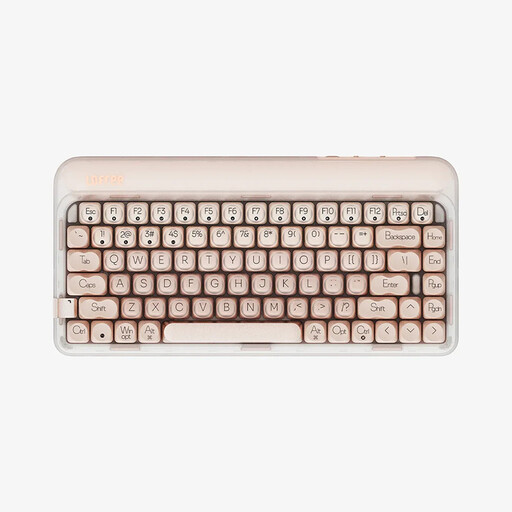
Lofree OE914 75% Mechanical Tri-Mode Keyboard + Free Gift Mouse
Why This Fits Their Persona: For the creative professional or enthusiast who wants more than a standard plastic set. This mechanical keyboard combines a premium typing experience with a striking design and comes with a matching mouse.
This is not a 'silent' set, but instead embraces the superior typing experience of mechanical keys. The Gasket-mount structure and sound-dampening layers create a refined, soft sound rather than a hollow, loud click. The tri-mode connectivity (wired, 2.4GHz, Bluetooth) ensures reliability.
The keyboard is hot-swappable, meaning you can replace the switches without soldering to customise the typing experience. The 75% layout is compact but retains the function keys.
Looking for More Options?
We have compiled a complete, up-to-date list of products that fully meet these strict selection criteria and local regulations.
Frequently Asked Questions
What is the lifespan of a wireless keyboard and mouse combo?
The lifespan depends on two things: the battery and the physical build quality. For batteries, manufacturers often provide an estimate, ranging from a few months to as long as three years. Sets with rechargeable batteries are a sustainable option. The physical lifespan of the keys is expressed in millions of keystrokes. A set from a well-known brand with membrane or mechanical keys will typically last for years with normal office use.
Is a Bluetooth keyboard and mouse combo good enough for office work?
Yes, for most office tasks, a modern Bluetooth keyboard combo is perfectly suitable. The technology has improved greatly in recent years. The biggest advantage is the convenience of connecting without a dongle and switching between devices. For tasks that require absolute precision and zero latency, such as competitive gaming or professional graphic design, a set with a 2.4GHz RF connection or a wired set may be a more reliable choice.
How do I clean my keyboard and mouse?
Always turn off or unplug the devices before you begin. Use a slightly damp (not wet) microfibre cloth with a mild cleaner to wipe the surfaces and the mouse. For dirt between the keys, you can use compressed air or a soft brush. Avoid harsh chemicals and ensure no liquid gets inside the devices, even if they are described as 'spill-resistant'. Regular cleaning extends the lifespan and is more hygienic.