
Choosing the Right Controllers: A Guide to Avoiding Buyer's Remorse
A good controller is the difference between a frustrating and an immersive gaming experience. But the market is flooded with options, and it's easy to fall into the trap of clever marketing or unclear specifications. Before you invest in a new gamepad or joystick, it's crucial to know what to look for. Many gamers make the same mistakes, ending up with a controller that develops issues after just a few months or doesn't work properly with their favourite platform.
Here, we'll discuss the most common pitfalls and the key specifications to help you choose a controller that fits your setup and playstyle.
The 3 Pitfalls of Buying a Controller
The selection is vast, and not every controller is worth its price. Watch out for these common problems to avoid a bad purchase.
- The 'Stick Drift' Plague: The most frustrating issue is 'stick drift', where your character or camera moves without you touching the analogue stick. This is caused by wear and tear on the internal sensors (potentiometers) found in many standard controllers. Cheaper models are especially susceptible, quickly rendering your controller unusable.
- Vague Compatibility: A controller is often marketed as "PC compatible," but in practice, this can mean you're reliant on unofficial software or that key features like vibration or the gyroscope don't work. A true PC controller should work out of the box without a complicated setup. The same applies to controllers that claim to work with Nintendo Switch, PS5, or Xbox but don't support all features.
- Paying for Useless 'Pro' Features: Some 'pro controllers' justify their high price with features that look impressive but add little value. Think excessive RGB lighting that drains your wireless controller's battery or programmable buttons so awkwardly placed that you never use them.
Core Specifications You Need to Check
To sidestep the pitfalls above, focus on a few technical specifications that truly make a difference.
Connectivity: Wireless or Wired?
The choice between a wired and a wireless controller depends on your preference.
- Wired: Offers the lowest input lag (latency) and you never have to worry about a dead battery. Ideal for competitive gamers in a fixed setup. Pay attention to the cable length.
- Wireless (Bluetooth / 2.4GHz): Gives you freedom of movement. Bluetooth is convenient for connecting to multiple devices like PCs, tablets, and phones. A 2.4GHz dongle often provides a more stable and faster connection than Bluetooth, which is important for serious PC gaming. Battery life is a critical factor here.
Joystick Technology: Hall Effect vs. Potentiometer
This is the most important specification for preventing 'stick drift'.
- Potentiometers: This is the traditional technology. Physical contact between parts measures movement, but this contact inevitably leads to wear and, consequently, 'stick drift'.
- Hall Effect Sensors: This modern technology uses magnets to determine the stick's position. Because there is no physical contact, there is virtually no wear and tear. Controllers with Hall Effect sticks have a significantly longer lifespan and remain accurate.
Platform Support
Always verify that the controller offers official, full support for your platform. For example, a PS5 controller like the DualSense has unique features (haptic feedback, adaptive triggers) that only work fully on the PS5 and a growing number of PC games. An Xbox controller is known for its seamless 'plug-and-play' experience on Windows PCs. For specific genres, like flight simulators, a specialised flight stick or HOTAS system is a better investment than a standard gamepad.
Our Recommendations for Different Gamers
Not every gamer needs the same thing. Here are some options tailored to specific profiles.
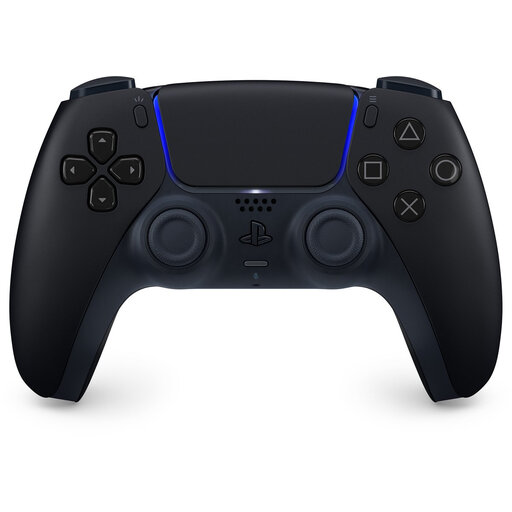
Sony PlayStation PS5 DualSense Wireless Controller - Midnight Black
Why This Fits Their Persona: This gamer plays on a PS5 and regularly switches to a PC. They want a high-quality, reliable controller with modern features that works well on both platforms.
It bypasses the 'vague compatibility' pitfall. Sony provides official PC support via Bluetooth and USB-C, and a growing number of PC games support the DualSense's unique features.
The haptic feedback and adaptive triggers offer a noticeably more immersive experience in supported games, an objective advantage over standard vibration.
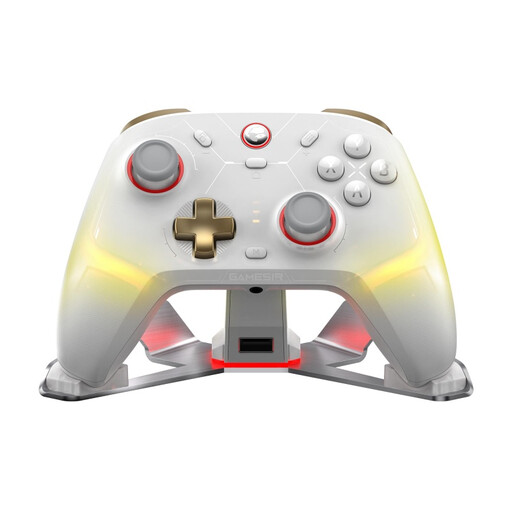
GameSir Cyclone 2 Multiplatform Controller
Why This Fits Their Persona: This player is looking for an edge in competitive games on PC, Switch, and mobile. Precision, durability, and low latency are essential. They want a pro controller without paying for unnecessary frills.
Directly tackles the 'stick drift' plague with Hall Effect sticks. The focus is on performance (high polling rate, microswitch buttons) rather than purely cosmetic extras.
The combination of Hall Effect sticks for durability and a high polling rate (1000Hz) for rapid response is a tangible advantage in fast-paced games. Tri-mode connectivity (cable, 2.4G, Bluetooth) offers maximum flexibility.
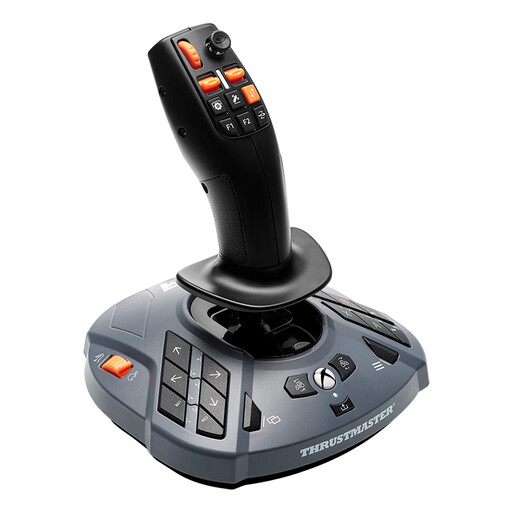
Thrustmaster SimTask FarmStick X Black USB 2.0 Joystick
Why This Fits Their Persona: This user primarily plays simulation games like Farming Simulator or construction sims. A standard gamepad doesn't offer enough buttons or the right level of immersion for operating heavy machinery.
This isn't a generic controller, but a specialised joystick. It avoids the vague compatibility pitfall by offering 'Plug & Play' functionality in Farming Simulator 25.
The multi-function design with 33 configurable buttons and a 3-axis stick is specifically engineered for the complex controls of farming and construction vehicles, something a standard gamepad cannot provide.
Looking for more options?
We have compiled a complete, up-to-date list of products that fully meet these strict selection criteria and local regulations.
Frequently Asked Questions
What is 'stick drift' and how can I prevent it?
'Stick drift' is a hardware problem where your controller's analogue sticks register input even when you're not touching them. The most effective way to prevent this is to choose a controller with Hall Effect sensors in the joysticks. These use magnets instead of physical contact points, which significantly reduces wear and the likelihood of drift.
Does a PS5 or Xbox controller just work on my PC?
Generally, yes, but with some differences. An Xbox controller is natively recognised by Windows and almost always works instantly (plug-and-play). A PS5 DualSense controller also works on PC via Bluetooth or a USB cable, but to use advanced features like adaptive triggers, the game must specifically support it. For some games or older titles, additional software like DS4Windows or Steam Input may be required for full functionality.
Is a more expensive 'pro controller' worth the money?
That depends on your needs. A pro controller can be worth the investment if you play competitively and will actually use the extra features. These can include programmable back buttons, swappable sticks, trigger stops for faster actions, and Hall Effect technology. For the average casual gamer, the benefits are often limited, and a quality standard controller will suffice. Assess whether the 'pro' features solve a problem you actually experience while gaming.