
ASUS ROG Pelta Gaming Headset: A Complete Buying Guide
Buying a new gaming headset can sometimes feel like navigating a minefield of marketing promises. You're looking for a model that works perfectly with your PC, PlayStation 5, and your phone, but you end up with a headset that stutters, fits uncomfortably, or has a microphone that drives your teammates crazy. Many gamers fall into the same traps: they overpay for features they don't use or choose a model that becomes unusable after just three months.
Before you make a decision, it's important to recognise the most common missteps:
- The "Universal" Connectivity Trap: A headset is marketed as compatible with everything, but in practice, this often means a slow Bluetooth connection with noticeable delay (latency) on your console, or a USB dongle that has poor compatibility with your other devices.
- Comfort That Only Exists on Paper: A headset might look sleek, but after an hour of gaming, it feels like a vice grip on your head. Too much weight, a hard headband, or non-breathable ear cushions can ruin long gaming sessions.
- The Subpar Microphone: You can hear every detail in the game perfectly, but your friends complain that you sound like you're communicating from a submarine. A good headset with a microphone for gaming is essential for team-based games.
With these points in mind, we'll help you make an informed choice that suits your gaming style.
What to Look For: Breaking Down the Core Specs
To avoid a bad purchase, it's crucial to look beyond the packaging. Focus on the specifications that truly matter for your use case.
Connectivity: Wireless, Wired, or Both?
The way you connect a headset determines its flexibility and performance. The ASUS ROG headset line, and specifically the Pelta, often offers multiple options in this area.
- 2.4GHz Wireless (via USB dongle): This is the gold standard for a serious wireless gaming headset for PS5 and PC. It provides a low-latency connection, meaning there's no noticeable delay between what happens in the game and what you hear. Ideal for competitive games.
- Bluetooth: A Bluetooth gaming headphone is convenient for connecting to your phone, tablet, or Nintendo Switch. It's perfect for on-the-go use or for games where a millisecond of delay is less critical.
- Wired (USB-C): A USB-C headset for PC and console offers the most stable, latency-free connection, and you never have to worry about a dead battery. Many modern headsets use USB-C for both data and charging.
A model that combines these three modes, like the ASUS ROG Pelta, offers the most flexibility for a gamer who plays on multiple platforms.
Comfort for Long Gaming Sessions
A comfortable gaming headset isn't a luxury, but a necessity. Pay attention to the following features:
- Weight: A lighter headset (around 300 grams) is generally more comfortable for extended use.
- Headband: An adjustable headband with soft padding distributes weight evenly and prevents pressure points.
- Ear Cushions: Materials like memory foam and breathable fabric help reduce heat buildup and conform to your head for a better fit and passive noise isolation.
A Microphone That Won't Annoy Your Teammates
For online gaming, clear communication is essential. A good microphone has a unidirectional pickup pattern, which means it primarily captures your voice and ignores background noise. Features like noise cancellation can help with this. A detachable microphone is a plus if you also want to use the headset for music.
Gaming Picks for Every Player
Not every gamer needs the same thing. Below are some popular choices tailored to specific user profiles.
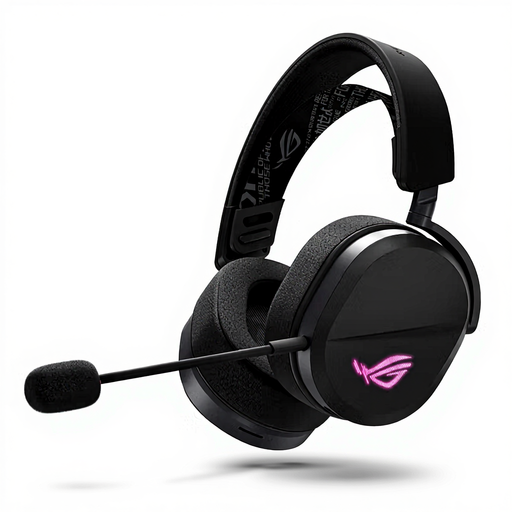
ASUS ROG Pelta Headset Wired & Wireless Head-band Gaming USB Type-C Bluetooth Black
Why This Fits Their Persona: Ideal for the serious gamer who seamlessly switches between a PC, PlayStation 5, Nintendo Switch, and smartphone. This headset is designed for flexibility without compromising on performance.
Tackles the connectivity trap by offering three separate modes: 2.4GHz for lag-free gaming, Bluetooth for mobile convenience, and wired via USB-C as a backup. You choose the right tool for the right job.
The tri-mode connectivity (2.4GHz, Bluetooth, USB-C) and broad compatibility make this an all-in-one solution. Its light weight (309g) and comfortable headband are geared towards long gaming sessions.

Trust GXT 491 Fayzo Headset Wired & Wireless Head-band Gaming USB Type-C Bluetooth Black
Why This Fits Their Persona: For the gamer seeking a versatile wireless headset with a great price-to-performance ratio who also values sustainability. Suitable for PC and PlayStation.
Offers clear dual wireless functionality (2.4GHz and Bluetooth) so you know what you're getting. Comfort is a key focus, with soft ear cushions and an adjustable headband, avoiding the comfort trap.
According to the manufacturer, the headset is made from 85% recycled plastic. The battery life of up to 22 hours and the detachable microphone make it a practical choice for daily use.
![VoxorAI KM08 White Wired Headphones [With Sound Card for Real-time Monitoring]](https://images4.joy-sourcing.com/product/s512x512_jfsintlpro-000-product/t1/4294967296/1769472/6109817587735/1166199/6a5990ceEf4866012/42b10752b5083d5e.png)
VoxorAI KM08 White Wired Headphones [With Sound Card for Real-time Monitoring]
Why This Fits Their Persona: This is more than a headset; it's an audio tool for aspiring streamers, podcasters, or karaoke enthusiasts who need features like real-time monitoring and voice changing.
This product avoids the subpar microphone trap by specialising in audio recording. The built-in sound card is a feature you won't find in standard gaming headsets.
The built-in sound card for real-time monitoring is the main advantage. It offers features for live streaming, karaoke, and recording that go beyond what a typical gaming headset can do.
Looking for more options?
We have compiled a complete, up-to-date list of products that fully meet these strict selection criteria and comply with local regulations.
Frequently Asked Questions
Can I connect a USB-C gaming headset directly to my PS5?
Yes, the PlayStation 5 has a USB-C port on the front where you can directly connect a compatible USB-C headset for PC and console. This provides a high-quality digital audio connection. The same applies to the Nintendo Switch in handheld mode.
What is the difference between 2.4GHz wireless and Bluetooth for gaming?
The main difference is latency (delay). A 2.4GHz wireless gaming headset uses a dedicated USB dongle for a fast, stable connection with very low latency, which is crucial for gaming. Bluetooth is more universal and convenient for mobile devices but generally has higher latency, which can lead to a noticeable delay between video and audio in fast-paced games.
How important is comfort really for a gaming headset?
Extremely important. An uncomfortable headset leads to distraction, headaches, and irritation, which directly impacts your gaming experience. A comfortable gaming headset with a good design allows you to focus entirely on the game, even during marathon sessions lasting several hours. It's a factor you should never underestimate.