
Buying an All-in-One Printer: Our Recommendations
A printer that jams just when you need to print an important document. Expensive cartridges that always run out at the worst possible moment. Or a stack of paper you have to scan manually, sheet by sheet. Sound familiar? A good all-in-one printer is the solution for your home or office. This device can not only print but also scan and copy, saving you space, time, and often money.
However, the selection is vast. That's why we at Joybuy have compared the specifications of various models. In this article, we'll guide you with practical tips and a selection of popular models, so you can make an informed choice that suits your needs.
What to Look for When Buying an All-in-One Printer?
Before you buy a printer, it's helpful to know which specifications are important for you. Pay special attention to the following two points.
Tip 1: Ink Tank or Cartridges – What Suits Your Usage?
The ink system is one of the most critical choices and directly impacts the cost per page.
- Printers with cartridges: These models, often inkjet printers, have a lower purchase price. They are an excellent choice if you only print occasionally, for example, for a school report or a return label. The cartridges contain a limited amount of ink and need to be replaced relatively often.
- Printers with refillable ink tanks (Ink Tank): These printers are more expensive to buy, but the cost per page is significantly lower. You refill the tanks yourself with ink from bottles. Do you print documents weekly or even daily for your home office or family? Then a printer with ink tanks is often more cost-effective in the long run.
Tip 2: Essential Features for Home and Office
Modern printers offer more than just printing. Consider which features are essential for you.
- Connectivity: A wireless printer with Wi-Fi is the standard today. It allows you to easily print from your laptop, tablet, or smartphone without the hassle of cables.
- Automatic two-sided printing (duplex): This feature automatically prints on both sides of the paper. This saves paper and is useful for printing reports or longer documents.
- Automatic Document Feeder (ADF): A printer with a scanner is standard in an all-in-one, but an ADF is a valuable extra. It allows you to scan or copy a stack of paper in one go. This is a very useful feature for a home office printer where documents need to be digitised regularly.
Popular All-in-One Printer Choices
Based on features and use cases, we have highlighted a few models worth considering.
HP Smart Tank 7305 Wireless All-in-One
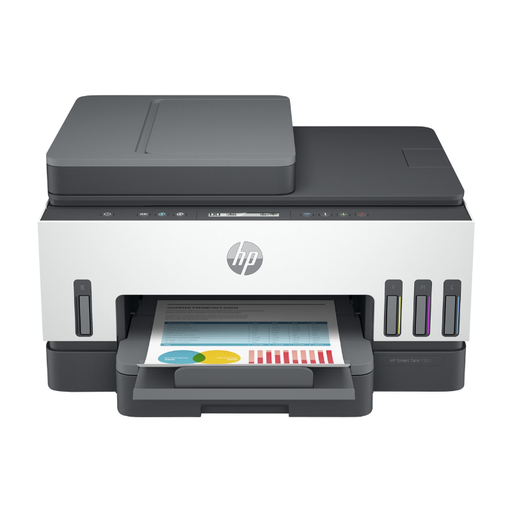
Why this model stands out The HP Smart Tank 7305 is designed for productivity. With its refillable ink tanks and automatic document feeder, this is a workhorse for a busy household or a small office. According to HP, you can print up to 12,000 black-and-white pages or 8,000 colour pages with the included ink, keeping the cost per page very low.
Advantages
- Low printing costs: Thanks to the efficient ink tank system.
- Automatic Document Feeder (ADF): Effortlessly scan or copy stacks of up to 35 sheets.
- Automatic two-sided printing: Saves paper and time.
- Extensive connectivity: Equipped with dual-band Wi-Fi, Bluetooth, and Ethernet.
- Sustainability: Made with over 25% recycled plastic.
Who is this model for? Ideal for remote workers, freelancers, and families who regularly print, scan, and copy a variety of documents and value efficiency and low running costs.
HP Smart Tank 7005 Wireless All-in-One
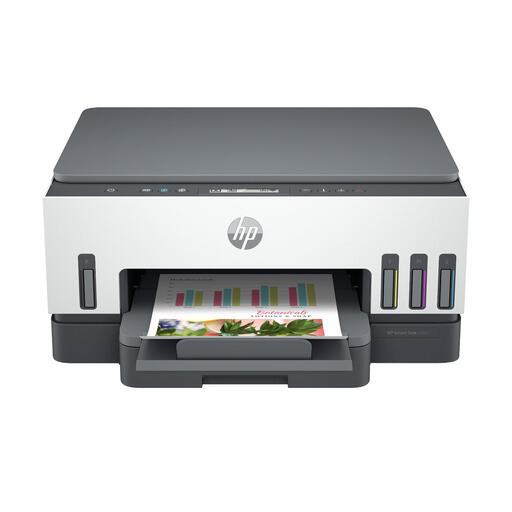
Why this model stands out The HP Smart Tank 7005 shares many of the advantages of the 7305, such as the cost-effective ink tank system and high print quality. The main difference is the lack of an Automatic Document Feeder (ADF). This makes the model slightly more compact and affordable.
Advantages
- Very low cost per page: Identical ink tank system to the 7305.
- Automatic two-sided printing: Standard feature for efficient paper use.
- Reliable wireless connection: Dual-band self-healing Wi-Fi for a stable connection.
- Simple operation: Smart, illuminated buttons guide you through tasks.
- High capacity: Paper tray for 250 sheets.
Who is this model for? An excellent choice as a home printer for families and students who print a lot and want the low costs of an ink tank printer but don't need an automatic document feeder for scans or copies.
HP DeskJet 2920 All-in-One Inkjet Printer
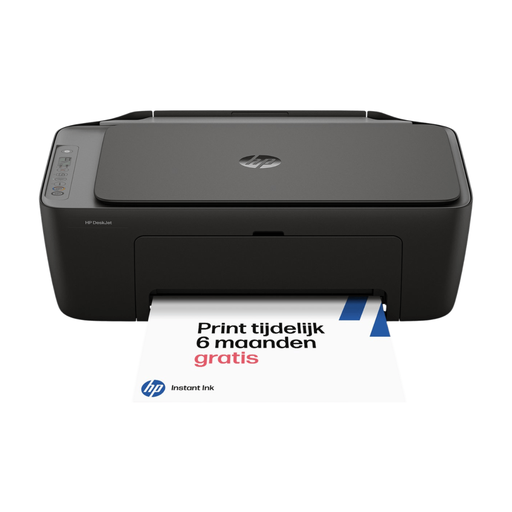
Why this model stands out This compact and stylish HP printer is an accessible all-in-one for basic use. The DeskJet 2920 uses traditional cartridges and is compatible with HP Instant Ink, a subscription service that automatically sends new cartridges before the old ones run out.
Advantages
- Compact and affordable: Low purchase price and a small footprint that fits on almost any desk.
- Easy setup and use: The printer can be quickly set up and operated from your phone via the HP Smart app.
- Wireless printing: Equipped with Wi-Fi for printing from various devices.
- Sustainable design: Housing made from at least 70% recycled plastic.
Who is this model for? Perfect for students or small households looking for an affordable, compact all-in-one printer for occasional printing, scanning, and copying.
Looking for Other Options?
The right printer depends entirely on your personal needs. The models listed above provide a good starting point for different users. Are you curious about other models or want to compare more specifications?
Then check out our full range of inkjet printers and find the printer that's right for you.
Frequently Asked Questions
1. What is the difference between an inkjet and a laser printer? An inkjet printer sprays liquid ink onto paper and is generally better at printing images and colour photos. A laser printer uses toner (powder) and heat, and is often faster and more economical for printing large volumes of text. Most all-in-one printers for home use are inkjet printers.
2. Is a wireless printer with Wi-Fi easy to install? Yes, installing a modern wireless printer is typically very straightforward. Manufacturers like HP offer dedicated apps (such as the HP Smart app) that guide you through the process step by step. You connect the printer to your Wi-Fi network, after which you can print from any device on that same network.
3. How many pages can I print with one set of ink? This depends heavily on the type of printer. With a cartridge-based printer, this can range from about 100 to several hundred pages. With an ink tank printer, like the HP Smart Tank series, this can be up to thousands of pages with the ink included in the box. The exact yield is stated by the manufacturer in the specifications of the cartridges or ink bottles.