
All-in-One PC Guide for a Clutter-Free Desk and More Productivity
Tired of that tangle of cables under your desk? A traditional desktop with a separate tower, monitor, and countless cords can be an eyesore, especially in a modern home or office. An All-in-One PC offers an elegant and practical solution. All components are neatly integrated into the monitor's housing, creating a minimalist and tidy workspace.
As a Joybuy Product Recommendation Officer, I'm here to help you make an informed decision. In this article, we'll discuss what to look for when making a purchase and highlight several popular models suited for various needs, from working from home to family use.
What to Look for When Buying an All-in-One Computer
Before you make a choice, it's wise to consider a few key specifications. This ensures you select a model that perfectly matches your requirements.
1. Display: Size and Quality
The display is the centrepiece of your All-in-One PC. Most models feature a screen size between 23 and 27 inches. A 24-inch all-in-one PC is a popular choice, offering a great balance between ample screen real estate and a compact footprint. Pay attention to the resolution as well. Full HD (1920x1080 pixels) is fine for everyday tasks, but for photo editing or working with multiple windows side-by-side, a QHD display (2560x1440 pixels) will provide a noticeably sharper image.
2. Performance: Processor and Memory
The processor is the brain of the computer. For an all-in-one PC for working from home—where you'll mainly be word processing, emailing, and video conferencing—an Intel Core i3 or a comparable processor will suffice. Need more processing power for multitasking or more demanding software? Then look for a model with an Intel Core i5 and at least 16 GB of RAM. Storage is also crucial; an SSD (Solid State Drive) ensures that the computer and its programs boot up significantly faster than a traditional hard drive.
3. Connectivity and Ease of Use
A desktop with a built-in screen is designed for convenience, but always check if it has enough ports for your peripherals. Consider USB ports for your mouse, keyboard, or external hard drive, and possibly an HDMI port if you want to connect a second monitor. Built-in webcams and microphones are standard nowadays, making these computers ideal for video meetings. It's the ultimate space-saving PC that's ready to use right out of the box.
Our Top Product Recommendations
Based on specifications and functionality, we have compiled a list of compelling options for you.
MSI Modern AM242TP 1M-1229EU
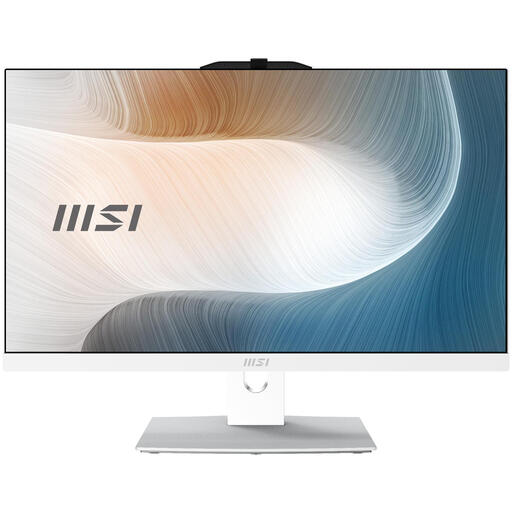
Why It Stands Out The MSI Modern AM242TP is distinguished by its sleek, white design and its 23.8-inch Full HD touchscreen. This makes navigation intuitive and fast, similar to a tablet. The matte screen coating reduces reflections, which is easy on the eyes during long work sessions.
Pros
- Touchscreen: Offers added convenience for quick interactions.
- Processor: Equipped with an Intel Core 3 100U processor, suitable for daily tasks and multitasking.
- Connectivity: Features modern Wi-Fi 6E for a fast and stable wireless connection.
- Operating System: Comes with Windows 11 Pro, which provides additional security and management features for business use.
Who Is It For? This model is an excellent choice for professionals and families seeking a versatile and stylish computer for administrative tasks, media consumption, and video calls. The touchscreen adds a layer of interactivity that can be particularly useful in a family environment.
View the MSI Modern AM242TP 1M-1229EU
HP 24-inch All-in-One 24-cr0057nd
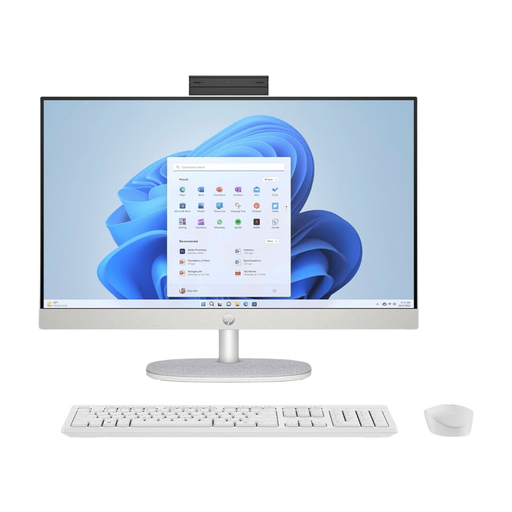
Why It Stands Out With this model, HP focuses on both performance and sustainability. According to the manufacturer, the design is partly based on recycled materials, including recycled coffee grounds. The powerful 13th generation Intel Core i5 processor and ample memory make this a true powerhouse for demanding users.
Pros
- Powerful Performance: The combination of a Core i5 processor, 16 GB DDR4 RAM, and a fast 512 GB SSD ensures a smooth experience, even with heavy multitasking.
- Privacy-Focused: The tiltable pop-up privacy camera can be easily hidden when not in use.
- Excellent Display: The 24-inch FHD IPS screen with 99% sRGB colour gamut delivers vibrant and accurate colours, ideal for creative projects.
- Complete Package: Comes with a wireless keyboard and mouse combination.
Who Is It For? This HP All-in-One is perfect for the serious remote worker or small business owner who needs a reliable and fast computer. Its powerful specifications make it suitable for more than just basic tasks, including light photo and video editing.
View the HP 24-inch All-in-One 24-cr0057nd
For the Power User: The DELL UltraSharp U3425WE Monitor as a Foundation
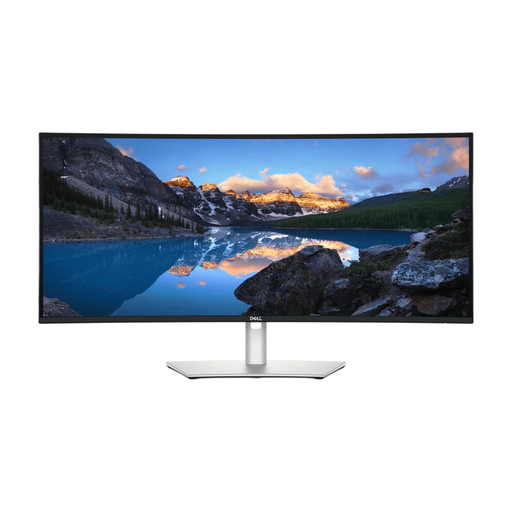
Why It Stands Out While not strictly an All-in-One PC, this monitor forms the core of an exceptionally powerful and minimalist workspace. By combining it with a compact mini-PC or laptop, you create a setup that merges the benefits of an All-in-One (few cables, sleek design) with the flexibility of separate components. The enormous 34-inch curved WQHD screen offers a panoramic view for ultimate productivity.
Pros
- Immense Workspace: The 3440 x 1440 resolution on a 21:9 aspect ratio allows you to comfortably use multiple applications side-by-side.
- Top-Tier Connectivity: With Thunderbolt 4, you can charge your laptop, transmit video, and connect to the network and other USB devices with a single cable.
- High-Quality Display: The IPS Black panel delivers deep blacks and a high contrast ratio, while the 120 Hz refresh rate ensures smooth motion.
- Built-in Hub: Functions as a docking station with numerous ports, including USB-C, HDMI 2.1, and an RJ45 network port.
Who Is It For? For the professional who demands maximum screen real estate and flexibility. Think data analysts, programmers, or creatives who want to build a modular yet tidy workspace that is more powerful and versatile than a standard All-in-One.
View the DELL UltraSharp U3425WE Monitor
Looking for More Options?
The world of All-in-One computers is diverse. Many models offer unique features that can enhance your workflow. Are you specifically looking for a model with touch controls for an even more direct interaction?
Then check out our full range of PCs with touchscreens for more choices.
Frequently Asked Questions
What is the advantage of an All-in-One PC? The main advantages are its space-saving design and clean aesthetic. Because all the hardware is built into the monitor, you don't need a separate computer tower. This results in fewer cables and a simpler setup: just plug it in and you're ready to go.
Is an All-in-One PC good for working from home? Yes, for most work-from-home scenarios, an All-in-One PC is an excellent choice. They are ideal for administrative tasks, email, web browsing, and video conferencing, thanks to the often-included built-in webcam, microphone, and speakers.
Can I upgrade an All-in-One PC later? Upgrade options are generally more limited than with a traditional desktop. In many cases, you can replace or expand the RAM or storage (SSD). However, the processor and graphics card are usually soldered to the motherboard and cannot be upgraded. It is therefore important to choose a model at the time of purchase that is future-proof enough for your needs.