
Choosing a 60% Mechanical Keyboard in 2026: What to Look For?
A compact keyboard offers a clean aesthetic and saves valuable desk space. But switching to a smaller form factor raises questions. Aren't you sacrificing too much functionality? Is a 60% mechanical keyboard practical for daily use, or is it just for a specific niche? The fear of making the wrong purchase is real, especially if you're used to a full-size keyboard.
This article serves as a practical guide. We'll explain the key differences, analyse the specifications you need to watch for, and present a selection of models that strike a great balance between compactness and functionality.
Buyer's Guide: How to Select a Compact Mechanical Keyboard
Before making a choice, it's crucial to understand the core specifications. These will define your user experience for both work and gaming.
Form Factor: 60% vs. 65% Layout
The term '60% keyboard' is often used as a catch-all for compact models without a numpad. However, there are important distinctions.
- Standard 60%: This is the most minimalist form factor. It lacks function keys (F1-F12), arrow keys, and the navigation cluster (Home, End, Page Up/Down). These functions are typically accessible via an
Fnkey combination. - 65% Layout: A popular variant that is slightly larger but offers a crucial advantage: it retains the arrow keys. Models like the MageGee MK-Box use a 68-key layout, which is technically closer to 65%. This offers the best of both worlds: a mini mechanical keyboard that still includes essential navigation keys.
Mechanical Switches: Red vs. Blue
The switch is the mechanism under each key, determining the typing feel and sound. The two most common types are Red and Blue.
- Keyboard with Red Switches: These switches are linear. They have no tactile 'bump' or audible click when pressed. The keystroke is smooth from top to bottom. This makes them popular for gaming, as they allow for rapid, repeated keystrokes without resistance. They are also quieter, making them more suitable for office environments.
- Keyboard with Blue Switches: These switches are tactile and clicky. You feel a distinct bump and hear a loud click with every keystroke. This provides satisfying, typewriter-like feedback that many typists appreciate. However, the sound can be considered disruptive in a shared space.
Connectivity and Layout
Most compact keyboards in this category are wired keyboards. A model with a detachable USB-C cable is practical for transport and replacement. Also, pay attention to the key layout. The QWERTY US layout is the standard for programming and gaming in many regions, and most mechanical keyboards follow this arrangement.
Our Recommendations for a 60% Mechanical Keyboard
Based on the criteria above, we have selected two variants of the MageGee MK-Box. Both models feature a 68-key layout, which is a practical upgrade from a strict 60% design.
1. MageGee MK-Box - Grey/Black with Blue Switches
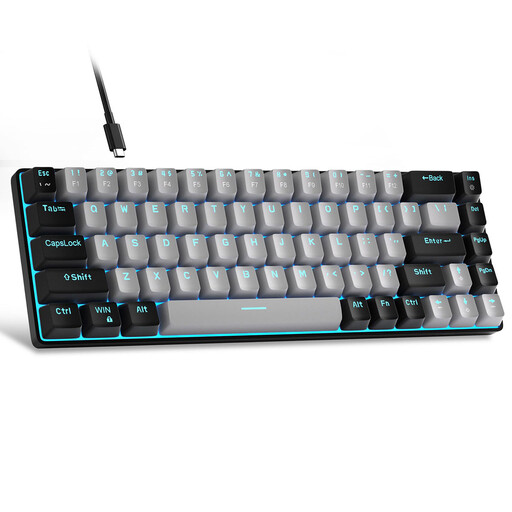
Why this product This model combines a compact form factor with the classic, satisfying feedback of Blue switches. The 68-key layout ensures you don't compromise on navigation, thanks to the dedicated arrow keys. It's a robustly built compact gaming keyboard with a metal panel and double-shot injection keycaps for durability.
Pros
- Tactile Feedback: The Blue switches provide a distinct, audible click with every press.
- Functionally Compact: Retains arrow keys in a small footprint.
- Gaming-Ready: Features full n-key rollover and anti-ghosting, meaning every keystroke is registered, even during rapid combinations.
- LED Backlit Keyboard: Blue LED backlighting with approximately 15 adjustable modes.
Who is this for? This keyboard is ideal for users who do a lot of typing and appreciate the physical and auditory feedback of a mechanical keyboard. Think of programmers, writers, and gamers who prefer a 'clicky' feel.
View product details and price
2. MageGee MK-Box - Sky Blue with Red Switches
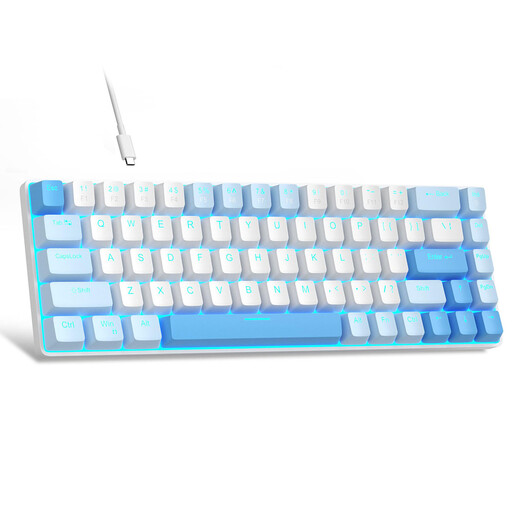
Why this product This version of the MK-Box is equipped with Red switches, providing a smooth and quiet typing experience. Its linear action makes it an excellent choice for fast-paced games and for use in noise-sensitive environments like an office or a dorm room. The sky-blue colour scheme gives it a unique and fresh look.
Pros
- Quiet and Smooth Keystrokes: The Red switches are linear and have minimal resistance.
- Fast Response: Ideal for games that require rapid, repeated actions.
- Striking Design: The combination of white and sky blue stands out from standard black or grey keyboards.
- Plug-and-Play: Works instantly on Windows and Mac without needing any driver installation.
Who is this for? This model is perfect for gamers seeking a competitive edge with fast, linear switches. It's also an excellent choice for professionals who want to use a mechanical keyboard in the office without disturbing colleagues.
View product details and price
Complete Your Minimalist Setup
A compact keyboard is a major step towards a clean and efficient desk. But a productive workspace is more than just a small keyboard. Proper lighting is just as important. It reduces eye strain, improves focus, and contributes to a calm and pleasant atmosphere. Optimising your desk isn't just about minimising objects; it's about creating an environment that is both functional and comfortable.
Looking for more ways to enhance your workspace? Good office lighting is an essential next step. Explore our selection for a more productive and comfortable environment.
Frequently Asked Questions
What is the difference between a 60% and a 65% keyboard? A 60% keyboard omits the arrow keys and the function row for the smallest possible form factor. A 65% keyboard, like the 68-key MageGee MK-Box, is slightly larger but retains the crucial arrow keys, which is a practical advantage for many users.
Are mechanical keyboards better for gaming? Mechanical keyboards generally offer faster response times, greater durability, and better feedback than standard membrane keyboards. Features like N-key rollover ensure all keystrokes are registered correctly, which can be an advantage in competitive games. Choosing a specific switch type (e.g., linear Reds for speed) can further optimise the gaming experience.
Can I replace the keycaps on a MageGee MK-Box? Yes, the MageGee MK-Box uses a standard layout and switches with an MX-style stem. This means you can replace the keycaps with most aftermarket keycap sets that are compatible with Cherry MX switches, offering opportunities for further personalisation.
Written by: Joybuy Product Recommendation Officer
Our recommendations are based on the analysis of product parameters and specifications to help you make an informed choice.