
Buyer's Guide to 4K Wireless Gaming Mice for Precise Performance
If you're serious about PC gaming, you know that every millisecond counts. A good mouse isn't a luxury; it's an essential part of your setup. However, the gaming mouse market is saturated with marketing terms and specifications that often confuse more than they clarify. Before you invest in a new 4K wireless gaming mouse, it's crucial to know what to look for to prevent buyer's remorse.
As a Joybuy Product Recommendation Officer, I'm here to help you separate fact from marketing fiction. Here are the most common pitfalls and the specifications that truly matter.
The Pitfalls: How Marketing Can Mislead You
Many gamers fall for the same traps, lured by impressive numbers that add little practical value. Watch out for the following:
- The DPI Obsession: Brands boast about extremely high DPIs, like a 26000 DPI gaming mouse or even more. While a high DPI can be useful, most professional players use a setting between 400 and 3200 DPI. An absurdly high number is often a marketing gimmick that says nothing about the sensor's actual quality and precision.
- Vague "Zero-Latency" Claims: The term "zero-latency" is technically impossible for a wireless device. What really matters is the polling rate, measured in Hertz (Hz). A higher polling rate means the mouse reports its position to the computer more frequently, resulting in a smoother, more responsive experience.
- Underestimating Weight: A mouse packed with the latest technology can still hinder your performance if it's too heavy. A lightweight gaming mouse reduces fatigue and enables faster, more precise movements, which is crucial in fast-paced games.
Core Specifications: What You Should Focus On
Focus on the specifications that make a direct and noticeable difference in your gameplay.
Polling Rate: The Speed of Your Mouse
The polling rate is how often your mouse reports its position to your PC per second.
- 125 Hz: Standard for office mice. Insufficient for serious gaming.
- 1000 Hz: The gold standard for most gaming mice. Reports 1,000 times per second (every 1ms).
- 4000 Hz (4K): The new standard for competitive players. A high polling rate gaming mouse at 4K reports every 0.25ms. This provides visibly smoother cursor movement and a near-instant response to your clicks. Note: A 4K polling rate requires a more powerful CPU, but this is not an issue for most modern gaming PCs.
Sensor: The Heart of Precision
Look beyond just DPI. The sensor itself determines accuracy. A sensor like the PAW 3398 sensor mouse is known for its flawless tracking, with no unwanted acceleration or stuttering. This type of sensor ensures your movements are translated 1-to-1 on the screen, which is essential for consistent aim.
Shape and Weight: Comfort for Long Sessions
Your mouse should feel like an extension of your hand. A lightweight gaming mouse (ideally under 75 grams) reduces strain on your wrist. Additionally, the shape is crucial. Are you left- or right-handed? An ambidextrous gaming mouse offers a symmetrical design that is comfortable for both hands, often with programmable buttons on both sides.
Our Product Recommendations
Below is a selection of products matched to specific user profiles, based on their objective specifications.
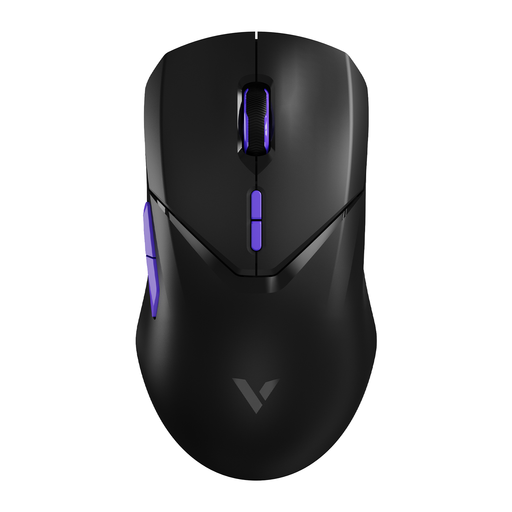
RAPOO VT9Pro 4K Wireless Gaming Mouse
Why This Fits Their Persona: For the player where every fraction of a second counts. This mouse is designed for maximum performance in competitive games like Valorant or Apex Legends, where reaction speed is the difference between winning and losing.
This mouse doesn't just focus on a high DPI; it combines it with a true 4000Hz polling rate and a top-tier PAW 3398 sensor. This delivers a measurable advantage instead of just a marketing number.
4K polling rate for extremely low latency. Ultralight 68-gram weight for fast, effortless movements. Long battery life of 180 hours according to the manufacturer.
RAPOO VT9Pro 4K Wireless Gaming Mouse
Why This Fits Their Persona: Left-handed gamers are often overlooked. This model offers a symmetrical, ambidextrous gaming mouse design, giving them access to pro-level specs without compromising on comfort or functionality.
Many high-end mice are exclusively ergonomic for right-handers. The VT9Pro breaks this mould by offering a perfectly symmetrical shape, making it a fully-fledged esports mouse for everyone.
True ambidextrous shape for both left- and right-handed use. Programmable buttons for a personalized setup. The same top-tier specifications as the best right-handed mice.
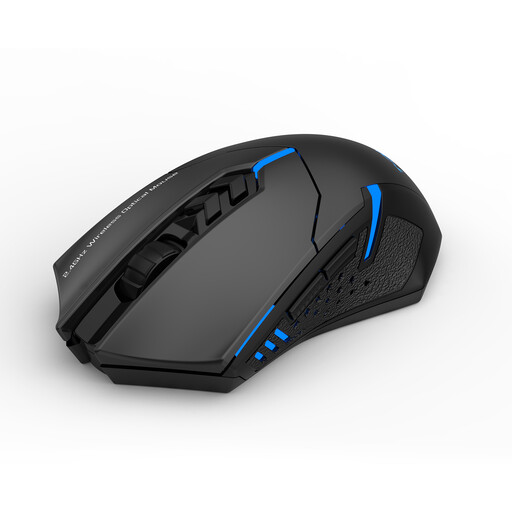
ET Wireless Gaming Mouse
Why This Fits Their Persona: Ideal for those seeking a reliable wireless experience for both gaming and daily use without paying a premium. The silent buttons are a major plus for use in shared spaces like a dorm room or living room.
This mouse doesn't make unrealistic promises. Instead, it delivers practical features that add immediate value, such as adjustable DPI levels and silent clicks, which is far more useful than an unused high DPI figure.
Silent buttons to avoid disturbing others. Simple plug-and-play setup. Adjustable DPI for versatility between gaming and work.
Looking for More Options?
We have compiled a complete, real-time list of products that fully satisfy these strict selection criteria and UK safety regulations.
Frequently Asked Questions
Does a 4K polling rate really make a difference for my games?
Yes, especially in fast-paced shooters (like Valorant, CS:GO) and other competitive games. It provides smoother cursor movement and faster registration of your clicks. The difference is most noticeable on high-refresh-rate monitors (144Hz and above). Be aware: it does demand slightly more from your CPU, but for most modern gaming PCs, this is not an issue.
How important is the weight of a gaming mouse?
Very important. A lightweight gaming mouse (typically under 80 grams) reduces strain on your wrist and arm. This allows you to play comfortably for longer and make faster, more precise 'flick shots'. While it is a matter of personal preference, many professional players favour lighter models for maximum agility.
What is the difference between a cheap and an expensive wireless gaming mouse?
The difference lies mainly in the sensor, polling rate, build quality, and weight. More expensive models, like an esports mouse, often feature a superior sensor (such as the PAW 3398) for flawless tracking, a higher and more stable polling rate, and are made from lighter, more durable materials. Cheaper models are fine for casual gaming, but for competitive play, investing in a high-end model can make a noticeable difference in consistency and performance.