
4K TV Stick: The 2026 Guide to Making Your Old TV Smart
Do you have a 4K television with a slow or outdated smart system? Or a TV with no smart features at all? You're not alone. It's a common problem: the screen is still perfect, but the software can't keep up with the latest streaming apps. Buying a new TV is an expensive and often unnecessary step. A 4K TV stick is a simple and cost-effective solution to upgrade your existing television and get instant access to all your favourite content.
This article will help you make the right choice. We'll discuss the key specifications to look for and highlight a few specific models based on their technical parameters.
What to Look For in a 4K Media Streamer?
Before you purchase a 4K streaming stick, it's helpful to understand a few technical specifications. These determine the performance and user experience.
- Resolution and HDR: A 4K stick must be able to output a resolution of 3840 x 2160 pixels. Also, look for support for HDR formats like HDR10+ and Dolby Vision. These technologies provide higher contrast and more vibrant colours, provided your television also supports them.
- Operating System: The interface is determined by the operating system, such as Fire OS (Amazon) or an Android TV-based system (Xiaomi). Check if the system provides access to the apps you use, like Netflix, Prime Video, Disney+, YouTube, and local services. A device is sometimes called a Netflix stick, but most sticks support a much broader range of services.
- Processor and Memory: A smooth user experience depends on the processor and RAM. A quad-core processor and at least 2 GB of RAM are recommended for navigating menus smoothly and launching apps quickly, without any lag.
- Connectivity: For stable streaming to your TV in 4K quality, a good internet connection is essential. Wi-Fi 6 is the latest standard and offers higher speeds and more stability than older Wi-Fi versions, which is especially advantageous in congested network environments. Bluetooth is useful for connecting wireless headphones or a game controller.
- Audio Support: For an immersive audio experience, support for formats like Dolby Atmos is a plus. This creates a three-dimensional soundscape, provided you have a compatible soundbar or home cinema system.
Our Top Picks for 2026
Based on the criteria above, we have selected two popular models. We will analyse the products based on their specifications to help you make an informed decision.
Amazon Fire TV Stick 4K (2024)
Why This Product
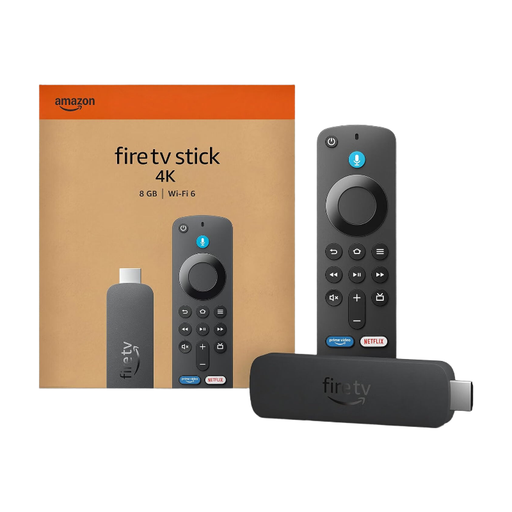
The Amazon Fire TV Stick 4K (2024 model) is a powerful smart TV stick that stands out with its support for Wi-Fi 6. This ensures a very stable and fast connection, which is crucial for streaming 4K content without buffering. The device runs on Fire OS, a clean and intuitive operating system with access to a wide range of apps. The included Alexa Voice Remote allows you to search for films and series or open apps using your voice.
Pros
- Connectivity: Support for Wi-Fi 6 for faster and more stable streaming.
- Picture and Sound Quality: Compatible with 4K Ultra HD, Dolby Vision, HDR10+, and Dolby Atmos.
- Voice Control: Integrated Alexa functionality for hands-free operation.
- Processor: A fast 1.8 GHz quad-core processor ensures a smooth interface.
Who Is This For?
This model is an excellent choice for users who want the best possible streaming performance and value the latest Wi-Fi technology. It's also ideal for people who are already in the Amazon ecosystem or prefer voice control via Alexa.
View the Amazon Fire TV Stick 4K (2024) on Joybuy.nl
Xiaomi TV Stick with 4K Support
Why This Product
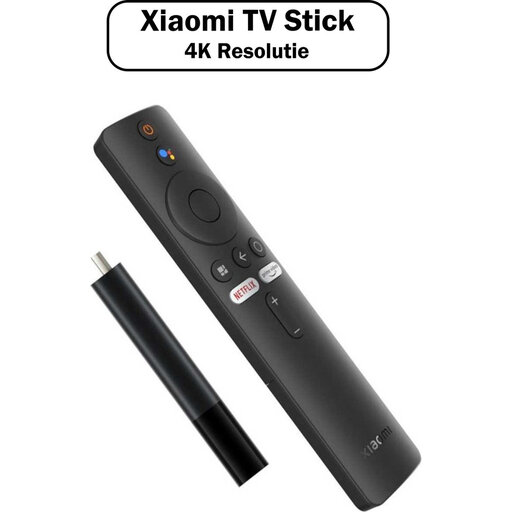
The Xiaomi TV Stick 4K offers a complete and user-friendly experience. The device runs on an operating system based on Android TV, which many users find intuitive and familiar. The stick comes with a quad-core processor, 2 GB of RAM, and 8 GB of storage—specifications that ensure smooth performance. A practical advantage is the included HDMI extender cable, which makes installation easier if your TV's HDMI port is hard to reach.
Pros
- User-Friendliness: The Android TV-based interface is clean and easy to use.
- Complete Set: Comes with an HDMI extender cable for flexible installation.
- Solid Performance: The combination of a quad-core processor and 2 GB of RAM is more than enough for fluid 4K streaming.
- Connectivity: Supports both 2.4GHz and 5GHz Wi-Fi and Bluetooth 5.2.
Who Is This For?
This stick is a great option for anyone looking for a no-nonsense solution that works right out of the box. The familiar interface and complete package make it an accessible choice for anyone who wants to make their old TV smart without any hassle.
View the Xiaomi TV Stick with 4K Support on Joybuy.nl
Didn't Find What You're Looking For? Explore More Options
The TV sticks discussed above are popular choices, but the selection is wider. Perhaps you're looking for a model with more storage, specific ports, or a different operating system. Every streaming device has its own unique features. If these models don't fully meet your needs, it's worth exploring the full range.
View all our streaming devices
Frequently Asked Questions about 4K TV Sticks
1. Can I use a TV stick on any TV? Yes, essentially. The only requirement is that your television has an available HDMI port. To play 4K content, you will of course need a 4K television, but a 4K stick also works on a Full HD (1080p) TV. The picture quality will then be automatically adjusted to the TV's maximum resolution.
2. What is the difference between a TV stick and a Chromecast? A TV stick is a standalone device with its own operating system and remote control. You install apps directly on the stick and navigate the menus with the remote. A traditional Chromecast has no interface or remote; you 'cast' content from your smartphone, tablet, or computer to the TV. However, the newer 'Chromecast with Google TV' models function as a fully-fledged TV stick, with their own interface and remote.
3. Do I need a subscription to use a TV stick? No, a subscription is not required to use the TV stick itself. You will need subscriptions for the streaming services you want to watch, such as Netflix, Disney+, or HBO Max. There are also many free apps available, such as YouTube.