
1TB External Hard Drives: Buying Guide and Recommendations
A full laptop, slow backups, or the need to safely carry important files, photos, and games with you. Sound familiar? A 1TB external hard drive is often the solution. With 1 terabyte (1000 GB) of extra space, you can store thousands of photos, hours of video, or a sizable game collection. But not all drives are created equal. The choice can be overwhelming, with terms like SSD, HDD, USB 3.2, and NVMe.
This guide is designed to help you. As a Joybuy Product Recommendation Officer, I'll cut through the specs and help you make a choice that fits your needs, without the unnecessary marketing jargon. We'll look at the most important features and highlight a few popular choices.
What to Look for in a 1TB External Drive?
Before we dive into the products, here are a few key points to make your decision easier.
Speed: 1TB External SSD or Traditional HDD?
The most critical choice is between a Solid State Drive (SSD) and a Hard Disk Drive (HDD).
- HDD (Hard Disk Drive): This is the traditional technology with spinning platters. HDDs are typically more affordable and offer a lot of storage for their price. They are an excellent choice for archiving files or creating backups where speed isn't the top priority.
- SSD (Solid State Drive): A 1TB external SSD uses flash memory, similar to a USB stick but much faster and more reliable. A portable SSD is more shock-resistant because it has no moving parts. If you're looking for a fast external hard drive for transferring large files, editing videos, or loading games, an SSD is the recommended option.
Connection and Compatibility: PC, Mac, or PS5?
Modern external drives typically use a USB-C connection and support standards like USB 3.2. This ensures high transfer speeds. However, pay attention to compatibility with your devices.
- External hard drive for Mac: Most drives are formatted for Windows (NTFS) by default. To use a drive on both Mac and Windows, it's best to format it to the exFAT file system.
- External hard drive for PS5: You can use an external drive to play PS4 games directly from it and to store PS5 games. To play a PS5 game, however, you must first move it back to the console's internal storage. A fast SSD is recommended here for shorter loading times.
Ruggedness for On-the-Go Use
Do you use your drive frequently on the go? Then a rugged external hard drive is a wise choice. Some models, particularly SSDs, are specifically designed to withstand drops, bumps, and even water and dust. An IP rating (e.g., IP65) indicates the degree to which the housing is protected.
Popular Choices for 1TB External Storage
Below is a selection of 1TB external drives that stand out for their specific features.
Samsung T7 Shield 1TB (MU-PE1T0R)
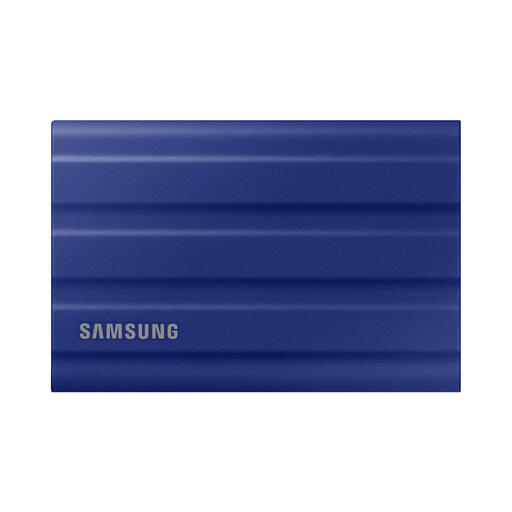
Why it stands out The Samsung T7 Shield is a rugged external hard drive that combines speed with durability. Its rubberised housing offers protection, and its specifications are geared for performance.
Advantages
- Speed: With read and write speeds of up to 1,050 MB/s and 1,000 MB/s respectively, you can transfer large files in seconds.
- Durability: The drive has an IP65 rating for dust and water resistance and is rated by Samsung to withstand drops of up to 3 metres.
- Compatibility: Works with PCs, Macs, Android devices, and game consoles.
Who is it for? This Samsung external SSD is ideal for photographers, videographers, and travellers who need a reliable and fast drive that can withstand the elements. It's also a great choice for fast external storage for consoles.
ADATA HV300 1TB
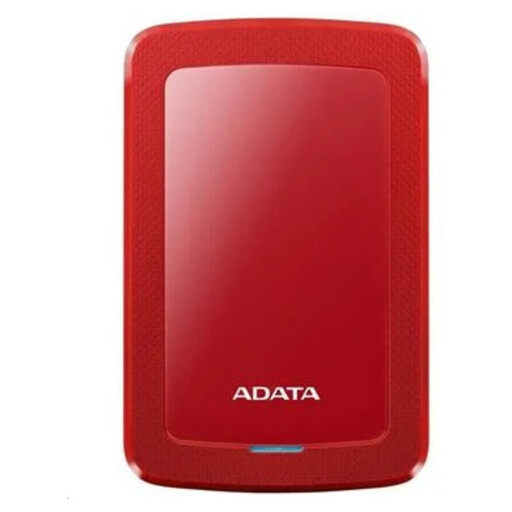
Why it stands out The ADATA HV300 is a traditional HDD that distinguishes itself with its ultra-slim design and accessible price point.
Advantages
- Compact: At just 10.3 mm thick, this is one of the slimmest external hard drives on the market. It fits easily into a bag or even a pocket.
- Protection: Equipped with shock sensors that pause drive activity during a sudden impact, helping to protect your data.
- Ease of Use: Plug-and-play functionality for both Windows and Mac (after a potential reformat).
Who is it for? Perfect for students and home users looking for an affordable solution for backups and storing documents, music, and movies. Less suitable for intensive tasks that require high speeds.
Samsung T9 1TB (MU-PG1T0B)
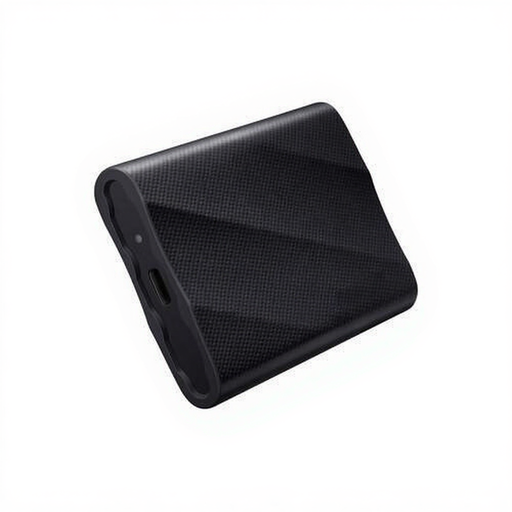
Why it stands out The Samsung T9 is built for maximum performance. Thanks to its USB 3.2 Gen 2x2 interface, this portable SSD achieves speeds nearly twice as high as many other external SSDs.
Advantages
- Extreme Speed: Offers read and write speeds of up to 2,000 MB/s, which is ideal for editing 4K/8K video directly or transferring massive project files in a flash.
- Temperature Control: Samsung's Dynamic Thermal Guard technology helps prevent overheating and maintain performance during intensive use.
- Rugged and Compact: Despite its speed, the T9 is compact and, according to the manufacturer, drop-resistant up to 3 metres.
Who is it for? This fast external hard drive is the choice for professionals and tech enthusiasts who demand the absolute most from their storage. Think video editors, 3D artists, and gamers who want to minimise loading times.
Haven't Found the Right Drive Yet?
This selection provides a snapshot of the options available for a 1TB external hard drive. Are you looking for a different capacity, another brand, or a model with specific features? Many more options are available.
For a broader overview of different models and capacities, you can browse our full range.
View all Hard Drives on Joybuy
Frequently Asked Questions
What is the main difference between an external SSD and an HDD?
In short: an SSD is significantly faster, quieter, and more shock-resistant, but often has a higher price per gigabyte. An HDD offers more storage space for less money but is slower and more fragile due to its moving parts.
Can I use an external hard drive for my PS5?
Yes, you can. You can use an external USB drive to store and play PS4 games directly. You can also store PS5 games on the external drive to free up space on the internal SSD, but you must move them back to the internal storage to play them. For the best experience, a fast external SSD is recommended.
Do I need to format an external drive for Mac?
Most external drives are factory-formatted for Windows (NTFS). A Mac can read these files but cannot write to them. To use the drive fully on a Mac, you can format it to APFS. If you want to use the drive on both Mac and Windows, formatting it to exFAT is the most practical solution. This can be done via Disk Utility on macOS or Disk Management in Windows.